4
2
7
9
10
11
17
1
3
5
6
12
8
13
14
15
18
19
20
16
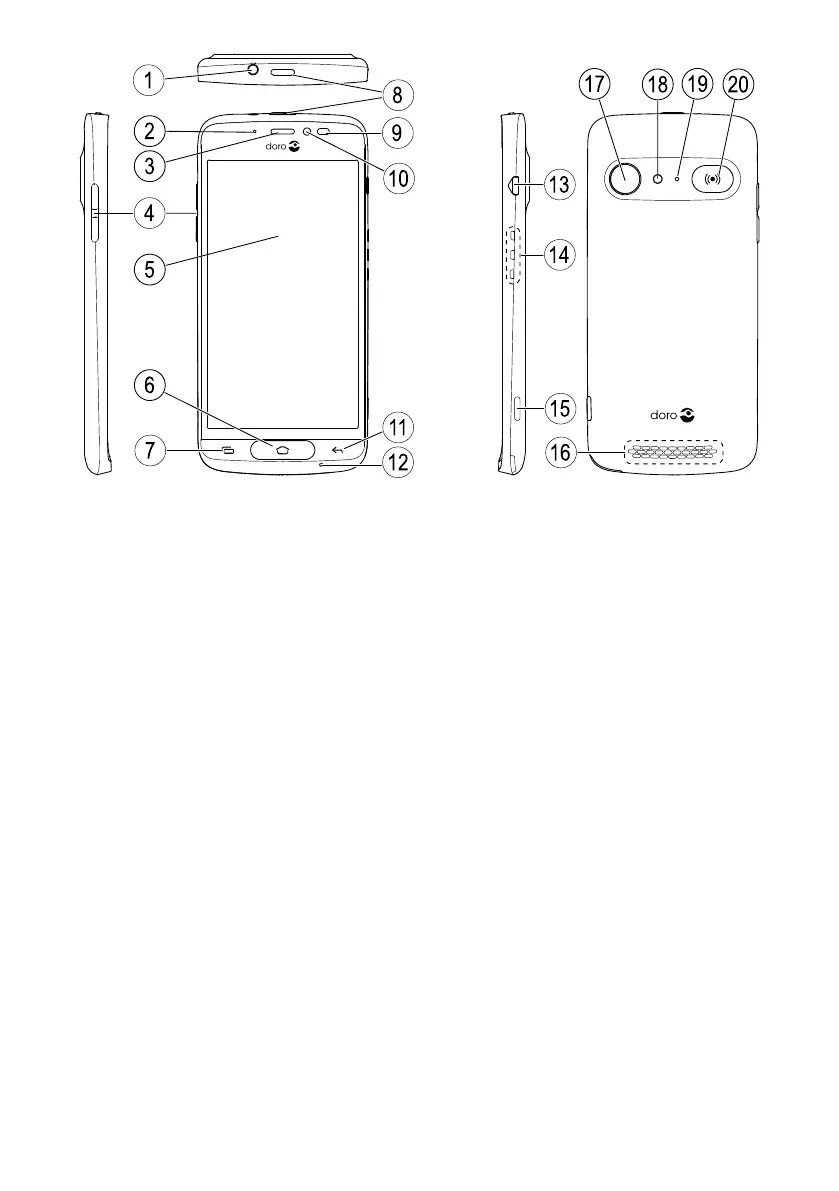
Note! All illustrations are for illustrative purposes only and may not
accurately depict the actual device.
English
1. Headset port
2. LED indicator
3. Earpiece
4. Volume keys
5. Touch display
6. Home key
7. Recents key
8. Power button
9. Proximity sensors
10. Front camera
11. Back key
12. Microphone
13. Charging port
14. Charging cradle connectors
15. Camera button
16. Loudspeaker
17. Rear camera
18. Flash
19. Second microphone
20. Assistance button
This guide is for reference only. The actual device, including but not limited
to the colour, size, and screen layout, may vary. The actual device an the
items supplied may vary depending on the software and accessories avail-
able in your region or offered by your service provider. Your local Doro
dealer provides additional accessories. The supplied accessories provide
the best performance with your phone.



 To Next Page