English
How to turn off GPS location services
1. From the Home screen, open the notification panel, tap
Set
My other connections The geolocation options.
2. Switch
to disable location services.
CAUTION
If you turn off location-based services such as map, navigation, and
weather applications cannot access your location information.
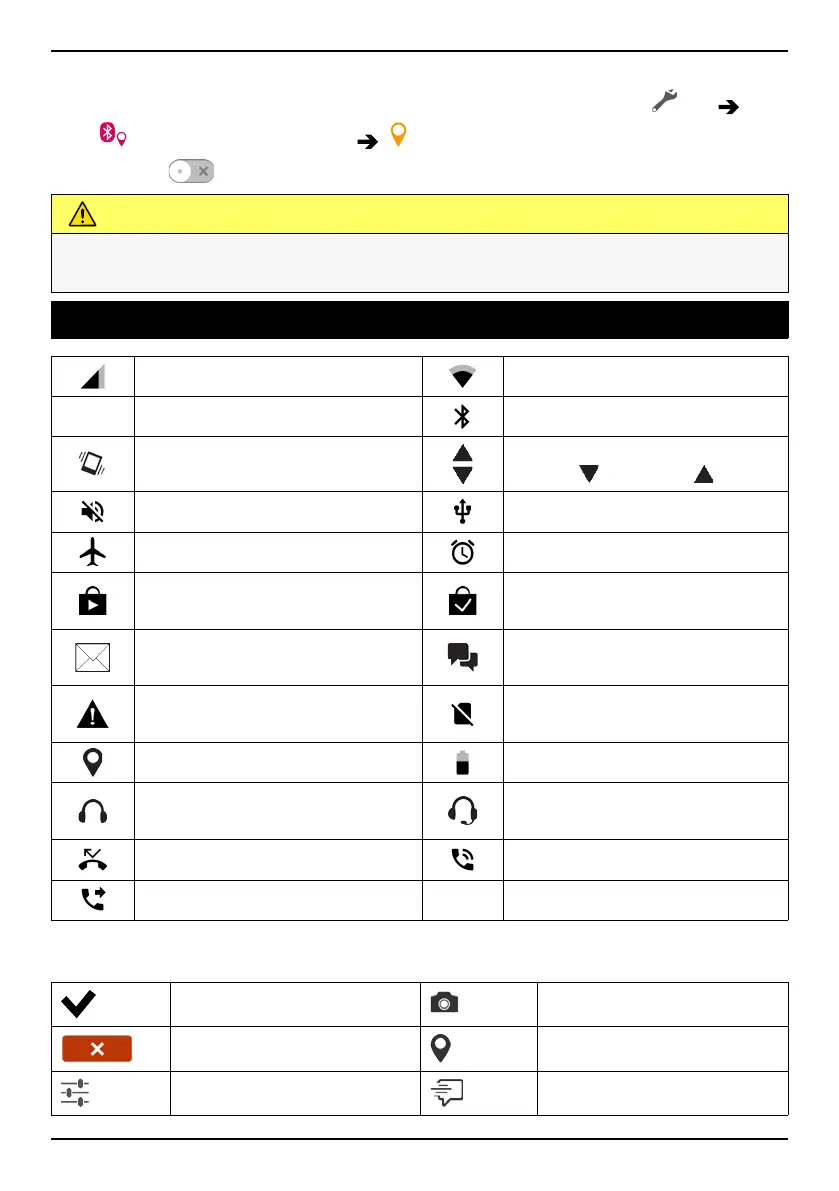
Status icons
Mobile network
Wi-Fi network
R
Roaming (in other network)
Bluetooth on
Vibrate mode
Data transmission:
data in
, data out .
Silent mode
Connected to computer
Flight mode
Alarm active
Google Play Store software
updates available
Google Play Store, update
completed
Unread email
New text message or multi-
media message
Error occurred or caution
required
SIM card not inserted
GPS activated
Battery level
Headset connected (without
microphone)
Headset connected (with mi-
crophone )
Missed call
Call ongoing
Call forwarding on
Examples of soft keys
Validate Take photo
Discard Add current location
Advanced Add template text
70



 To Next Page