Pairing the wireless speaker with your smart device
• Use the supplied USB cable to charge your portable speaker directly
from your computer or device with a micro USB port.
• Make sure that the speaker is fully charged before using it for the
Note:
Remember to note the above point and fully charge your speaker
prior to the first use. It will take approximately 2-3 hours to recharge
aer.
Press & Hold the power buon to turn on the speaker. Repeat the
steps to turn the device off as well.
LED light will remain RED when charging and turn GREEN once charge
completes.
The speaker has a built-in baery saver mode where it will
automacally power off if not in use for 15 minutes. This
funcon can be removed with a firmware upgrade. For
assistance, please contact: support@dossav.com
•
Preparaon
1. Place your smart device and wireless speaker no more than one meter
away from each other.
2. Press the power buon located on the back of the speaker for several
seconds to turn it on.
3. Set your smart device to “discover” the wireless speaker. Upon
powering on, a tone will be heard, the blue LED will start flashing,
accompanied by a prompt nofying that the speaker has entered into
the pairing mode.
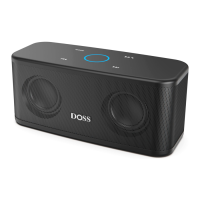
4. Enabled Bluetooth on your device and choose DOSS SoundBox from
the list.
5. If pairing is successful, the LED will change to steady blue and your
phone will confirm that the connecon has been established. If the
pairing process fails aer 60 seconds, please repeat steps 1 through
5 described above.
6. long press the buon , you can disconnect the Bluetooth.
Note: If your smart device cannot discover the SoundBox,long press the
buon and have a try again.


 To Next Page