Douglas Lighting Controls Page 3 August 25, 2015
www.DouglasLightingControls.com Tech Support: 1-877-873-2797
2. FEATURES AND OPTIONS
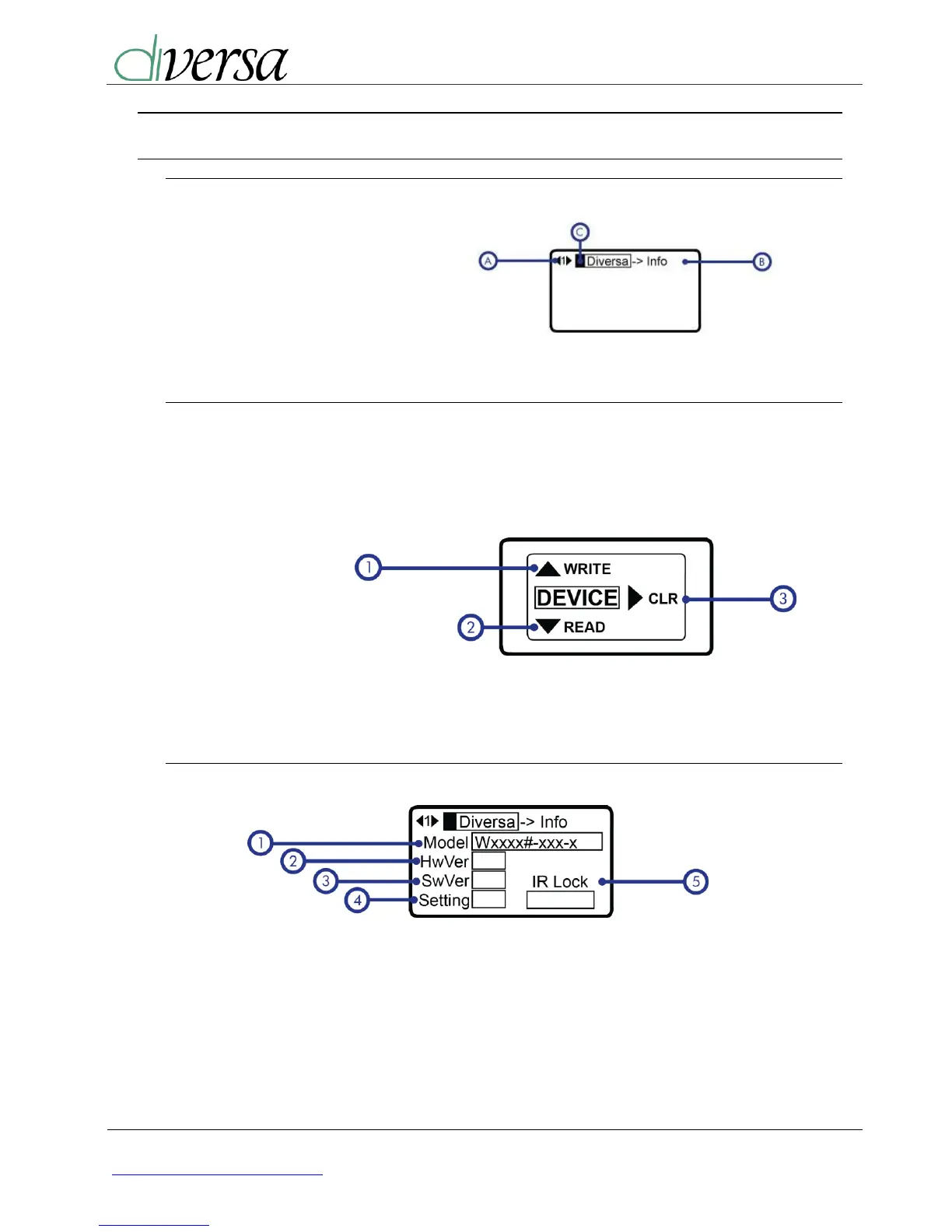
Menu Navigation
A. Menu Number
B. Menu Title
C. Cursor
Send/Receive
Send/Receive range varies for each sensor form factor. WOS type sensors are designed
to have a very short range; hold right up to the sensor lens. WOR/WOW type sensors are
designed to have a significantly longer range. A WiFi symbol will appear while the sensor
is Reading or Writing.
1. Write (Push UP)
2. Read (Push DOWN)
3. Clear (Push RIGHT)
4. Off* (Push LEFT)
*programmer will turn off automatically after one minute of no activity.
2.1. Sensor Information
1) Model Number:
Full Model number indicating
options. Note, lens type is not
shown.
2) Hardware Version
3) Firmware Version
4) Setting (Read only):
This field indicates if the device is setup
to use either the on-board dip switch
values or the IR settings.
5) IR Lock:
If “Locked” the Setting DIP for
configuration is ignored and only the IR
settings are used.


 To Next Page