01
7
Before You Start
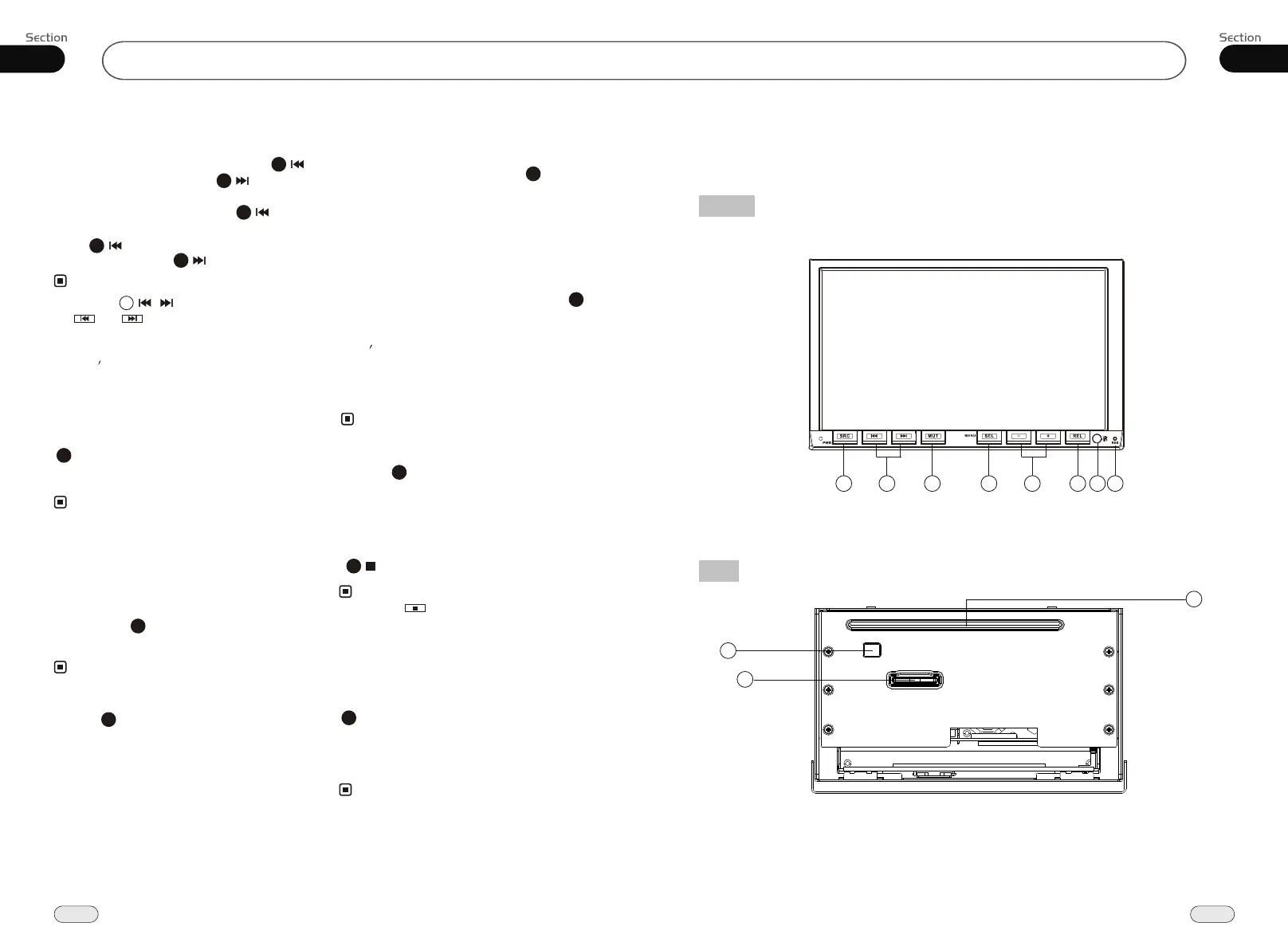
Location of the Controls
FRONT
Back
34
06
CD/MP3/SD/USB
10
9
11
1 4
5
7 8
2
3
6
Repeat Playing
During CD/MP3/SD/USB playback, press
replay the current track, press
it again to cancel this function.
RPT to
15
* This function is operated by using the remote
control.
Note:
* The default setting is MENU Repeat.
* Press CLEAR to clear the mistake input.
22
Number Buttons
Press one of Number Buttons(0~9) to
select a track to play automatically.
23
* Press track region and the screen shows the
number keys, touch the number to select tracks.
Note:
Selecting Track
2
* This function is operated by using the remote
control.
Note:
* Press CLEAR to clear the mistake input.
22
During CD playback, first press GOTO,
and TFT shows : disc go to:--:--,press your
desired time of the playback by using num-
ber buttons.
Second press GOTO button, track go to:--:--
appears on TFT, also input your desired
numbers to play the current time of your
selection.
During MP3/SD/USB mode, first press
GOTO and the TFT shows:---. Then press
NUMBER BUTTONS to input the MP3/SD
track s Number to play it; secondly press
GOTO button, and the TFT shows : --:--,
now input the desired time to play the
current track at this point.
2
¼òµ¥¹ÊÕÏÅųýÖ¸ÄÏ
Stop Play
During CD/MP3/SD/USB playback, Press
to stop the playback.
18
* Pressing in the monitor perform the same
function.
Note:
Playing Tracks at Random
During CD/MP3/SD/USB playback,
RDM button on the remote control to
play random under the directory
which you select. P return to
press
any track at
ress it again to
normal playing.
16
* This function is operated by using the remote
control.
Note:
Quickly Selecting Tracks
Note:
During MP3/SD/USB playback, press
to play previous track, press to play
next track.
During CD playback, first press to
return to the beginning of the current track,
press again within 3 seconds to play
previous track , press to play next track .
21
21
21
21
21
* Pressing / button on the main unit or
and in the monitor perform the
same function.
* In CD/MP3/SD/USB mode, you can press
track s Number or name to play.
4


 To Next Page