EasyManua.ls Logo

DP AIR GOMETER - Maintenance and Troubleshooting; Troubleshooting Chain Issues; Troubleshooting Monitor Issues

Default Icon
14 pages
Print Icon
To Next Page IconTo Next Page
To Previous Page IconTo Previous Page
Loading...
MAINTENANCE
/
TROUBLE
.
SHOOTING
Maintenance:
Keep
DP
AIR
GOMETERTM
clean
by
wiping
with an absorbent
cloth
after use.
TwiceeachyearrheSCREWS(No.
109&110)s!qy!g.Pglem.o.vpdtoloosenCHAINGUAFD.qlllo
126&1??angallowthe
rArrrGuAnd
(r.,ro.
r-soj]b oe
reriioveo.
LuoriciiecHAiN
(No. 119) and each
end
ot
the
FAN
AXLE
with
machine
oiland
reas-
semble.
To store
the
Dp AIR GOMETERTM
simply
keep
it in
a clean
dry
place.
To avoid
damage
to the
electronics
it
is
recommended
that
the
batteries
be
removed
from
the
MONITOR
(No. 18)
before
storage'
Trouble
-
Shooting:
Chain
makes
"popPing" noise.
CHAIN
IS
TOO
LOOSE.
a.
To adiust,
remove SCREWS
(No. 133 &
110),
FANGIA|D-(No'-1-36)'
and
SCREWS
(No.
109 &
130)to
loosen
CHAINGUARDS
(No. 126
and
127)
-
see
FIGURE
4.
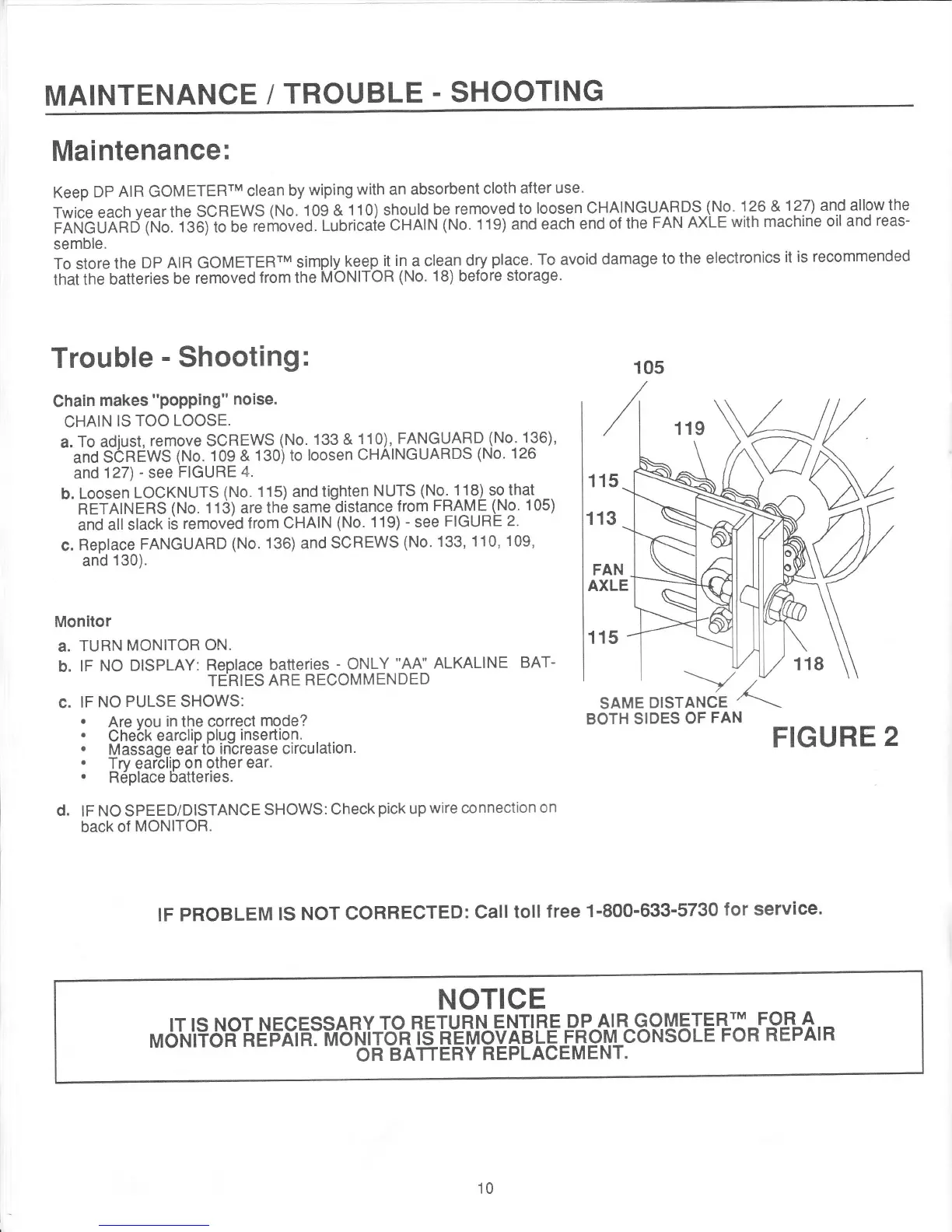
b.
Loosen
LOCKNUTS
(No.
115) and
tighten
NUTS
(No. 118) so that
RETAINERS
(No. 1 13) are the
same-distance
lrom
FRAME-(No'
1
05)
and all
slack
is
removdd
from CHAIN
(No.
119)
-
see
FIGURE
2.
c.
Replace
FANGUARD
(No. 136)
and
SCREWS
(No' 133'
110'
109,
and
130).
Monitor
119
115
113
FAN
AXLE
115
a.
b.
TURN
MONITOR
ON.
lF
NO
DISPLAY:
Replace
batteries
-
ONLY
"AA"
ALKALINE
BAT-
TERIES
ARE RECOMMENDED
c.
IF
NO
PULSE SHOWS:
.
Are
vou
in the correct
mode?
.
Check
earcliP
Pluq
insertion.
.
Massaoe
eai tb
in-crease
circulation.
.
Trv ear-clip
on other
ear.
'
Replace
batteries.
d.
tF
NO
SPEED/DISTANCE
SHOWS:
Check
pick
up
wire connection
on
back of
MONITOR.
118
Y
SAME
DISTANCE
A
-.-
BOTH SIDES
OF
FAN
FIGURE
2
tF PRoBLEM
ts
NoT
GoRRECTED:
Call
toll
free
1-800-633-5730
for
service.
NOTICE
rrlsNorNEcEssARYroR-EIU-B![ F.NII.R-E-DfJ!R^q9.MEIEB'I-F-OEA--
Moi{iToi'RE'pTrH:MaU'l{11+E;VRE6PoLEf,fr
g$gorusoreFoRREPAIR
10