8
The VariZapper 2.0
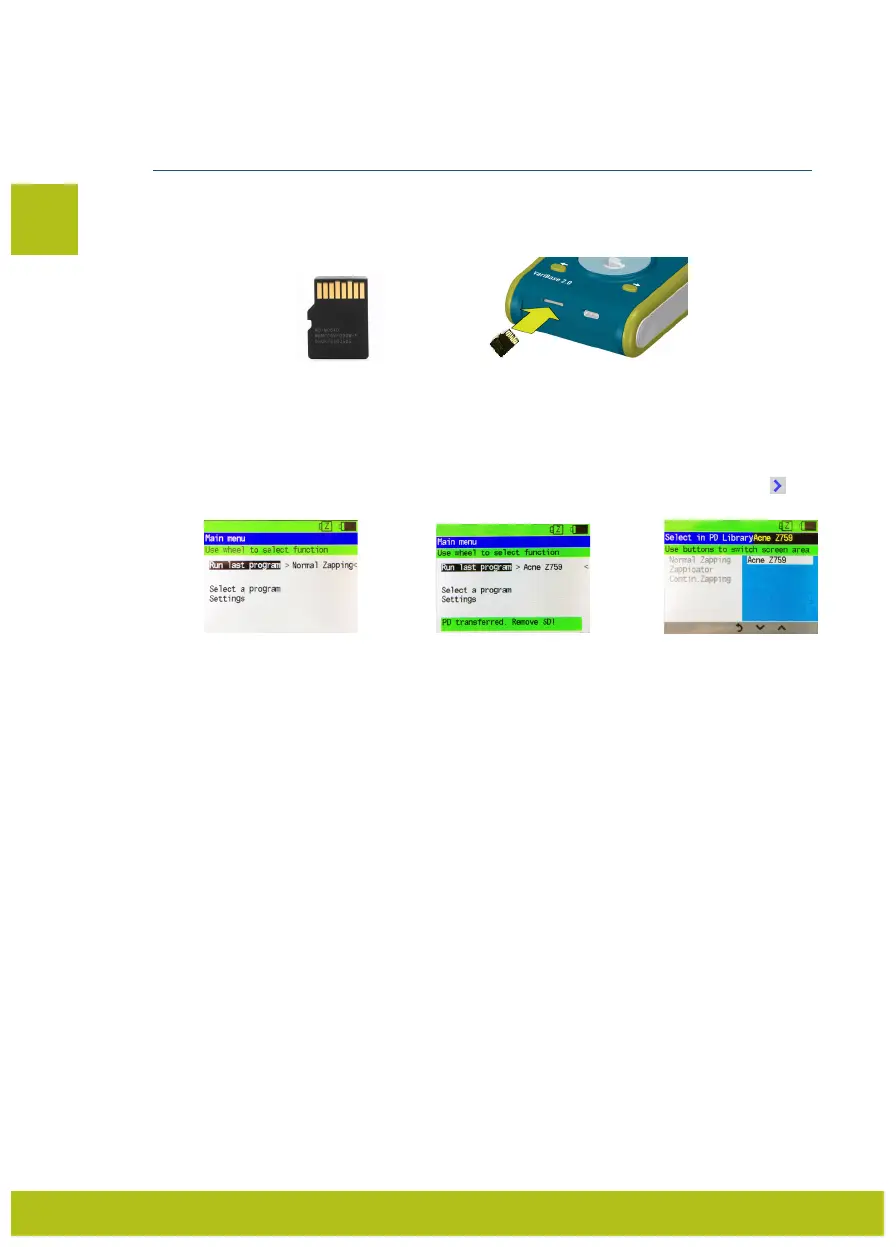
The microSD Card should be put in the slot with the the PINS SHOWING UP (Fig. 9 and 10). The microSD
Cards have frequencies programmed on them which are put together according to Dr. Clark’s frequency
list for their specific purpose. This enables you to use the VariZapper 2.0 with very specific frequencies.
4.1.4.1 Uploading a program/updating firmware
The device automatically recognizes whether the microSD Card contains a frequency program or a
firmware update.
4.1.4.1.1 Upload program from Program Driver
IMPORTANT:
Insert the microSD Card only when the Main Menu Panel is displayed (Fig. 11).
Just after the Program Driver (PD) has been put into the slot, the PD will be uploaded automatically and
the message in Fig. 12 will appear, if the upload was successful. To select the uploaded PD press .
You will be able to see and select all the PDs stored on the device (Fig. 13).
4.1.4.1.2 Update firmware with microSD Card
To update the firmware with a microSD Card:
1) First turn off your VariZapper 2.0
2) Insert the microSD card with the new firmware, then
3) turn on the device (press the Turnwheel for 5 seconds).
The software is now updated automatically. While the firmware loads, the Turnwheel is lit red. When the
upload is complete, the Turnwheel light turns green.
4) Remove the microSD card, before you restart your updated device.
4.1.4.1.3 Upload/update – Errors
If you try to upload a PD or update your VariZapper 2.0 with a microSD Card that has no information on
it, it will not be recognized and nothing will happen.
EN
Fig. 9 Fig. 10
Fig. 12 Fig. 13
4.1.4 Using Program Drivers/microSD Cards
Fig. 11


 To Next Page