24 DR
®
PRO XL520 CHIPPER SHREDDER
Removing and Replacing the Chipper Knife
Tools and Supplies needed:
• 3/16" Allen Wrench
• Awl or Sharp Tool
• 1/2" Wrench
• Two 9/16" Wrenches
• Gloves
1. To prevent accidental Starter engagement, disconnect the Battery Negative
Terminal using two 5/16" wrenches, and disconnect the Spark Plug Wire.
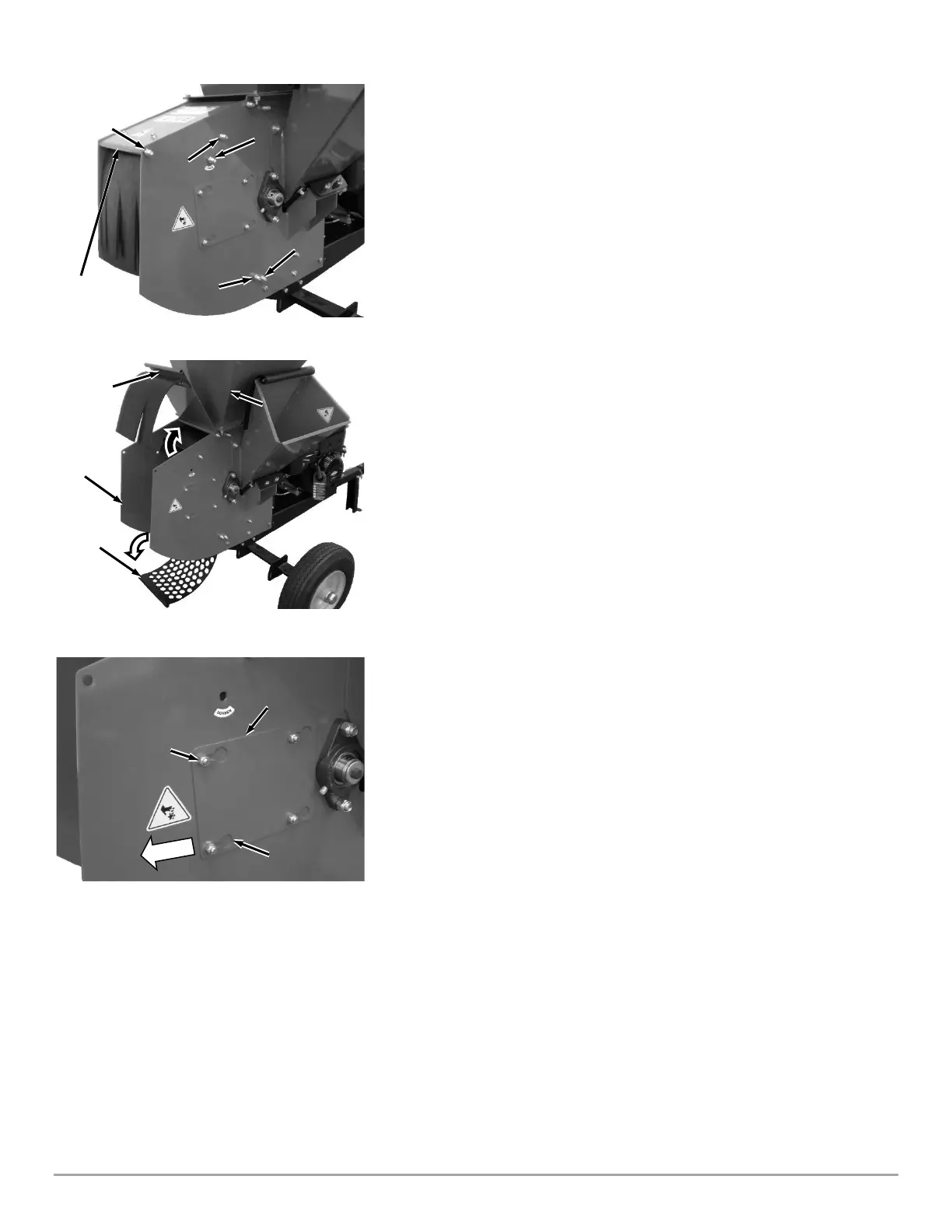
2. Remove the Bolt and Lock Nut securing the Housing Top Plate using two
9/16" Wrenches (Figure 32).
3. Remove the Upper Screen Bolt and Lock Nut using two 9/16" Wrenches.
4. Loosen (but do not remove) the Screen Pivot Bolt, Upper Scroll Bolt and
Lower Scroll Bolt using two 9/16" Wrenches.
5. Rotate the Housing Top Plate up towards the Hopper, exposing the Screen
(Figure 33).
6. Rotate the Screen down exposing the Shredder Hammer Assembly
7. Loosen the four Lock Nuts that hold the Knife Access Plate to the Chipper
Side Plate, using a 1/2" Wrench (Figure 34).
8. Slide the Knife Access Plate over to align the Lock Nuts with the large holes in
the Knife Access Plate and remove the Knife Access Plate.


 To Next Page