OXYCRG (OCRG) MONITORING
VF8 DELTA/DELTA XL/KAPPA 12-13
Using the cursor
To view the Event Recall menu, use the Cursor button on the OCRG Review
Summary screen.
To access the Event Recall menu from the OCRG Review
Summary screen
1. Turn the rotary knob until Cursor button is highlighted.
2. Press the rotary knob to click
Cursor button. The cursor and the cursor time
appear on the screen.
3. Turn the rotary knob to move the cursor along the data graphed.
4. Move the cursor until it overlaps a trigger event. BRDY and SpO
2
high/low
data (if available) is displayed. The apnea time (if available) appears.
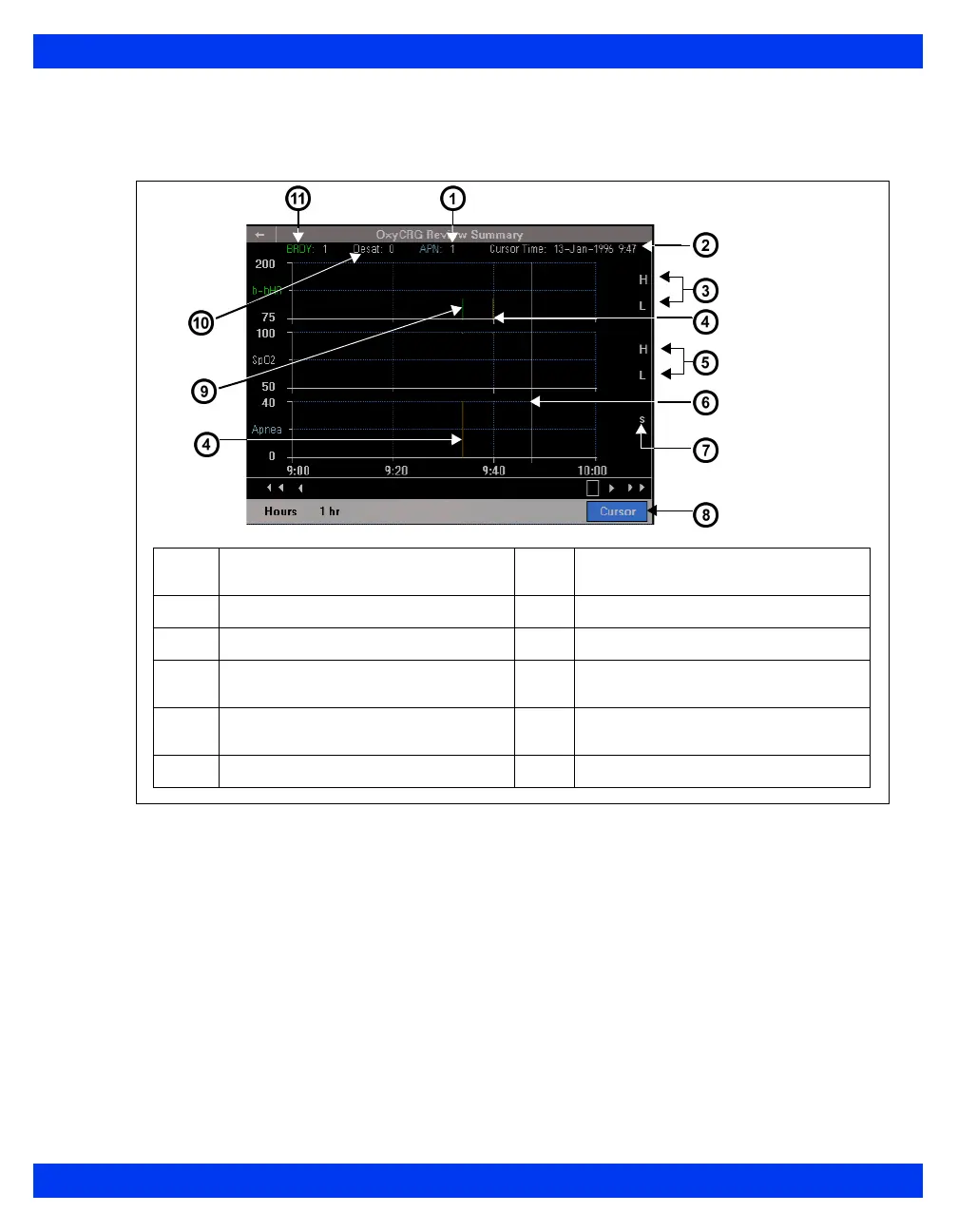
1
Number of apnea events for data on
display
7
Apnea time
2
Cursor date/time
8
Cursor button
3
BRDY high/low values
9
Associated data (green)
4
Trigger event (orange)
10
Number of desaturation events for
data on display
5
SpO
2
high/low values
11
Number of bradycardia events for
data on display
6
Cursor











 To Next Page