
EasyManua.ls Logo

Dräger UCF 6000 - User Manual

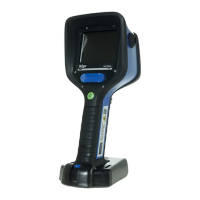
Dräger UCF 6000
166 pages
Print Icon
To Next Page IconTo Next Page
Loading...
WARNING
Strictly follow the Instructions for Use.
The user must fully understand and strictly
observe the instructions. Use the product
only for the purposes specified in the
Intended use section of this document.
!
Dräger UCF 6000, Dräger UCF 7000
Dräger UCF 8000, Dräger UCF 9000
i
enUS
Instructions for use
4
da
Brugsanvisning
28
fi
Käyttöohje
52
no
Bruksanvisning
72
sv
Bruksanvisning
94
ro
Instrucţiuni de utilizare
114
hu
Használati útmutató
138

Table of Contents

Other manuals for Dräger UCF 6000

Questions and Answers

  • M
    melissahillSep 12, 2025
    What to do if the charging cradle LEDs indicate an error or do not light up at all for Dräger thermal camera?
    • D
      dianagonzalesSep 12, 2025
      If the charging cradle LEDs indicate an error during the charging process or do not light up at all for your Dräger thermal camera, consider the following: * The crawling plate is not positioned correctly. Retighten screw. * Check and correct the position of the carrying strap. * Remove foreign objects from under the crawling plate or in the charging cradle. * Place charging cradle on level surface. * If there is no supply voltage present, check the operation of the power supply unit and/or vehicle connection cable.
  • A
    amy30Sep 14, 2025
    How to fix a weak laser pointer on Dräger UCF 6000 Thermal cameras?
    • D
      David CamachoSep 14, 2025
      If the laser pointer on your Dräger thermal camera is weak or diffused, the cause may be water droplets or dirt on the laser emission window. Clean the laser emission window to resolve this issue.

Dräger UCF 6000 Specifications

General IconGeneral
BrandDräger
ModelUCF 6000
CategoryThermal cameras
LanguageEnglish

Related product manuals
