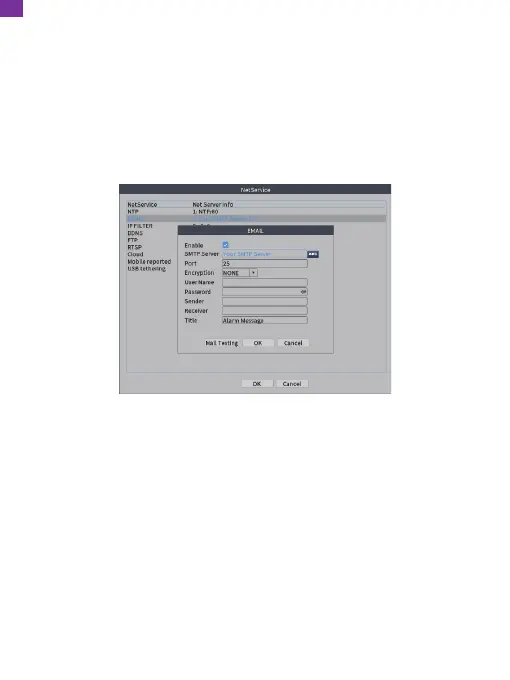
⑤ Please check [Enable] and select ''TLS" in the [Encryption] option, then input
the information as required. For example, [SMTP Server] is [smtp.gmail.com]
(you must enable [Less secure on] on the web page), [Port] is [587],
[User Name] and [Sender] are your Gmail account details, [Password] is your
Gmail account password and [Receiver] can be any email. Change [Title]
according to your needs, then click [OK] to save. Ensure your [Mail Testing]
succeeds, then click [OK] to save. Alerts will now be sent to your email when
motion is detected.
Note: The account of User Name is the same as Sender, while Receiver is a
different account for receiving email alerts. Click [OK] to save after [Mail Testing]
succeeds. It will send alarm messages. Please check the camera after you receive
an alarm, then check the recorded video later.
EN
25


 To Next Page