EasyManua.ls Logo

DRAKE R8A - NOISE BLANKER; CW OPERATION; RTTY OPERATION; SSB OPERATION

DRAKE R8A
43 pages
Print Icon
To Next Page IconTo Next Page
To Previous Page IconTo Previous Page
Loading...
aac(s)
(
G)
NB
(WW)
|
AME
Getting
Started
cont'd.
18
ene)
Ene)
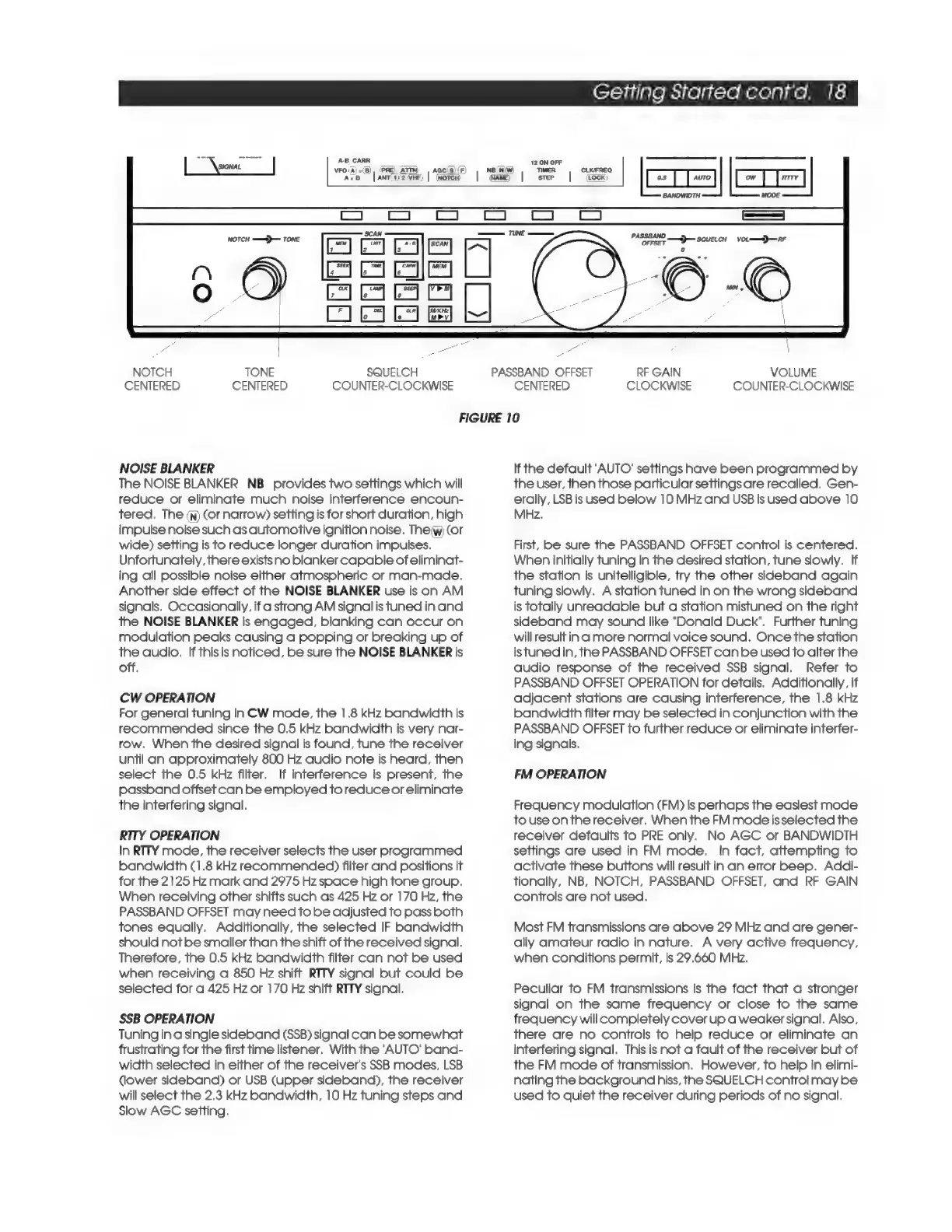
NOTCH
TONE
SQUELCH
PASSBAND
OFFSET
RF
GAIN
VOLUME
CENTERED
CENTERED
COUNTER-CLOCKWISE
CENTERED
CLOCKWISE
COUNTER-CLOCKWISE
FIGURE
10
NOISE
BLANKER
If
the
default
‘AUTO’
settings
have
been
programmed
by
The
NOISE
BLANKER
NB_
provides
two
settings
which
will
reduce
or
eliminate
much
noise
interference
encoun-
tered,
The
(n)
(or
narrow)
setting
is
for
short
duration,
high
impulse
noise
such
as
automotive
ignition
noise.
Theiw)
(or
wide)
setting
is
to
reduce
longer
duration
impulses.
Unfortunately,
there
exists
no
blanker
capable
of
eliminat-
ing
all
possible
noise
either
atmospheric
or
man-made,
Another
side
effect
of
the
NOISE
BLANKER
use
is
on
AM
signals.
Occasionally,
if
a
strong
AM
signalis
tuned
in
and
the
NOISE
BLANKER
is
engaged,
blanking
can
occur
on
modulation
peaks
causing
a
popping
or
breaking
up
of
the
audio.
If
this
is
noticed,
be
sure
the
NOISE
BLANKER
is
off.
CW
OPERATION
For
general
tuning
in
CW
mode,
the
1.8
kHz
bandwidth
is
recommended
since
the
0.5
kHz
bandwidth
is
very
nar-
row.
When
the
desired
signal
is
found,
tune
the
receiver
until
an
approximately
800
Hz
audio
note
is
heard,
then
select
the
0.5
kHz
filter.
If
interference
is
present,
the
passband
offset
can
be
employed
to
reduce
or
eliminate
the
interfering
signal.
RITY
OPERATION
In
RTTY
mode,
the
receiver
selects
the
user
programmed
bandwidth
(1.8
kHz
recommended)
filter
and
positions
it
for
the
2125
Hz
mark
and
2975
Hz
space
high
tone
group.
When
receiving
other
shifts
such
as
425
Hz
or
170
Hz,
the
PASSBAND
OFFSET
may
need
to
be
adjusted
to
pass
both
tones
equally.
Additionally,
the
selected
IF
bandwidth
should
not
be
smaller
than
the
shift
of
the
received
signal.
Therefore,
the
0.5
kHz
bandwidth
filter
can
not
be
used
when
receiving
a
850
Hz
shift
RTITY
signal
but
could
be
selected
for
a
425
Hz
or
170
Hz
shift
RTTY
signal.
SSB
OPERATION
Tuning
in
a
single
sideband
(SSB)
signal
can
be
somewhat
frustrating
for
the
first
time
listener.
With
the
‘AUTO’
band-
width
selected
in
either
of
the
receiver's
SSB
modes,
LSB
(lower
sideband)
or
USB
(upper
sideband),
the
receiver
will
select
the
2.3
kHz
bandwidth,
10
Hz
tuning
steps
and
Slow
AGC
setting.
the
user,
then
those
particular
settings
are
recalled.
Gen-
erally,
LSB
is
used
below
10
MHz
and
USB
is
used
above
10
MHz.
First,
be
sure
the
PASSBAND
OFFSET
control
is
centered.
When
initially
tuning
in
the
desired
station,
tune
slowly.
If
the
station
is
unitelligible,
try
the
other
sideband
again
tuning
slowly.
A
station
tuned
in
on
the
wrong
sideband
is
totally
unreadable
but
a
station
mistuned
on
the
right
sideband
may
sound
like
“Donald
Duck’.
Further
tuning
will
resultin
a
more
normal
voice
sound.
Once
the
station
istuned
in,
the
PASSBAND
OFFSET
can
be
used
to
alter
the
audio
response
of
the
received
SSB
signal.
Refer
to
PASSBAND
OFFSET
OPERATION
for
details.
Additionally,
if
adjacent
stations
are
causing
interference,
the
1.8
kHz
bandwidth
filter
may
be
selected
in
conjunction
with
the
PASSBAND
OFFSET
to
further
reduce
or
eliminate
interfer-
ing
signals.
FM
OPERATION
Frequency
modulation
(FM)
is
perhaps
the
easiest
mode
to
use
onthe
receiver.
When
the
FM
mode
isselected
the
receiver
defaults
to
PRE
only.
No
AGC
or
BANDWIDTH
settings
are
used
in
FM
mode.
In
fact,
attempting
to
activate
these
buttons
will
result
in
an
error
beep.
Addi-
tionally,
NB,
NOTCH,
PASSBAND
OFFSET,
and
RF
GAIN
controls
are
not
used.
Most
FM
transmissions
are
above
29
MHz
and
are
gener-
ally
amateur
radio
in
nature.
A
very
active
frequency,
when
conditions
permit,
is
29.660
MHz.
Peculiar
to
FM
transmissions
is
the
fact
that
a
stronger
signal
on
the
same
frequency
or
close
to
the
same
frequency
will
completely
cover
up
a
weaker
signal.
Also,
there
are
no
controls
to
help
reduce
or
eliminate
an
interfering
signal.
This
is
not
a
fault
of
the
receiver
but
of
the
FM
mode
of
transmission.
However,
to
help
in
elimi-
nating
the
background
hiss,
the
SQUELCH
control
may
be
used
to
quiet
the
receiver
during
periods
of
no
signal.

Related product manuals