EasyManua.ls Logo

DRAKE R8A - Page 33

DRAKE R8A
43 pages
Print Icon
To Next Page IconTo Next Page
To Previous Page IconTo Previous Page
Loading...
ou
RS232C
Interface
cont'd.
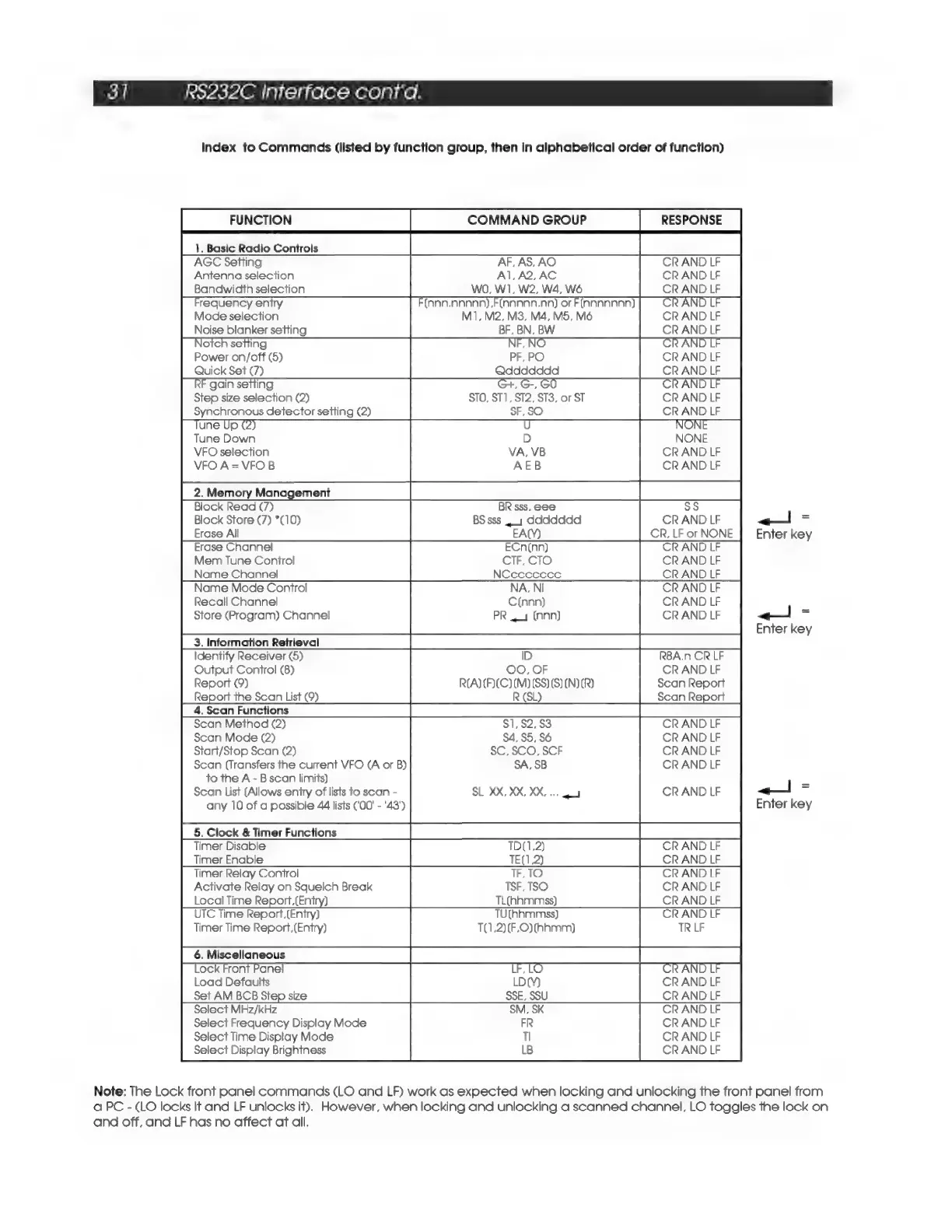
Index
to
Commands
(listed
by
function
group,
then
in
alphabetical
order
of
function)
FUNCTION
COMMAND
GROUP
|
RESPONSE
|
AGC
Setting
AF, AS,
AO
CR
AND
LF
Antenna
selection
Al,
A2,AC
CR
AND
LF
Bandwidcth
selection
WO, W1,
W2,
W4,
W6
CR
AND
LF
requency
entry
(nnn.nnnnn).F(nannnn.nn)
or
F(annnnnn)
AND
Mode
selection
M1, M2, M3, M4, M5,
CR
AND
LF
Noise
blanker
setting
BF,
BN,
BW
CR
AND
LF
Notch
setting
»NO
AND
Power
on/off
(5)
PF,
PO
Quick
Set
(7)
Qddddddd
CR
AND
LF
gain
setting
+,
G-,
GO
AND
Step
size
selection
(2)
STO,
ST1,
ST2,
ST3,
or
ST
CR
AND
LF
Synchronous
detector
setting
(2)
SF,SO
CR
AND
LF
U U
NON
D
Tune
Down
NONE
VFO
selection
VA,
VB
CR
AND
LF
VFO
A=VFO
B
AEB
CR
AND
LF
Block
Read
(7)
BR
sss,
eee
Ss
Block
Store
(7)
*(10)
BS
sss
4_y
ddddddd
CR
AND
LF
<«!
a
Erase
All
EACY)
CR,
LF
or
NONE
Enter
key
Erase
Channel!
ECn{nn)
Mem
Tune
Control
CIF,
CTO
Name
Channel!
NCecccecce
Name
Mode
Control
NA,
NI
Recall
Channel
C(nnn)
Store
(Program)
Channel!
PR
44
(nnn)
<!
=
Enter
ke’
|
3.InformationRetrieval
|
CCid
Identify
Receiver
(5)
ID
R8A.n
CR
LF
Output
Control
(8)
OO,
OF
CR
AND
LF
Report
(9)
RA)
(F)(C)(M)
(SS)
(S)
(N)
(I)
Scan
Report
Report
the
Scan
List
(9)
Scan
Report
|
4.ScanFunctions
|
Scan
Method
(2)
,92,
CR
AND
LF
Scan
Mode
(2)
_
55,
CR
AND
LF
Start/Stop
Scan
(2)
: ,
CR
AND
LF
Scan
(Transfers
the
current
VFO
(A
or
B)
;
CR
AND
LF
to
the
A
-
B
scan
limits)
=
Scan
List
(Allows
eniry
of
lists
to
scan
-
XX,
XX,
CR
AND
LF
<<!
=
any
10
of
a
possible
44
lists
(00!
-
'43')
Enter
ke
|
5.Clock&TimerFunctions
|
Timer
Enable
TE()
2)
CR
AND
LF
Timer
Relay
Control
TF,TO
CR
AND
LF
Activate
Relay
on
Squelch
Break
TSF,
TSO
CR
AND
LF
Local
Time
Report,(Entry)
TL(hhmmss)
CR
AND
LF
UTC
Time
Report,
(Entry)
TU(AAmMmss)
Ch
AND
LF
Timer
Time
Report,(Entry)
T(1,2)(F.O)
(hh
mm)
TR
LF
6.
Miscellaneous
ae
Pee
Lock
Front
Panel
,LO
AND
Load
Defaults
LD(Y)
CR
AND
LF
Set
AM
BCB
Step
size
SSE,
SSU
CR
AND
LF
Select
MHz/kHz
SM,
SK
CR
AND
LF
Select
Frequency
Display
Mode
FR
CR
AND
LF
Select
Time
Display
Mode
Tl
CR
AND
LF
Select
Display
Brightness
LB
CR
AND
LF
Note:
The
Lock
front
panel
commands
(LO
and
LF)
work
as
expected
when
locking
and
unlocking
the
front
panel
from
a
PC
-
(LO
locks
It
and
LF
unlocks
it).
However,
when
locking
and
unlocking
a
scanned
channel,
LO
toggles
the
lock
on
and
off,
and
LF
has
no
affect
aft
all.

Related product manuals