EasyManua.ls Logo

DRAKE R8A - Page 32

DRAKE R8A
43 pages
Print Icon
To Next Page IconTo Next Page
To Previous Page IconTo Previous Page
Loading...
The
receiver
rear
panel
provides
a
common
DB-9
con-
nector
which
conforms
to
the
RS-232C
serial
data
com-
munications
standard
with
the
receiver
configured
as
DCE.
This
connector
may
be
attached
to
a
basic
dumb
ASCIl
terminal
or
a
personal
computer
such
as
an
IBM
XT/
AT
running
a
terminal
emulation
program
such
as
PROCOMM
PLUS™
or
BITCOM"™.
Standard
BASIC
terminal
programs
will
run
equally
well.
The
interface
provides
complete
control
and
program-
ming
capability
of
the
receiver.
Only
the
analog
controls
such
as
volume,
RF
gain,
etc.
are
not
controllable.
The
receiver
front
panel
buttons
and
tuning
wheel
are
nor-
mally
operable
when
the
receiver
is
under
computer
control.
The
buttons
and
tuning
wheel
can
be
locked
out,
if
desired,
either
by
pressing
the
button
sequence:
[
*
],
LOCK
function
line
button
or
by
use
of
the
‘LO’
computer
command.
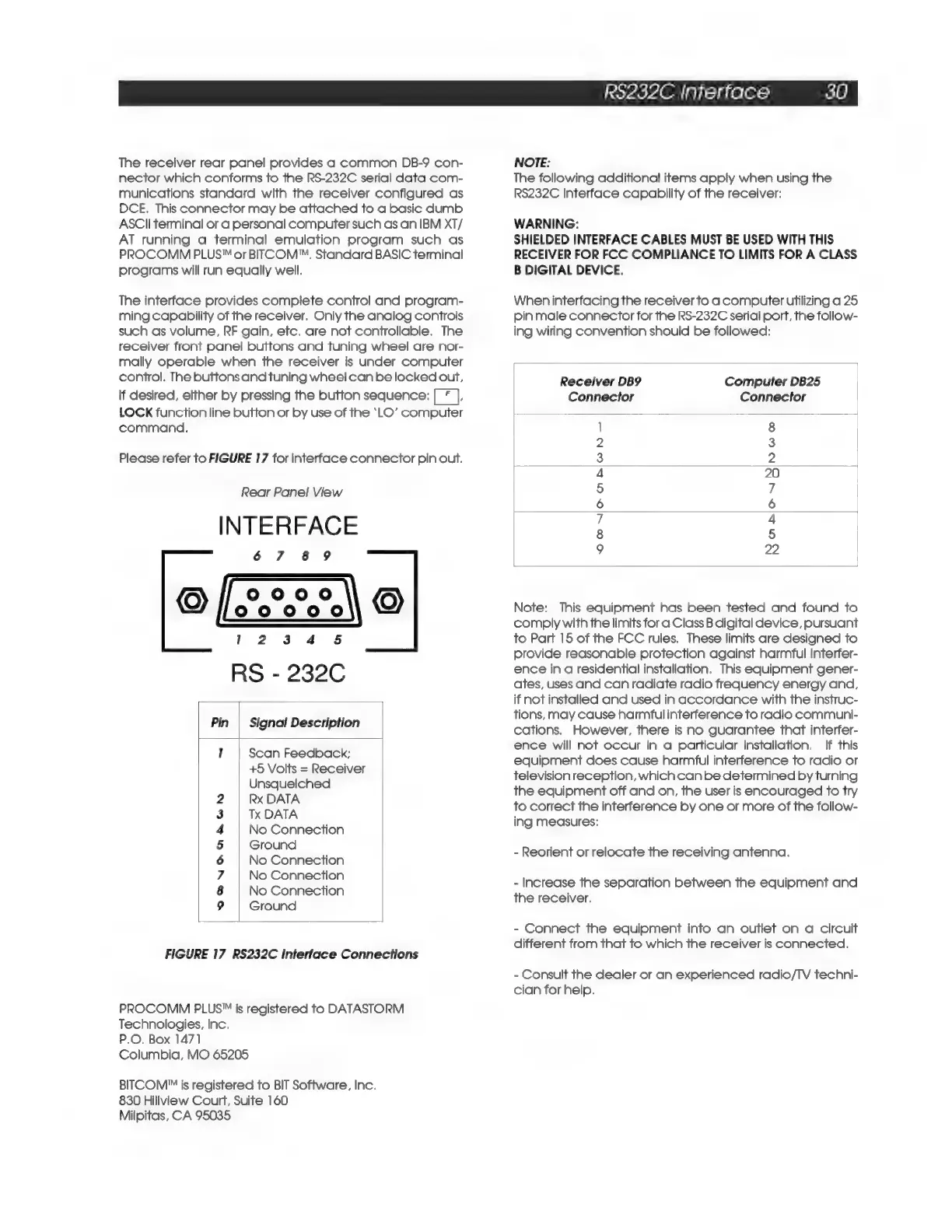
Please
refer
to
FIGURE
17
for
interface
connector
pin
out.
Rear
Panel
View
INTERFACE
67
8
9
9
FAA
Ko)
1
2
3
4
§
RS
-
232C
Pin
|
Signal
Description
1
Scan
Feedback;
+5
Volts
=
Receiver
Unsquelched
Rx
DATA
Tx
DATA
No
Connection
Ground
No
Connection
No
Connection
No
Connection
Ground
CON
AGA
WIND
FIGURE
17
RS232C
Interface
Connections
PROCOMM
PLUS"
is
registered
to
DATASTORM
Technologies,
Inc.
P.O.
Box
1471
Columbia,
MO
65205
BITCOM'™
is
registered
to
BIT
Software,
Inc.
830
Hillview
Court,
Suite
160
Milpitas,
CA
95035
RS232C
Interface
30
NOTE:
The
following
additional
items
apply
when
using
the
RS232C
Interface
capability
of
the
receiver:
WARNING:
SHIELDED
INTERFACE
CABLES
MUST
BE
USED
WITH
THIS
RECEIVER
FOR
FCC
COMPLIANCE
TO
LIMITS
FOR
A
CLASS
B
DIGITAL DEVICE.
When
interfacing
the
receiver
to
a
computer
utilizing
a
25
pin
male
connector
for
the
RS-232C
serial
port,
the
follow-
ing
wiring
convention
should
be
followed:
Computer
DB25
Connector
Receiver
DB9
Connector
OONIOMAwWh
N
N
NanoanS|y
oo
Note:
This
equipment
has
been
tested
and
found
to
comply
with
the
limits
for
a
Class
B
digital
device,
pursuant
to
Part
15
of
the
FCC
rules,
These
limits
are
designed
to
provide
reasonable
protection
against
harmful
interfer-
ence
in
a
residential
installation.
This
equipment
gener-
ates,
uses
and
can
radiate
radio
frequency
energy
and,
if
not
installed
and
used
in
accordance
with
the
instruc-
tions,
may
cause
harmful
interference
to
radio
communi-
cations.
However,
there
is
no
guarantee
that
interfer-
ence
will
not
occur
in
a
particular
installation.
If
this
equipment
does
cause
harmful
interference
to
radio
or
television
reception,
which
can
be
determined
by
turning
the
equipment
off
and
on,
the
user
is
encouraged
to
try
to
correct
the
interference
by
one
or
more
of
the
follow-
ing
measures:
-
Reorient
or
relocate
the
receiving
antenna.
-
Increase
the
separation
between
the
equipment
and
the
receiver.
-
Connect
the
equipment
into
an
outlet
on
a
circuit
different
from
that
to
which
the
receiver
is
connected.
-
Consult
the
dealer
or
an
experienced
radio/TV
techni-
cian
for
help.

Related product manuals