EasyManua.ls Logo

DRAKE R8A - Page 31

DRAKE R8A
43 pages
Print Icon
To Next Page IconTo Next Page
To Previous Page IconTo Previous Page
Loading...
29
Special
Use
Features
and
Functions
This
receiver
has
several
special
features
that
are
referred
tointhe
main
body
of
thisowner's
manual
but
may
require
additional
explanation.
FUNCTION
LINE
INVERT
As
described
on
page
11
of
this
manual,
the
six
function
buttons,
located
below
the
display
area
of
the
receiver,
activate
a
primary
or
secondary
function
if
the
annunciator
is
displayed
or
not.
The
user
can
define
either
of
two
function
lines
as
primary
functions,
To
continuously
access
the
alternate
function
line
without
incurring
the
time
out
action,
Press
the
button
and
hold
for
3
seconds
until
a
confirmation
beep
is
heard.
The
annunciator
will
remain
lit
indicating
that
the
alternate
function
line
is
now
continuously
active.
To
summarize,
pressing
the
button
allows
access
to
the
alternate
function
line
for
the
short
duration.
Alternate
function
availability
times
out
after
any
front
panel
inac-
tivity.
Pressing
the
button
and
holding
itfor
3
seconds
acts
as
a
Shift
Lock
on
the
function
lines.
SETTING
POWER
OFF
(ON)
LAMP
BRIGHTNESS
To
set
the
brightness
of
the
display
when
the
power
is
turned
off,
press
the
[*]
button
followed
by
the
button
until
the
desired
brightness
is
selected.
Continue
to
hold
down
the
button
and
turn
power
off.
This
action
will
store
the
Off
state
brightness.
Turn
power
on
and
press
the
button
sequence
Fr}.
to
set
the
power
On
state
brightness.
Now
the
lamp
will
automati-
cally
change
to
the
desired
brightness
for
power
on
and
power
off
states.
This
can
be
used
to
dim
or
blackout
the
display
when
power
is
off,
without
changing
the
lamp
state
during
use
of
the
radio.
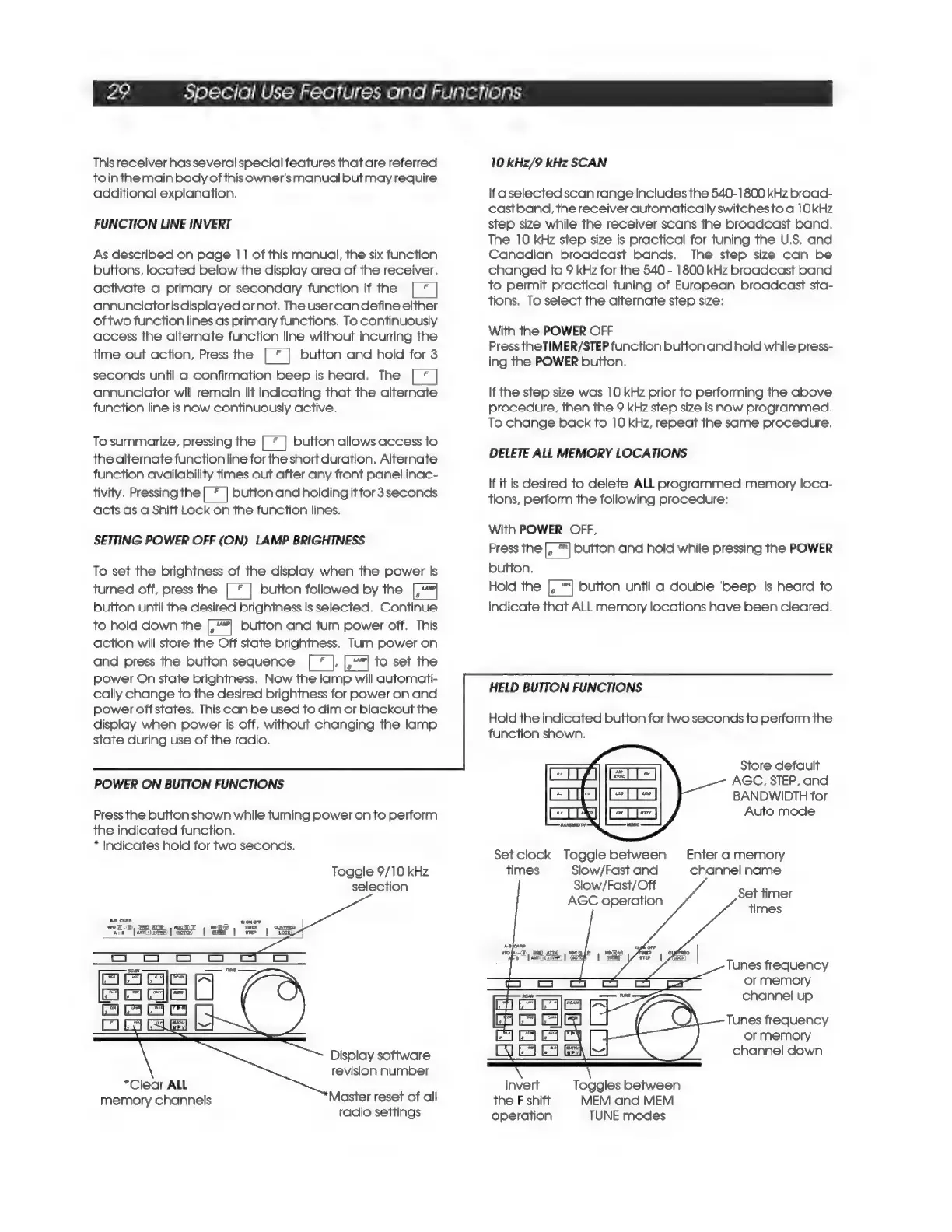
POWER
ON
BUTTON
FUNCTIONS
Press
the
button
shown
while
tuming
power
on
to
perform
the
indicated
function.
*
Indicates
hold
for
two
seconds.
Toggle
9/10
kHz
selection
Display
software
revision
number
*Clear
ALL
memory
channels
Master
reset
of
all
radio
settings
10
kHz/9
kHz
SCAN
If
aselected
scan
range
includes
the
540-1800
kHz
broad-
castband,
the
receiver
automatically
switches
to
a
10kHz
step
size
while
the
receiver
scans
the
broadcast
band.
The
10
kHz
step
size
is
practical
for
tuning
the
U.S.
and
Canadian
broadcast
bands.
The
step
size
can
be
changed
to
9
kHz
for
the
540
-
1800
kHz
broadcast
band
to
permit
practical
tuning
of
European
broadcast
sta-
tions.
To
select
the
alternate
step
size:
With
the
POWER
OFF
Press
the
TIMER/STEP
function
button
and
hold
while
press-
ing
the
POWER
button.
If
the
step
size
was
10
kHz
prior
to
performing
the
above
procedure,
then
the
9
kHz
step
size
is
now
programmed.
To
change
back
to
10
kHz,
repeat
the
same
procedure.
DELETE
ALL
MEMORY
LOCATIONS
If
it is
desired
to
delete
ALL
programmed
memory
loca-
tions,
perform
the
following
procedure:
With
POWER
OFF,
Press
the
le
|
button
and
hold
while
pressing
the
POWER
button,
Hold
the
button
until
a
double
'beep'
is
heard
to
indicate
that
ALL
memory
locations
have
been
cleared.
HELD
BUTTON
FUNCTIONS
Hold
the
indicated
button
for
two
seconds
to
perform
the
function
shown.
Store
default
AGC,
STEP,
and
BANDWIDTH
for
Auto
mode
Set
clock
Toggle
between
Enter
a
memory
times
Slow/Fast
and
channel
name
Slow/Fast/Off
AGC
operation
Set
timer
times
Tunes
frequency
or
memory
channel
up
Tunes
frequency
or
memory
channel
down
Invert
Toggles
between
the
F
shift
operation
MEM
and
MEM
TUNE
modes

Related product manuals