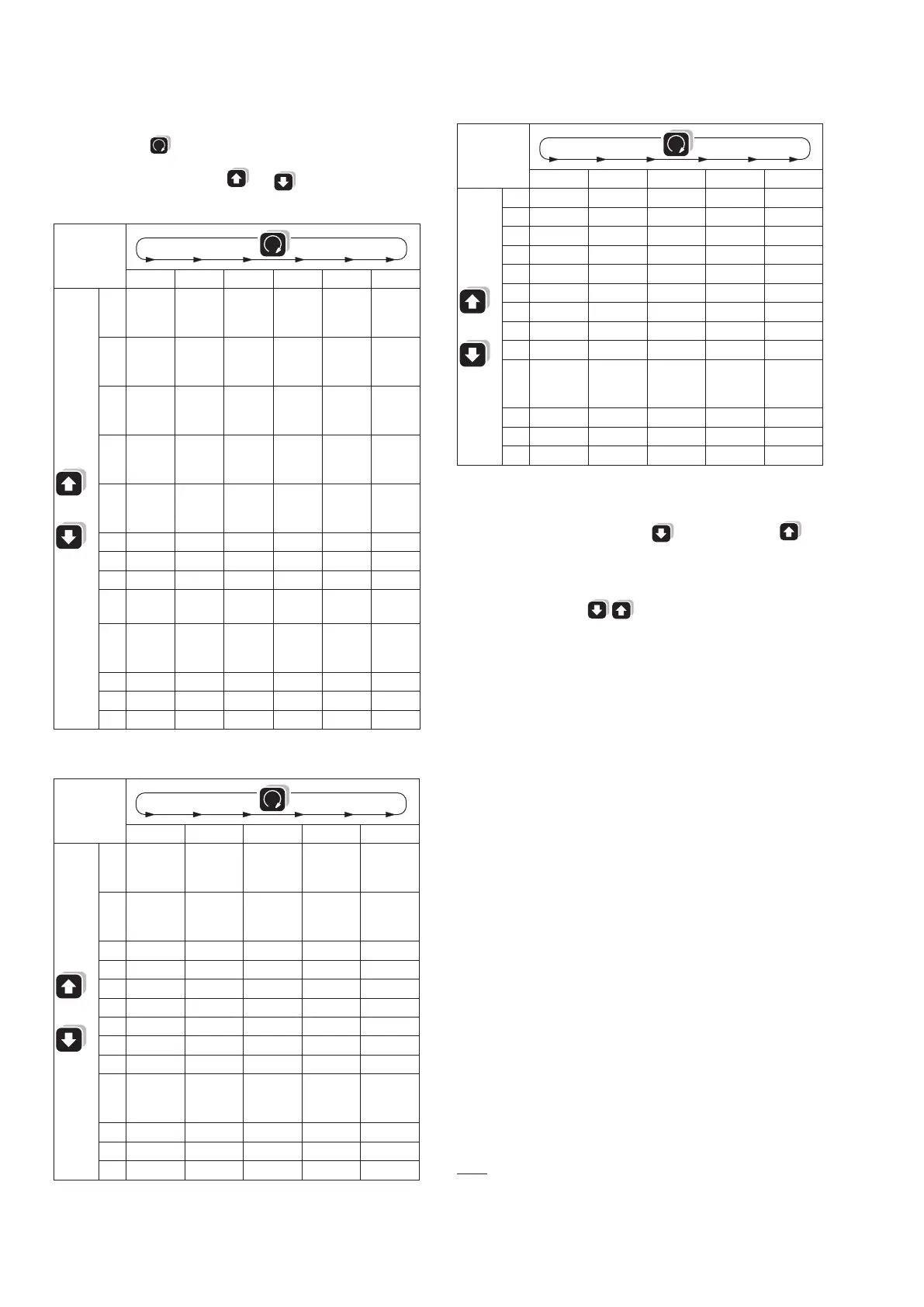
Display levels
Within a level (1, 2, 3 …) you can change the 3 displays to the next mode
(a, b, c, ...) with the
key. From the last mode, the display changes to
mode a again.
Change to the next level with the and keys.
4 wire asymmetric load
a b c d e f
1
U1
U2
U3
U1
max.
U2
max.
U3
max.
U1
min.
U2
min.
U3
min.
U12
U23
U31
U12
max.
U23
max.
U31
max.
U12
min.
U23
min.
U31
min.
2
I1
I2
I3
I1
max.
I2
max.
I3
max.
I1
avg
I2
avg
I3
avg
I1
avgmax.
I2
avgmax.
I3
avgmax.
IN IN
max.
3
P1
P2
P3
P1
max.
P2
max.
P3
max.
P P
max.
4
Q1
Q2
Q3
Q1
max.
Q2
max.
Q3
max.
Q Q
max.
5
S1
S2
S3
S1
max.
S2
max.
S3
max.
S S
max.
6 PF1 PF2 PF3 PF PF
minind
PF
mincap
7 F
8
EP inc HT
1
EP inc LT
2
EP out HT
1
EP out LT
2
9
E Q i n d
HT
1
EQ ind LT
2
E Q c a p
HT
1
EQ cap LT
2
10
P
Q
PF
P
S
F
11 Pint0 Pint1 Pint2 Pint3 Pint4
12 Qint0 Qint1 Qint2 Qint3 Qint4
13 Sint0 Sint1 Sint2 Sint3 Sint4
3 wire asymmetric load
a b c d e
1
U12
U23
U31
U12
max.
U23
max.
U31
max.
U12
min.
U23
min.
U31
min.
2
I1
I2
I3
I1
max.
I2
max.
I3
max.
I1
avg
I2
avg
I3
avg
I1
avgmax.
I2
avgmax.
I3
avgmax.
3 P P
max.
4 Q Q
max.
5 S S
max.
6 PF PF
minind
PF
mincap
7 F
8
EP inc HT
1
EP inc LT
2
EP out HT
1
EP out LT
2
9
EQ ind HT
1
EQ ind LT
2
EQ cap HT
1
EQ cap LT
2
10
P
Q
PF
P
S
F
11 Pint0 Pint1 Pint2 Pint3 Pint4
12 Qint0 Qint1 Qint2 Qint3 Qint4
13 Sint0 Sint1 Sint2 Sint3 Sint4
Single-phase, 3 wire symmetric load, 4 wire symmetric load
a b c d e
1 U U
max.
U
min.
2 I I
max.
I
avg
I
avgmax.
3 P P
max.
4 Q Q
max.
5 S S
max.
6 PF PF
minind
PF
mincap
7 F
8
EP inc HT
1
EP inc NT
2
EP out HT
1
EP out NT
2
9
EQ ind HT
1
EQ ind NT
2
EQ cap HT
1
EQ cap NT
2
10
P
Q
PF
P
S
F
11 Pint0 Pint1 Pint2 Pint3 Pint4
12 Qint0 Qint1 Qint2 Qint3 Qint4
13 Sint0 Sint1 Sint2 Sint3 Sint4
Operating
Brightness
13 levels: continuous pressing of the key (darker), or the key
(brighter).
Delete / Clear
To delete the min. or max. values, or the energy values of the displayed
measurements, press the keys at the same time.
Locking
The reset function for the energy meters can be locked by setting the
jumper at the rear of the instrument to the position LOCK.
1
HT = high tariff
2
LT = low tariff



 To Next Page