7
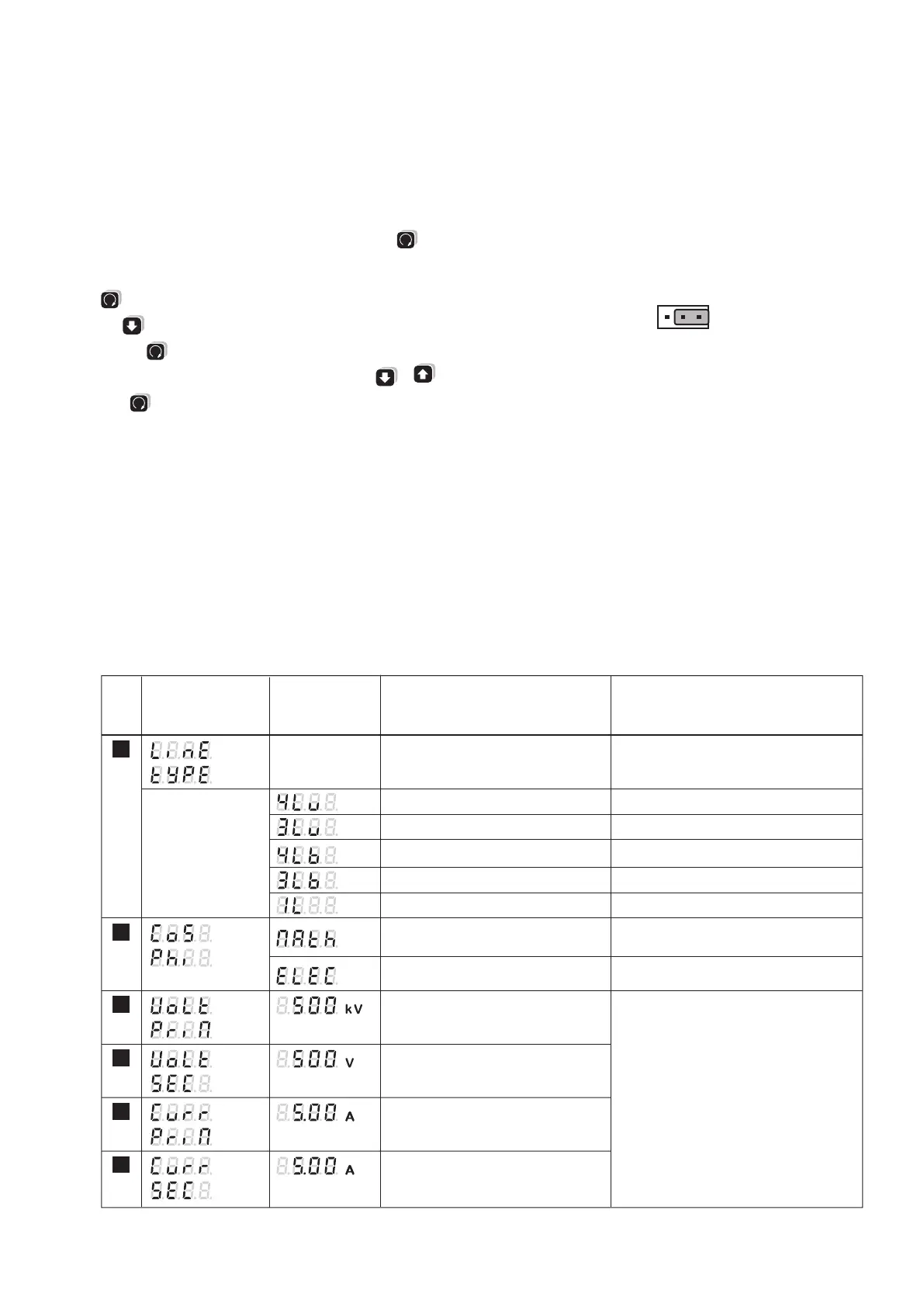
Topmost display
Middle display
No.
Undermost display
(Selection,
* = Default)
Meaning
Hints
4-line system, unbalanced load
3-line system, unbalanced load
4-line system, balanced load
3-line system, balanced load
Single-line system
System configuration
Primary voltage of an external
transformer on the voltage (line-to-line
voltage)
*
First you enter any 3-digit number followed
by the appropriate power unit selection in
steps of factor 10
Secondary voltage of an external
transformer on the voltage input
(line-to-line voltage)
*
Primary current of an external
transformer on the current input
*
Secondary current of an external
transformer on the current input
*
100 V to 999 kV
100 V to 999 V
1.00 A to 999 kA
0.1 A to 9,99 A
(4 lines unbalanced)
(3 lines unbalanced)
(4 lines balanced)
(3 lines balanced)
(1 line)
*
Load type for energy recovery:
Mathematical
Load type for energy recovery:
Electrical
4 quadrant display, ind-cap-ind-cap
4 quadrant display, ind-ind-cap-cap
1
2
3
4
5
6
Parameters overview
Programming
All parameters may be displayed at any time. For modifications the jumper
on the backside of the device must be removed (not on position LOCK).
The following table shows all parameters with their adjustable ranges or
possible selections respectively. The black numbers give a cross-reference
to the appropriate diagram position on page 30.
Starting at the measurands display by pressing the key
you may
change to the menu level.
Afterwards you can select the desired menu item by pressing the key
shortly.
Use to enter the level where the desired parameter is displayed.
Pressing
shortly will force the selectable element to flash.
The flashing content may be modified using the keys or .
Press
for a longer time to leave the parameter or menu level.
All settings will remain non-volatile stored even in case of power-fail.
Hints:
First you have to set the system configuration and the transformer ra-
tios because further measurand selections, alarm limit settings etc. will
depend on them.
The programming may be modified via an optional extension module
as well.
Locking the configuration
Place the jumper in the LOCK position.
The configuration of all parameters is disabled.
Factory Default
Brightness: (mid setting)
Limit value / S01: Off
Limit value / S02: Off
Transformer ratio: 1 : 1
Jumper: Not in the LOCK position
Connecting mode: 4 wire asymmetric load
Synchronizing
interval: 15 min.



 To Next Page