9. SETTING THE VACUUM CLEANER
FIG. 8
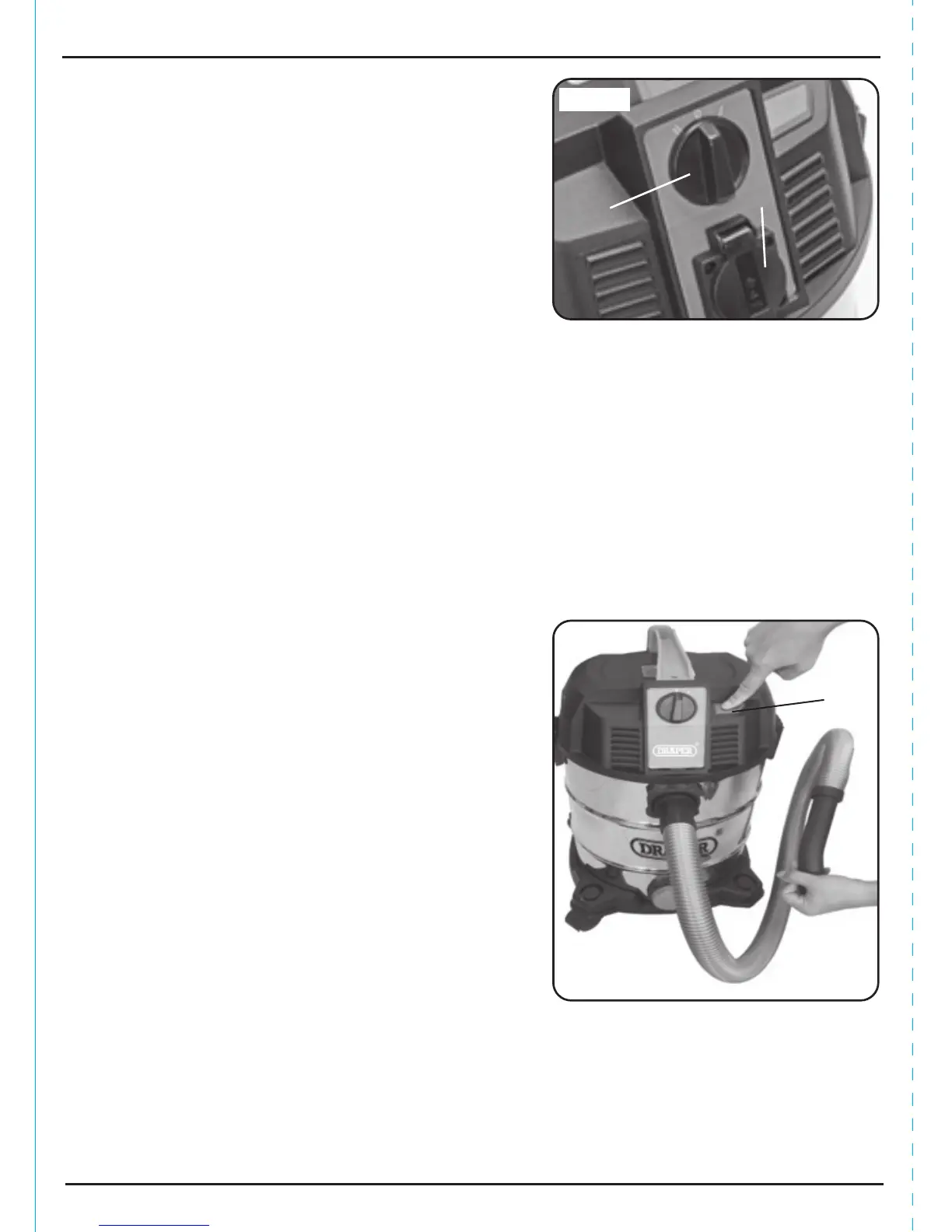
9.5 DUST CLEARING BUTTON - FIG. 8
This button is used clear the cloth filter of dust build up.
The dust adhered to the filter is blown and shaken off,
causing it to fall back into tank.
Block the hose inlet, push and release the dust clearing
button to quickly blast off dirt from pleated filter and
restore suction power.
FIG.7
9.4 SWITCHING ON - FIG. 7
Connect the vacuum cleaner to the power supply and
switch the vacuum cleaner on by turning the switch
knob to position “I”. Now use the vacuum cleaner
as normal.
NOTE: The power tool socket is live in switch
position “0” so a power tool can be used without having
the vacuum cleaner switched on.
The power tool socket is live in switch position “I”
so a power tool can be used in a different area to that
being vacuumed.
WARNING: EXPLOSION AND FIRE HAZARD.
Never vacuum asbestos, inflammable fluids, such as
petrol, oil, solvents etc. Do not operate near
inflammable fluids or gas. Never vacuum fluids or
material hotter than 60˚C, such as burning cigarettes,
ashes, glowing coals etc.
12


 To Next Page