– 12 –
9. OPERATION
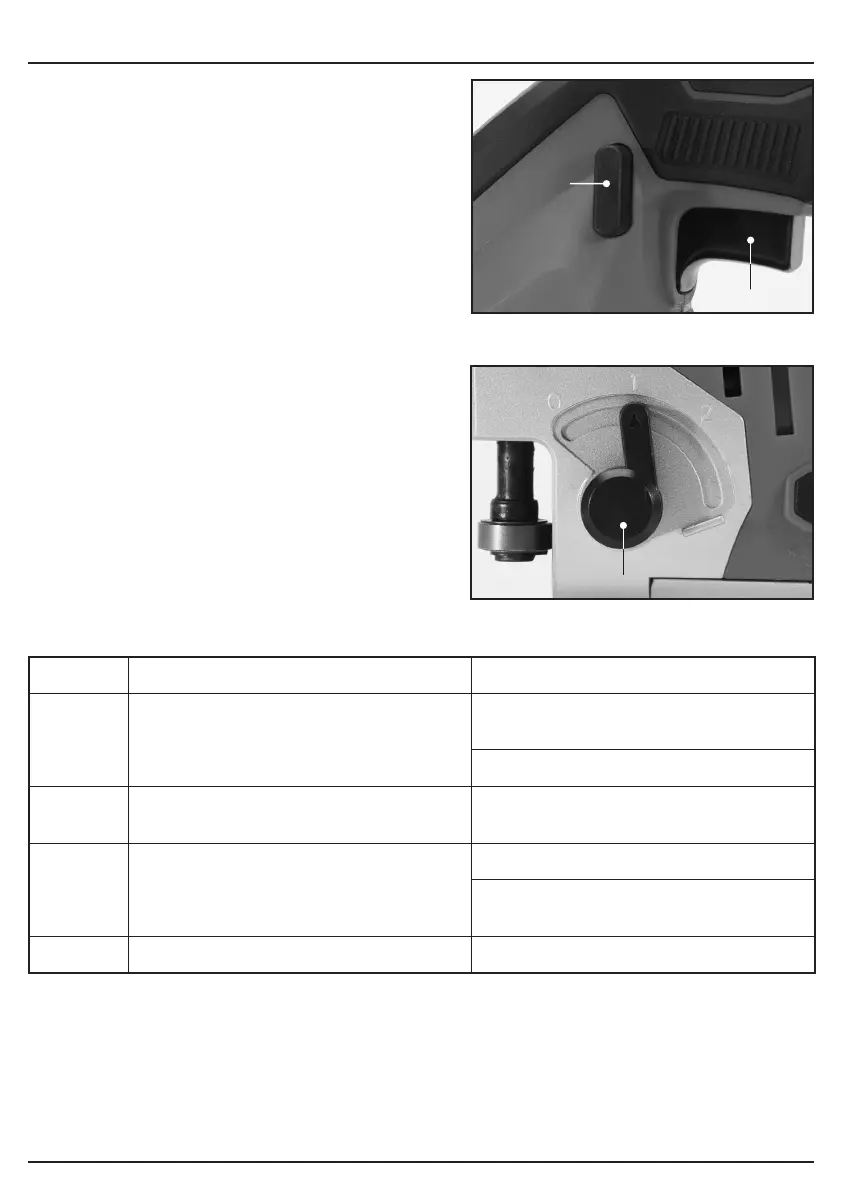
9.1 SWITCH ACTION – FIG.3
− To turn on the tool, press the lock/unlock button
(1). The tool goes into standby mode. To start
the tool, pull the switch trigger (2). To stop the
tool, release the switch trigger, and the tool
goes back into standby mode. To turn off the
tool, press the lock/unlock button.
− For continuous operation, pull the switch
trigger in the standby mode, and then push in
the lock on button. To stop the tool, pull the
switch trigger fully, and then release it.
9.2 SELECTING THE CUTTING
ACTION – FIG.4
− This tool can be operated with an orbital or a
straight line (up and down) cutting action. The
orbital cutting action thrusts the jig blade
forward on the cutting stroke and greatly
increases cutting speed.
− To change the cutting action, just turn the
orbital/pendulum speed adjustment switch (3)
to the desired cutting action position. Refer
to the table to select the appropriate
cutting action.
Position Cutting action Applications
0 Straight line cutting action For cutting mild steel, stainless steel
and plastics.
For clean cuts in wood and plywood.
1 Small orbit cutting action For cutting mild steel, aluminium and
hard wood.
2 Medium orbit cutting action For cutting wood and plywood.
For fast cutting in aluminium and mild
steel.
3 Large orbit cutting action For fast cutting in wood and plywood.
(2)
(1)
3 FIG.
4 FIG.
(3)


 To Next Page