74
Gentier Real-Time PCR System
are same with those introduced in D-3.3.4.1Abs Quant.
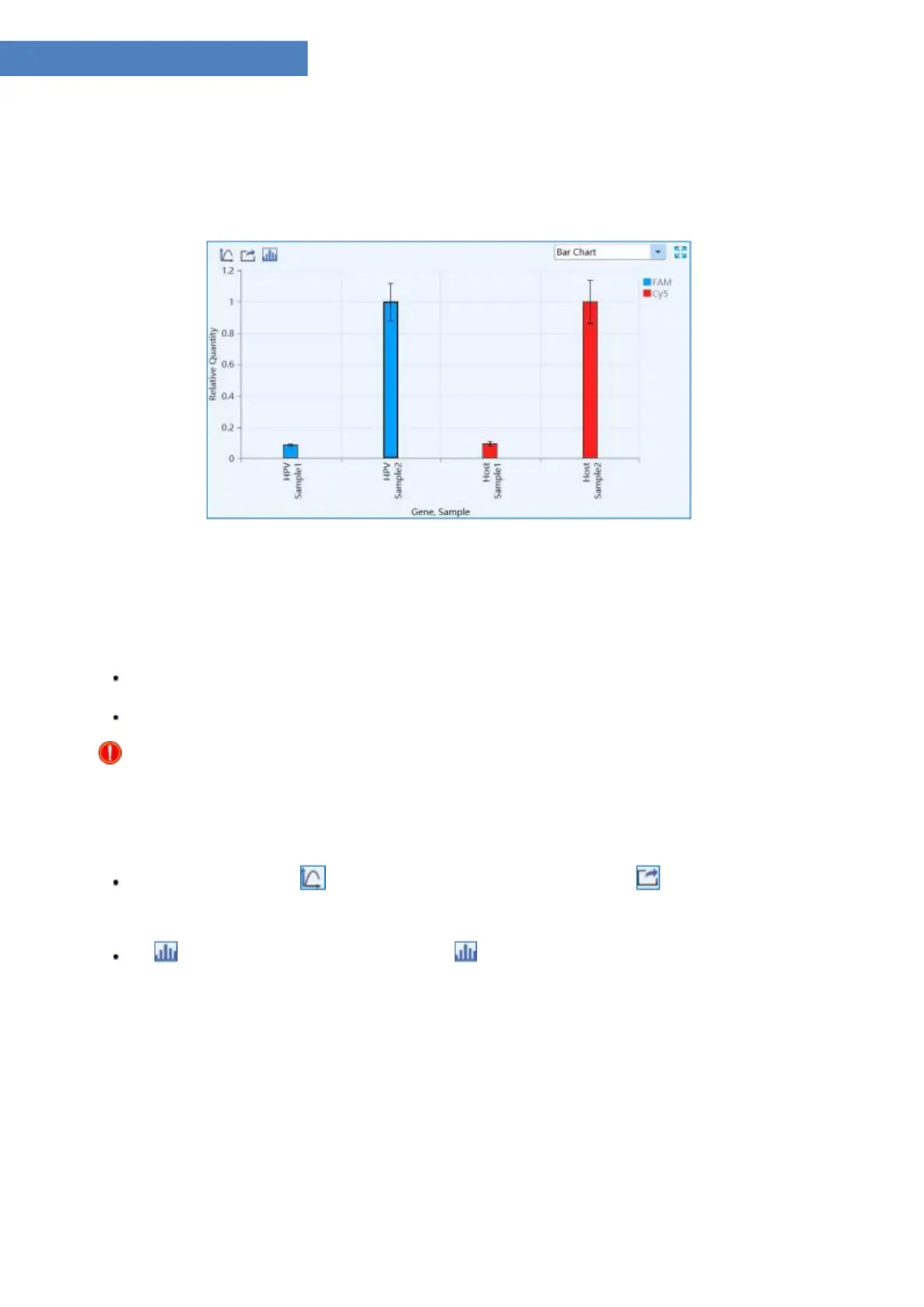
I. Bar Chart: dispaly the relative ratio relationship between target gene & sample and
reference gene & sample, as shown in figure D-11.1.
Figure D-11.1 Rel Quant analysis interface - Bar Chart function module
▶ Parameter introduction:
X axis shows the gene and sample for comparison;
Y axis shows the Relative Quantity ratio of the compared gene and sample;
Reminding: the application software set the relative quantity ratio of the reference sample
to 1 by default.
▶ Function key introduction:
The introduction of < Y-axis Coordinate Adjustment > and < Export > keys are
same with those keys introduced in D-3.3.4.1 Abs Quant - Amplification Curve.
< Display Setting >: user can click < Display Setting > icon and the application
software will automatically pop up the display setting window, as shown in figure D 11.2.



 To Next Page