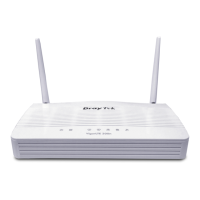
Vigor2800 Series User’s Guide
7
1
1
.
.
1
1
.
.
6
6
F
F
o
o
r
r
V
V
i
i
g
g
o
o
r
r
2
2
8
8
0
0
0
0
V
V
G
G
L
L
E
E
D
D
E
E
x
x
p
p
l
l
a
a
n
n
a
a
t
t
i
i
o
o
n
n
LED Status Explanation
Blinking
The router is powered on and running properly.
ACT
(Activity)
On
The router is powered on.
On The QoS function is active. QoS
Off The QoS function is inactive.
On The phone is off hook (the handset of phone is hanging). FXS1/FXS2
Blinking A phone call is incoming.
On Wireless access point is ready.
Blinking Wireless traffic goes through.
WLAN
Off Wireless access point is turned off.
DSL On The ADSL, ADSL2/2+ line is connected.
Printer On The USB interface printer is ready.
Orange A normal 10Mbps connection is through its
corresponding port.
Green A normal 100Mbps connection is through its
corresponding port.
LAN (P1, P2,
P3, P4)
Blinking Ethernet packets are transmitting.
C
C
o
o
n
n
n
n
e
e
c
c
t
t
o
o
r
r
E
E
x
x
p
p
l
l
a
a
n
n
a
a
t
t
i
i
o
o
n
n
Interface Description
Printer
Connecter for a USB printer.
PWR
Connecter for a power adapter with12-15VDC.
ON/OFF
Power Switch.
FXS2 & FXS1
Connecters for telephone set and analog phone with VoIP
communication.
LAN P4 – P1
Connecters for local networked devices.
DSL
Connecter for accessing Internet with the ADSL,ADSL2/2+ line
Factory Reset
Restore the default settings.
Usage: Turn on the router (ACT LED is blinking). Press the hole and
keep for more than 5 seconds. When you see the ACT LED begins to
blink rapidly than usual, release the button. Then the router will restart
with the factory default configuration.


 To Next Page
 Loading...