Vigor2800 Series User’s Guide
63
Enable UDP Bandwidth
Control
Check this and set the limited bandwidth ratio on the right
field. This is a protection of TCP application traffic since
UDP application traffic such as streaming video will exhaust
lots of bandwidth.
Limited_bandwidth Ratio The ratio typed here is reserved for limited bandwidth of UDP
application.
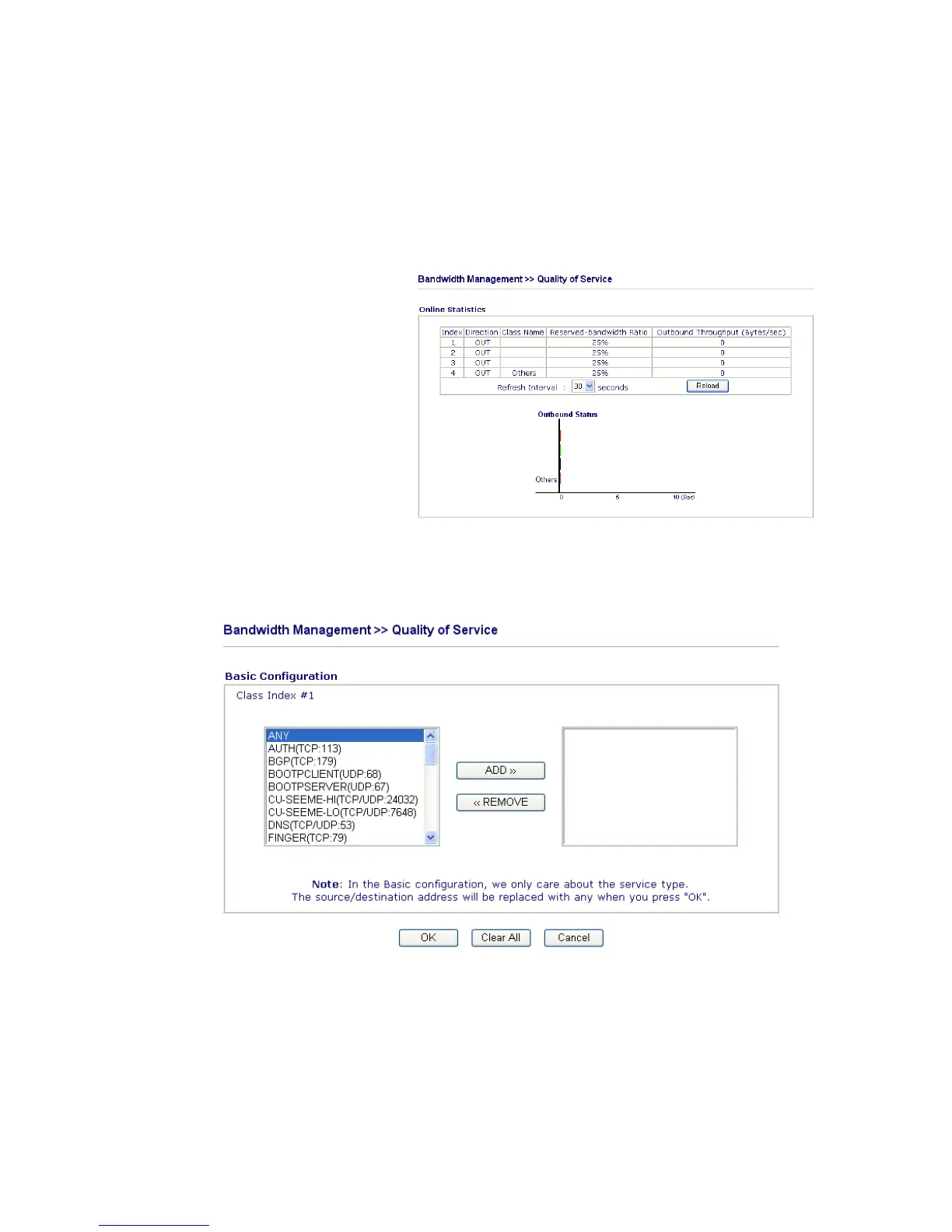
On Line Statistics Display an online statistics for quality of service for your
reference.
B
B
a
a
s
s
i
i
c
c
S
S
e
e
t
t
t
t
i
i
n
n
g
g
s
s
f
f
o
o
r
r
Q
Q
o
o
S
S
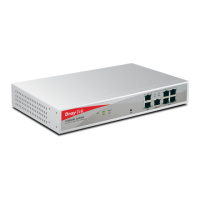
Click the Basic button to open basic configuration screen for each index number.
Choose one of the items from the left box and click ADD>>. The selected one will be shown
on the right box. To remove the selected on from the right box, simply choose the one again
and click <<Remove.
A
A
d
d
v
v
a
a
n
n
c
c
e
e
d
d
S
S
e
e
t
t
t
t
i
i
n
n
g
g
s
s
f
f
o
o
r
r
Q
Q
o
o
S
S
Click this button to open advanced configuration for each index number. You can insert,
move, edit or delete select rule in this page.






 To Next Page