Vigor2910 Series User’s Guide
105
3
3
.
.
9
9
V
V
P
P
N
N
a
a
n
n
d
d
R
R
e
e
m
m
o
o
t
t
e
e
A
A
c
c
c
c
e
e
s
s
s
s
A Virtual Private Network (VPN) is the extension of a private network that encompasses
links across shared or public networks like the Internet. In short, by VPN technology, you
can send data between two computers across a shared or public network in a manner that
emulates the properties of a point-to-point private link.
Besides, here provides ISDN LAN to LAN and remote dial-in functions (for i model only).
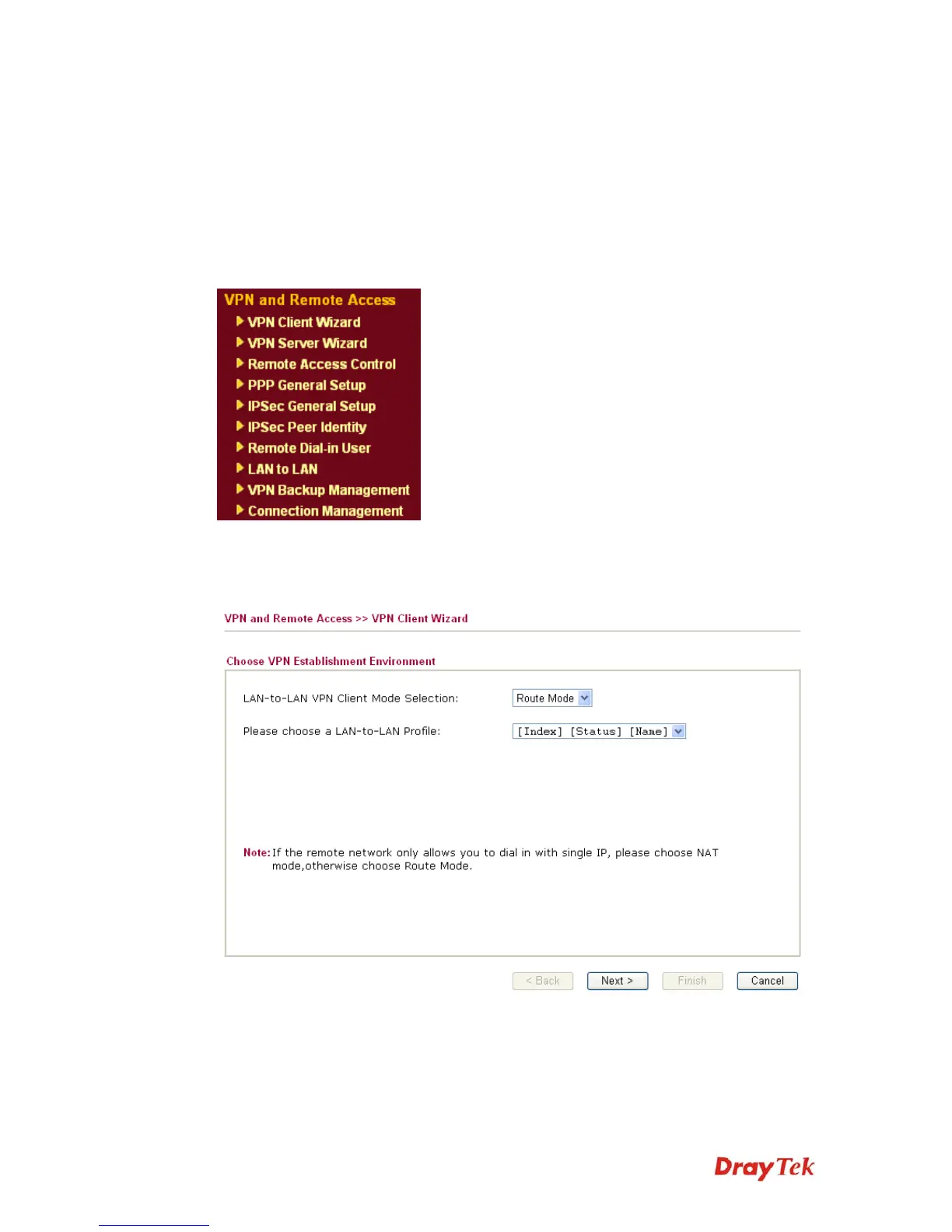
Below shows the menu items for VPN and Remote Access.
3
3
.
.
9
9
.
.
1
1
V
V
P
P
N
N
C
C
l
l
i
i
e
e
n
n
t
t
W
W
i
i
z
z
a
a
r
r
d
d
Such wizard is used to configure VPN settings for VPN client. Such wizard will guide to set
the LAN-to-LAN profile for VPN dial out connection (from server to client) step by step.
LAN-to-LAN Client Mode
Selection
Choose the client mode.
Route Mode/NAT Mode – If the remote network only allows
you to dial in with single IP, please choose this mode,
otherwise please choose Route Mode.











 To Next Page