Vigor2910 Series User’s Guide
246
W
W
e
e
b
b
P
P
a
a
g
g
e
e
C
C
h
h
a
a
n
n
g
g
e
e
s
s
f
f
o
o
r
r
V
V
P
P
N
N
B
B
a
a
c
c
k
k
u
u
p
p
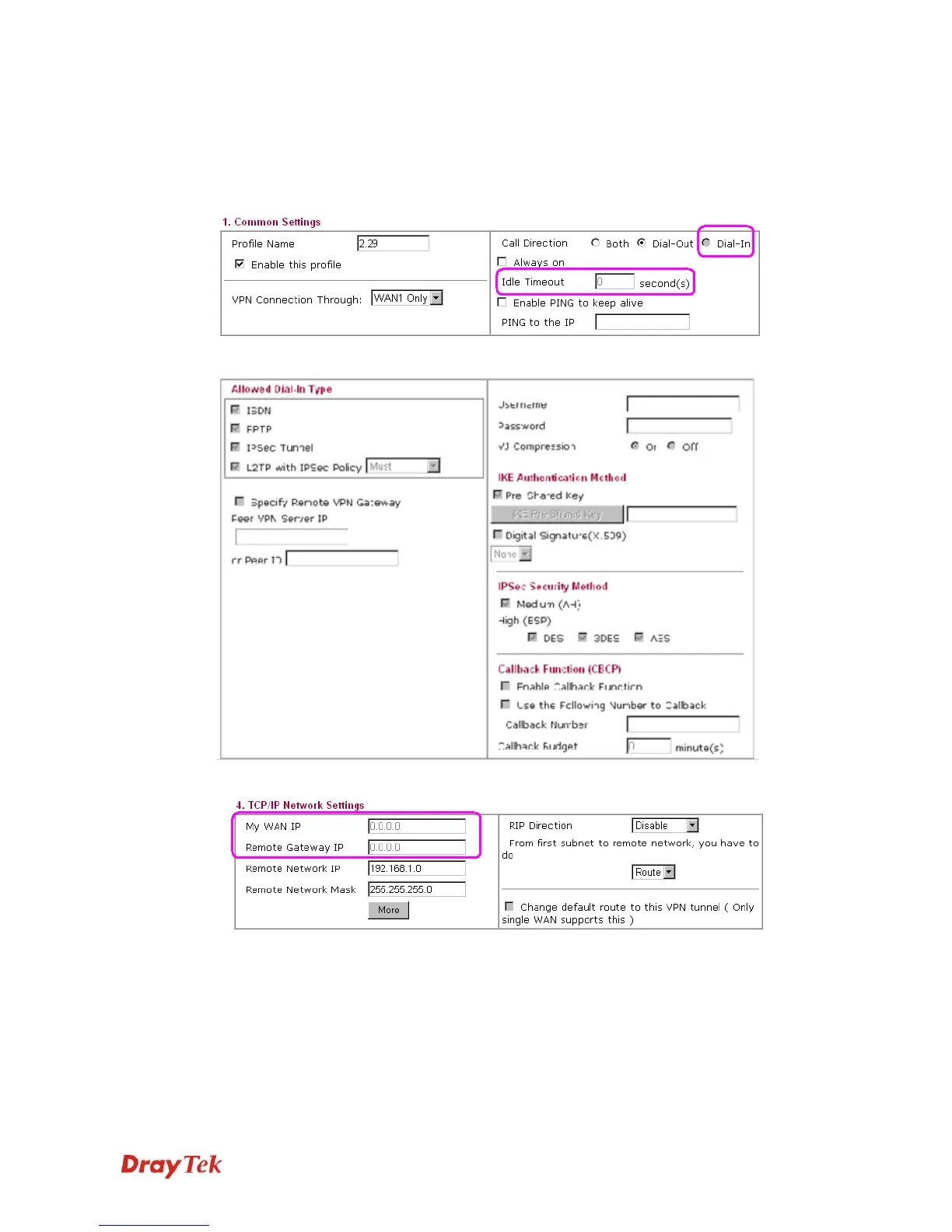
Corresponding web page (LAN to LAN) will be changed if VPN Backup is enabled. Refer to
the following figures.
Dial-in call direction and Idle Timeout will be dimmish and cannot be used.
All the items in Allowed Dial-in Type will be dimmish and cannot be used.
My WAN IP and Remote Gateway IP will be dimmish and cannot be used.
In addition, after configuring VPN Backup profile(s), the Connection Management in VPN
and Remote Access will be changed. Before adding a new VPN Backup profile, the webpage
will be shown as the following:











 To Next Page