§
"
-
I-
r-
u
~a:
w
u
-
I-
r-
:J~
WO
,...
ilSln
w
-
I-
CJ
'u
f
~ti
CJ
Z -
~t'?
t'?N
t'?
t'?N
t'?t'?
N
Z
~~.,
NI/')1/')1/')
N
(I)
~~Z
0:
t- tn
~~(I)
w
Z
0:
t-
0:
1=
(5
~ai
-
w
j
A.
I-
-
0:
.J
1=
0
CJ
w
w
w
~~C\I~
Z
W
t-
W
:JN
t'?t'?
--N
N
"
"" ""
.,.,
N
tn
I/')
:J
In
0
z
:i:
I
0
0
~tn
I-
-
0:
-
w :i
tn
0
In
W
I
0:
0
W
W
~~A.
"
A.
ii:
W
(I)
C\lC\I~
Z
.. .. .
0:
0
A.
~~::J:t'?
NN NN
(\IN
w
.,t'?
t'?"
t'?t'?
W
tn
(I)
:
~a.
CJ
-'
m
tn
::J:
:i:
-'
m
w
CJ
ct
j
°
:i:
-
:E
0:
I-
0
r-
tn
ct
CC
.. .. ..
"
..
.. ..
a:0
I/')
t'?
1/')1/')
I/')t'?
I/')N
NN
1/')1/')
1010
1/')10
t'?N
ION
cO
Z
%:i=
~-
I-
r-
:J
0
t:8
.. .. ..
00
-n
it)
1010 1010
10.,
.,.,
1010
1010
1010
t'?t'?
1010
In:i=
-
I-
I-
~~<D
~0>
C\i
<:ia:
..-....
~~....
<D
..:~
O\~
IX)
~~0
to-
N
fa
N
.,
Ow
t'? t'?
~,....
N
g
~~~~.JGI
"""'....
..-...-
"""'......
IX) 0>
-....
Nt'?
.,
~:I
~~-
o)~
C\i,..:
.0>
0>0>
:gg
" -
-....
on
11)""",
""'" ""'"
,........
"""'....
.,
<D<D
~c:;) N N
IX)
-
CD-
""'"
0
N oj
c?
UZ
......-
-co
.,...
""'" """'
....
.,
~<D
~~.....
uS
co
....
C\i
CD
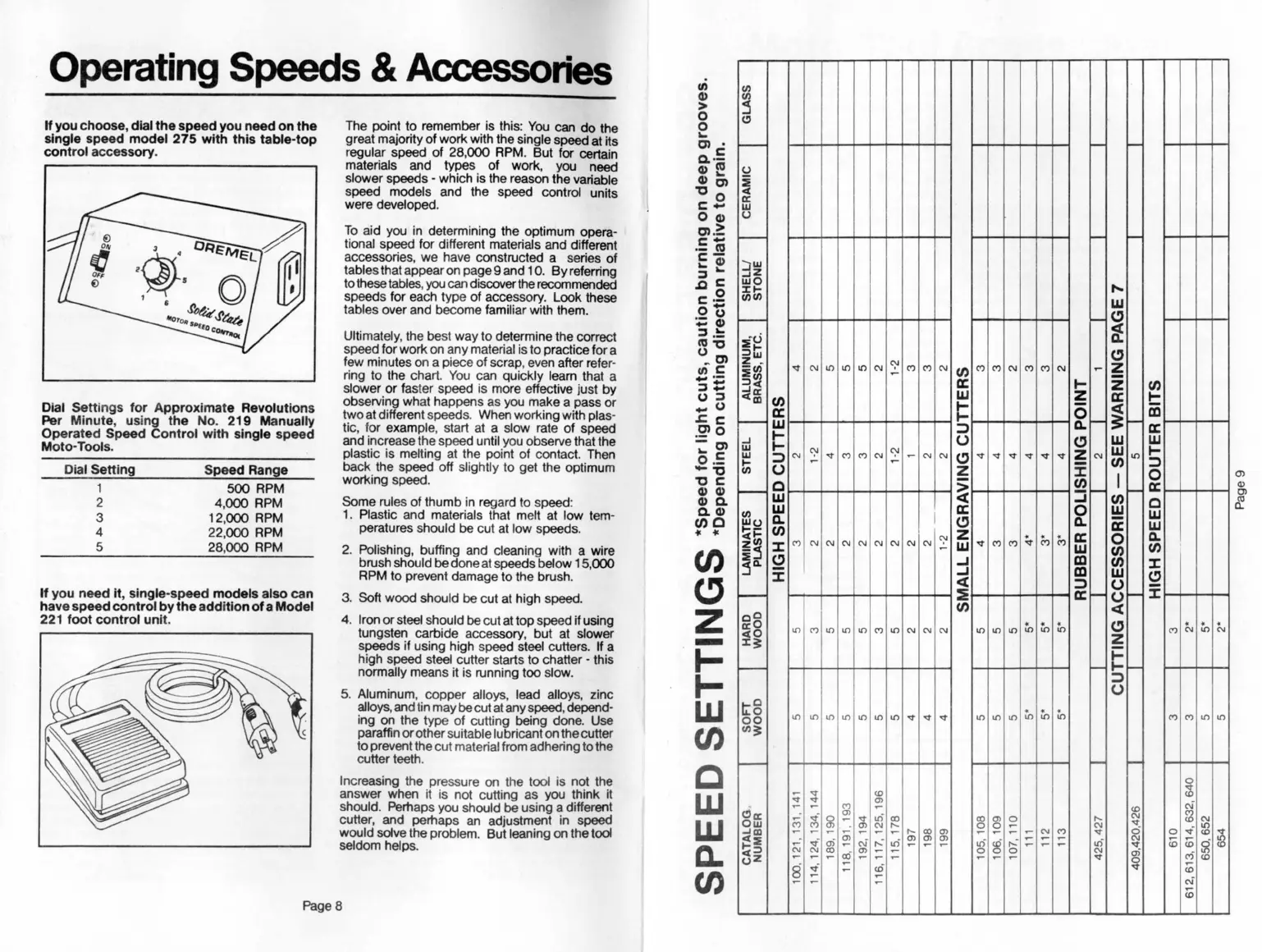
. Operating Speeds &Accessories
Ifyou choose, dial the speed you need on the
single speed model 275 with this table-top
control accessory.
Dial Settings for Approximate Revolutions
Per Minute, using the No. 219 Manually
Operated Speed Control with single speed
Moto-Tools.
Dial Setting
1
2
3
4
5
Speed Range
500 RPM
4,000 RPM
12,000 RPM
22,000 RPM
28,000 RPM
If you need It, single-speed models also can
have speed control by the addition of a Model
221 foot control unit.
The point to remember is this: You can do the
great majority of work with the single speed at its
regular speed of 28,000 RPM. But for certain
materials and types of work, you need
slower speeds -which is the reason the variable
speed models and the speed control units
were developed.
To aid you in determining the optimum opera-
tional speed for different materials and different
accessories, we have constructed a series of
tables that appear on page 9 and 10. Byreferring
to these tables, you can discoverthe recommended
speeds for each type of accessory. Look these
tables over and become familiar with them.
Ultimately, the best way to determine the correct
speed for work on any material is to practice for a
few minules on a piece of scrap, even after refer-
ring to the chart. You can quickly leam that a
slower or faster speed is more effective just by
observing what happens as you make a pass or
two at different speeds. When working with plas-
tic, for example, start at a slow rate of speed
and increase the speed until you observe that the
plastic is melting at the point of contact. Then
back the speed off slightly to get the optimum
working speed.
Some rules of thumb in regard to speed:
1. Plastic and materials that melt at low tem-
peratures should be cut at low speeds.
2. Polishing, buffing and cleaning with a wire
brush should be done at speeds below 15,000
RPM to prevent damage to the brush.
3. Soft wood should be cut at high speed.
4. Iron or steel should be cut at top speed ifusing
tungsten carbide accessory, but at slower
speeds if using high speed steel cutters. If a
high speed steel cutter starts to chatter -this
normally means it is running too slow.
5. Aluminum, copper alloys, lead alloys, zinc
alloys. and tin may be cut at any speed, depend-
ing on the type of cutting being done. Use
paraffin or other suitable lubricant on the cutter
to prevent the cut material from adhering to the
cutter teeth.
Increasing the pressure on the tool is not the
answer when it is not cutting as you think it
should. Perhaps you should be using a different
cutter, and perhaps an adjustment in speed
would solve the problem. But leaning on the tool
seldom helps.
Page 8
en
CJ
Z
-
'1-
I-
W
UJ
C
W
W
0-
W
en
G)
>
0
0
...
m.
Q..5
G)«I
G)'"
"m
c£
OG)
m'::
c-
.- «I
c-
...!
:lc
,go
c-
.213
-G)
:1=
«I"
~m
cnC
...-
:1:=
U:I
_U
.l:c
.2» 0
-m
"'c
0-
-"
"c
G)G)
G)Q.
Q.G)
(1)0
t< t<
0)
CD
OJ
~


 To Next Page
 Loading...