OFFLINE SETUP (No Internet Access)
STEP 1: Ensure the power switch is in the off position.
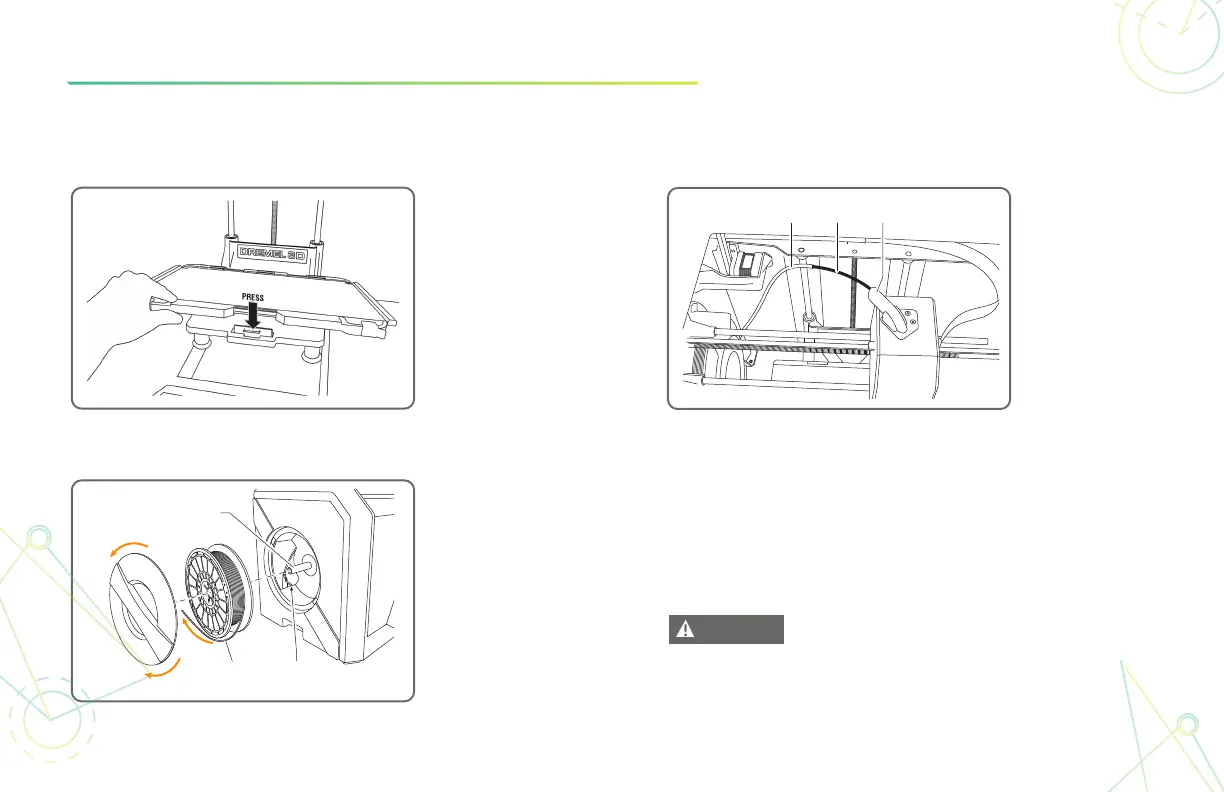
STEP 2:
Install the build
plate holder
using the build
platform clips.
STEP 5:
STEP 4:
Insert filament
from the guide
tube into the
extruder intake.
Guide Tube Filament Extruder Intake
Turn on the power switch and the printer will
guide you through the setup process.
STEP 3:
Twist spool door
counter-clockwise
to remove. Place
spool onto holder
with filament being
fed from the
bottom towards
the back. Thread
filament through
guide tube.
2610053097 09/18
WARNING
READ ALL OPERATING/SAFETY INSTRUCTIONS IN THE MANUAL AND
FAMILIARIZE YOURSELF WITH THE DREMEL 3D40 BEFORE SETUP AND USE.
FAILURE TO COMPLY WITH THE WARNINGS AND INSTRUCTIONS MAY RESULT
IN FIRE, EQUIPMENT DAMAGE, PROPERTY DAMAGE, OR PERSONAL INJURY.
Spool
Holder
. 1
Open
Filament
Filament
Guide Tube



 To Next Page