DRI-STEEM GTS Humidifier Installation, Operation, and Maintenance Manual • Page 3
Safe operating instructions
1. STOP! Read the safety information on the previous page.
2. Set the humidistat to lowest setting.
3. Turn off all electric power to the appliance.
4. This appliance is equipped with an ignition device that
automatically lights the burner. Do not try to light the burner
by hand.
5. Remove control access panel.
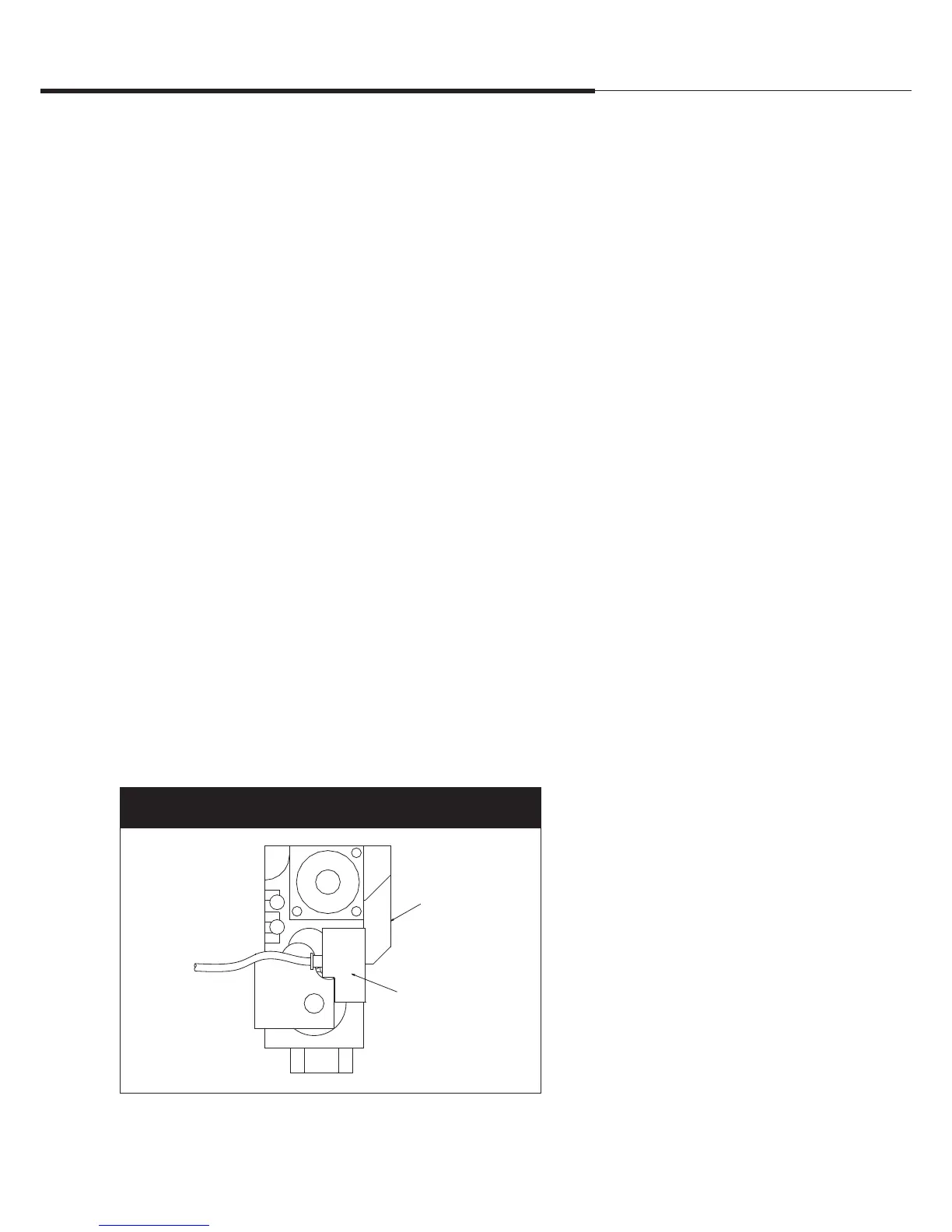
6. Unplug the black power plug on the gas valve (see
Figure 3-1).
7. Wait five minutes to clear out any gas.
If you then smell gas, STOP! Follow “B” in the safety
information on the previous page.
If you don’t smell gas, go to the next step.
8. Plug the black power plug back into the gas valve.
9. Replace control access panel.
10. Turn on all electric power to the appliance.
11. Set humidistat to desired setting.
12. If the appliance will not operate, follow the instructions on this
page titled, “To turn off gas to appliance,” and call your service
technician or gas supplier.
To turn off gas to appliance
1. Set the humidistat to lowest setting.
2. Turn off all electric power to the
appliance if service is to be performed.
3. Remove control access panel.
4. Unplug the black power plug on the gas
valve.
5. Replace control access panel.
Safety precautions
Gas
valve
Gas valve
power
plug
Figure 3-1:
Detail of gas valve
More safety precautions are on the next page ▶
Top view
Overview




 To Next Page