LCD
SYS
DIA
PLU
M
SET
mmH
g
mmHg
/m
in
S
TA
R
T
STO
P
Safety Notice
Unit Illustration Unit Illustration
Unit Illustration
16. Product is not intended for infants or individuals who cannot express their
intentions.
17. Any hazards associated with prolonged overinflation of the bladder.
18. Do not disassemble the unit or wrist cuff. Do not attempt to repair.
19. Use only the approved wrist cuff for this unit. Use of other arm cuffs may
result in incorrect measurement results.
20. The system might produce incorrect readings if stored or used outside
the manufacturer’s specified temperature and humidity ranges.
21. Do not use cell phones and other devices, which generate strong
electrical or electromagnetic fields, near the device, as they may cause
incorrect readings and interference or become interference source to the
device.
22. Do not mix new and old batteries simultaneously
23. Replace batteries when Low Battery Indicator "
" appears on screen.
Replace both batteries at the same time.
24. Do not mix battery types. Long-life alkaline batteries are recommended.
25. Remove batteries from device when not in operation for more than
3 months.
26. Do not insert the batteries with their polarities incorrectly aligned.
27. Dispose batteries properly; observe local laws and regulations.
28.
Refer to instruction manual/ booklet symbol.
29. Refer to keep dry.
World Health Organization (WHO)
Blood Pressure Classification Indicator
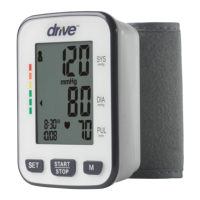
Monitor Unit
Systolic Blood Pressure
Diastolic Blood Pressure
Pulse Rate
“M” Button
“ START/STOP “ Button
“ SET “ Button
Wrist Cuff
ContentsDisplay
1. Monitor Unit
3. Plastic Storage Case
2. Owner’s Manual
Important Testing Guidelines Quick Start
1. Avoid eating, exercising, and bathing for 30 minutes prior to testing.
2. Sit in a calm environment for at least 5 minutes prior to testing.
3. Do not stand while testing. Sit in a relaxed position while keeping your
wrist level with your heart.
4. Avoid speaking or moving body parts while testing.
5. While testing, avoid strong electromagnetic interference such as
microwave ovens and cell phones.
6. Wait 3 minutes or longer before re-testing.
7. Try to measure your blood pressure at the same time each day for
consistency.
8. Test comparisons should only be made when monitor is used on the
same wrist, in the same position, and at the same time of day.
9. This blood pressure monitor is not recommended for people with severe
arrhythmia.
10. Do not use this blood pressure monitor if the device is damaged.
1. Install 2x AAA batteries. (See Figure A )
Figure A
2. Remove clothing from the wrist area. (See Figure B)
3. Rest for several minutes prior to testing. Wrap cuff around
left wrist. (See Figure C)
Figure B Figure C
Groups
Systolic
Blood
Pressure
Diastolic
Blood
Pressure
Pulse
Rate
Low Battery Indicator
WHO Blood Pressure
Classification Indicator
Last 3 Results Average
Irregular Heartbeat Indicator
Time
Date
AVG
mmHg
kPa
No
(
( )
)
/
1 2
1-2cm ''(0.4-0.8 )
S
E
T
M
S
Y
S
P
U
L
/
min
D
I
A
mmHg
mmHg
S
T
O
P
S
T
A
R
T
S
YS
DIA
P
L
U
M
SET
m
mHg
mm
Hg
/
m
i
n
START
STOP


 To Next Page