1
2
3
Adjust the alkalinity between 100 and 200
ppm.
Adjust the pH to 7.4.
Adjust the chlorine between 0.1 and 0.5
ppm.
5. INITIAL WATER ADJUSTMENTS
1
2
We recommend to add 1 to 2 kg magnesium chloride (MgCl
2
) or 0.75 - 1.5 kg
of normal salt (NaCl) per m
3
of water. The TDS should be at around 1200. It is
recommended to mix them, for example in a ratio 1:3 (MgCl
2
:NaCl).
Add the magnesium chloride or salt directly to your swimming pool and let the
system run.
In outdoor pools it is necessary to use ACO
®
.
Water adjustments Adding activator/salt to the water
Attention: Do not calibrate free chlorine with a chlorine
level of less than 0.3 ppm free chlorine!
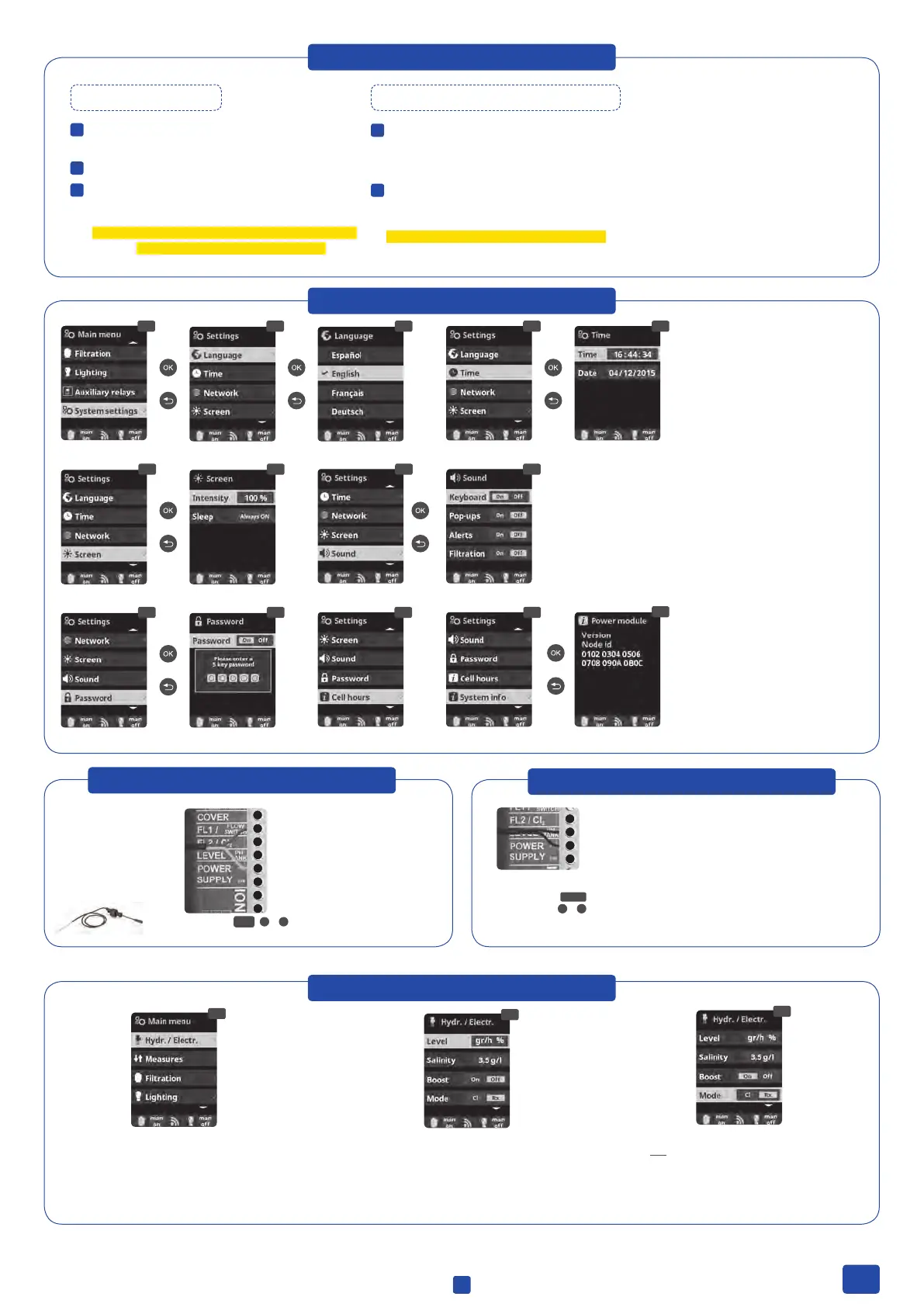
6. SYSTEM SETTINGS
6.8 6.96.6 6.7
6.1 6.3 6.46.2 6.5
6.12
6.14
6.136.116.10
2x
6.9 Sound
6.11 Password: Protect the user´s menu by activating a password.
To enter your password press a combination of 5 keys and the
system will memorise them. If you forget the password, there is a
“master password”. Ask your installer/provider.
6.3 Language
6.5 Date and Time
6.7 Display brightness
6.12 Hydrolyse-Cell working hours
6.14 System info: Information about
the software versions and the ID node
7. PADDLE FLOW SWITCH
1
2
3
4
5
6
7
8
Connect as shown in the image
and contact your installer for
activation.
Paddle Flow switch
FL1
2
&
5
Paddle ow switch. Stops
the hydrolysis and the
dosing pumps if there is
no water ow.
8. SUCTION LANCE (pH BOTTLE)
3
4
5
6
Connect the suction lance. The installer/provider
should be contacted to activate the sensor.
pH-Minus bottle
level
TANK
4
&
5
9. HYDROLYSIS
9.1
9.3
9.2
9.1 Hydrolysis: Programming
of hydrolysis functions
9.2 Level:
Hydrolysis - Desired disinfection
production (Always 100%).
9.3 Mode: If the device has Free Chlorine
and redox probes, choose the parameter
that controls the cell’s chlorine generation.
3
EN


 To Next Page