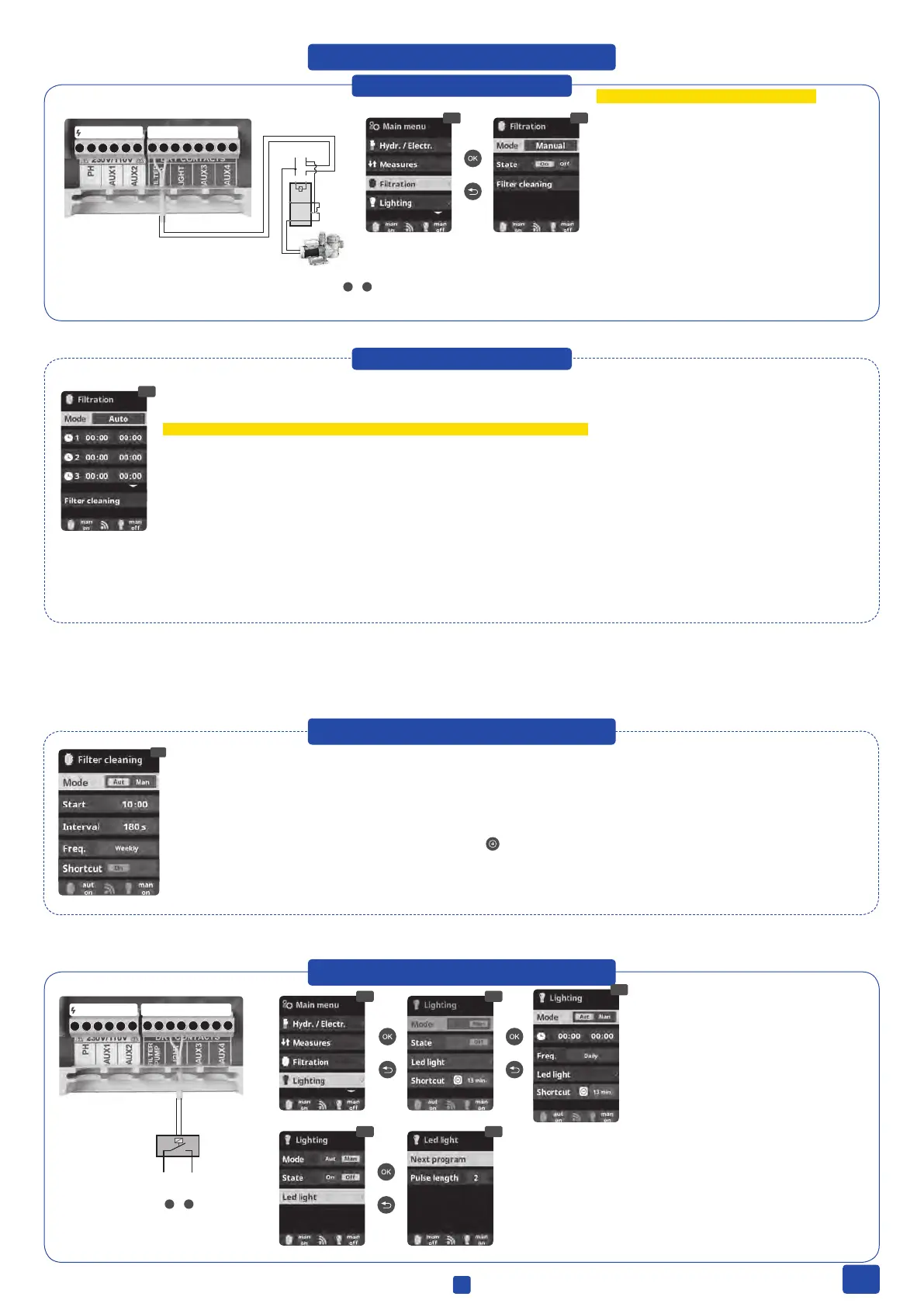
12.1 Manual mode
12.11 12.12
110-230 V max. 3.15 A
DRY CONTACT
14
12
11
A1 A2
LN
1 2 3 4 5
6
7 8 9
10
11
12 13
14
12.11 Filtration:
Conguration control of the lter pump. To set, select
Filtration and conrm by pressing OK. The mode selection
is done in Mode line with the plus/minus keys.
12.12 Manual:
Manually turns ON/OFF the ltration process. No timing
or additional functions. The State (Status) line indicates
whether the ltration pump is ON.
Filter Cleaning: See chapter 13
FILTER PUMP
Filtration control
Setup and connection of a Variable Speed
Pump, see section 11 - Variable Speed Pump
7
&
8
12. FILTRATION
12.2 Automatic mode
12.21
In this mode the ltration is controlled by up to 3 timers.
We hardly recommend to run your system in a 24/7 mode with a variable speed pump.
For example: During the night time (6:00 until 24:00 & 0:00 until 10:00) in low speed, during day time (10:00 until 6:00) in medium speed.
To set the ON/OFF times select with the up/down keys in the timer line you want to change (1-3 ).
The plus/minus keys open the selected start time eld. Set the time with plus/minus keys. Scroll with the up key to the minute eld and set it up with
plus/minus keys. To conrm press OK and to cancel press return/escape.
Backwash: See chapter 13
12.21 Automatic
13. AUTOMATIC BACKWASH
13.1 Backwash Mode with Besgo Valve: The DA-GEN is congured for automatic backwash with Besgo. Use AUX 2!
• Mode: Choose Auto
• Start: Choose starting time
• Interval: Set backwash time in seconds (Recommendation: min. 240 seconds with AFM
®
, min. 300 seconds with Sand)
• Freq.: Choose frequency (at least weekly)
• Shortcut: Enable/Disable Shortcut for manual backwash
13.1
14. LIGHTING
14.4 14.5
14.1
LIGHT
Lighting control
9
&
10
14.2
14.3
14.1 Lighting
14.2 Manual Mode (ON/OFF). You can activate
the light also by pressing the short cut. You can
set a timer, after that the light will go out.
14.3 Automatic Mode: Switches lights according
to timer settings. Additional you can switch the
lights on by pressing the Shortcut button
14.5 LED spotlight: In case of installallation of RGB LED lights in the
pool, you can change the color of the lights in the pool. Select the length
of time in seconds in Pulse length and then press Next Program option
to apply the pulse. Refer to your LED spotlight manual to set its different
colors.
Only with an external pump controller unit
Without an external pump controller unit
1 2 3 4 5
6
7 8 9
10
11
12 13
14
110-230 V max. 3.15 A
DRY CONTACT
6
EN


 To Next Page