
EasyManua.ls Logo

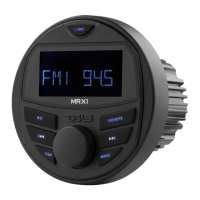
DS18 HYDRO MRX1 - User Manual

DS18 HYDRO MRX1
5 pages
Print Icon
To Next Page IconTo Next Page
Loading...
MRX1
owner’s manual
MRX1
POWERSPORTS & MARINE
MULTIMEDIA RADIO
POWERSPORTS & MARINE
MULTIMEDIA RADIO

Questions and Answers

  • D
    dylanclineJul 28, 2025
    Why is there no sound coming from my DS18 Radio?
    • J
      James KingJul 28, 2025
      If there's no sound from your DS18 Radio, there are a couple of things to check: First, make sure the volume isn't set to the minimum. If it is, simply adjust it to a comfortable listening level. Second, verify that all the wiring connections are secure and properly connected.
  • P
    pquinnAug 5, 2025
    What to do if my DS18 HYDRO MRX1 has no power?
    • R
      ramoswilliamAug 5, 2025
      If your DS18 Radio has no power, here are a couple of things to check: * If your radio's power supply is connected to the car's accessory circuits, ensure the ignition key is switched to “ACC” if the engine isn't running. * Also, inspect the fuse. If it's blown, replace it with a new one.
  • D
    Daniel HarrisAug 11, 2025
    Why is my DS18 HYDRO MRX1 not working and the automatic station selection failing?
    • C
      Charles MartinAug 12, 2025
      If your DS18 Radio isn't working and the automatic station selection is failing, it could be due to a couple of reasons. First, check that the antenna cable is firmly inserted. If the signals are too weak for automatic selection, try selecting a station manually.
  • R
    Rachel HartAug 20, 2025
    What to do if the operation keys on my DS18 HYDRO MRX1 Radio do not work?
    • B
      Brian PerryAug 20, 2025
      If the operation keys on your DS18 Radio aren't working, it might be because the built-in microcomputer isn't operating correctly due to noise. Try pressing the reset button.

Summary

Unit Operation and Settings

Power Control and Reset

Instructions for turning the unit on/off and performing a factory reset.

Sound and System Adjustments

Details on adjusting audio settings, clock, and regional preferences.

Radio Tuning and Memory

Guidance on receiving, storing, and recalling radio stations.

USB Media Playback

Instructions for playing music files from a USB drive and navigating directories.

Audio Source and Bluetooth

MP3;WMA Playback Controls

Features for searching, repeating, and random playback of music files.

AUX Input Connection

Procedure for connecting and playing audio from an external device via AUX.

Bluetooth Audio Streaming

Steps for pairing, playing, and disconnecting Bluetooth devices.

Installation and Wiring

Wiring Diagram and Connections

Details on wire insertion view, color codes, and pin assignments for connection.

Installation Guidelines

Recommendations for professional installation and secure wiring practices.

Product Specifications and Troubleshooting

Features Overview

Summary of the unit's capabilities including media playback and connectivity.

Technical Specifications

Detailed electrical and physical specifications of the multimedia radio.

Troubleshooting Common Issues

Guidance on diagnosing and resolving common problems like no power or no sound.

DS18 HYDRO MRX1 Specifications

General IconGeneral
Channels4
Marine GradeYes
BluetoothYes
USB InputYes
RCA OutputYes
Display TypeLCD