Need help?
Do you have a question about the DSAN Limitimer PRO-2000 and is the answer not in the manual?
Step-by-step guide for initial setup and powering on the timer.
How to select and use pre-set timing formats for contests and debates.
Instructions for connecting signal lights using Cat-5 cables and RJ45 ports.
Explains DIP switches for client-server mode, count direction, and behavior.
Covers sound selection, volume, and time setting permissions via DIP switches.
Configuring multiple timers for synchronized control via wired or wireless connections.
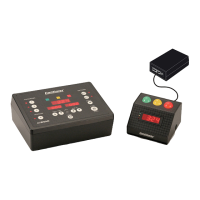
The Limitimer PRO-2000RM is a sophisticated speaker timer system designed for studio installations, housed in a compact 1U rackmount enclosure. This device integrates a Limitimer controller with advanced connectivity options, including an Ethernet port and a serial data port, making it compatible with popular touch panels and show control systems. Its primary function is to provide precise timekeeping for speakers, debates, or contests, with a range of customizable features to suit various event formats.
The core function of the Limitimer PRO-2000RM is to manage and display time for presentations. It can drive Limitimer signal lights through multiple methods: hardwire connections, Bluetooth wireless technology, and across local and wide area networks. This flexibility allows for diverse setup configurations, from simple, single-speaker setups to complex multi-point control scenarios. The device can also be controlled by other client-configured timers within the Limitimer product family, enabling synchronized timekeeping across multiple locations or control points.
The system supports pre-set timing formats through its "Programs" feature, which is particularly useful for debates or contests where quick selection of different timekeeping rules is required for individual speakers or segments. Each program can have its own Total Time, Sum-up Time, Blink, and Beep settings, which are saved for easy recall. Program 4 (Session) offers unique functionality, allowing it to run simultaneously in the background while Programs 1, 2, or 3 are active and displayed. This enables tracking of an overall session time alongside individual speaker times.
The Limitimer PRO-2000RM offers intuitive controls for setting and managing time. The front panel features Up-Down arrow buttons for setting "Total Time" and "Sum-up Time." Total Time can be adjusted in one-minute increments, with a "Set Seconds" button allowing for precise second-by-second adjustments. Sum-up Time, which indicates the duration for the yellow phase light, can also be set, with a constraint that it cannot exceed the Total Time.
Once time is set, the "Start" button initiates the countdown, displaying the time in bright red and illuminating phase lights. By default, the timer counts down in minutes:seconds, but this can be customized to count up or display in hours:minutes using the DIP switches. The "Clear" button resets a selected program's settings to 0:00, while "Repeat" resets the Time Remaining to the Total Time.
The device's front DIP switches provide easy access to a variety of settings, enhancing its adaptability. These include:
For signal light connections, the PRO-2000RM provides dual RJ45 jacks on the rear panel and one on the front panel. These connections use Cat-5 cable for 12-volt power, differential data, and ground reference. Multiple signal lights can be daisy-chained or connected via power booster hubs (PSL-PB6 or PSL-PB18) for larger setups.
Wireless connectivity is a key feature, with an integrated Class II Bluetooth transceiver capable of sending data to Bluetooth-equipped signal lights or client-configured timers up to 300 feet away. Communication can occur over four channels, supporting up to six Bluetooth receivers per channel. The pairing process is straightforward: keep the signal light and timer within 20 feet during initial setup, wait for yellow LEDs to turn green, indicating a successful pairing, after which they can be separated.
The Ethernet port and serial data port (RS-232) enable integration with touch panels and show control systems. The RS-232 port transmits ASCII-based API data, including countdown time and phase light states, allowing external controllers to simulate the Limitimer console. The device translates serial data into an easy-to-read plain-text format for this purpose. The touch panel controller port should be configured at 9600 baud with 8 data bits, no parity, and one stop bit.
The Limitimer PRO-2000RM is designed for ease of configuration and troubleshooting. When a PC is connected to the front USB port, a flash memory drive named "Limitimer" becomes visible in Windows Explorer. Users can access the "Configure-Networking" application (Windows® only) to manage network properties such as IP address, gateway, mask, port, and DHCP settings. By default, the PRO-2000RM acts as a server with a dynamically assigned IP address, but users can configure a fixed IP address if needed. This allows for precise control over network integration and ensures compatibility with existing network infrastructures.
Network status LEDs on the device provide visual feedback on connectivity:
These indicators are crucial for quickly diagnosing network issues or confirming proper configuration. The device's robust design and clear status indicators contribute to its maintainability in professional studio environments.
 General
| Model | PRO-2000 |
|---|---|
| Voltage Rating | 100-240V AC |
| Timer Modes | Countdown |
| Control | Buttons |
| Power | AC Adapter |
| Battery Backup | Yes |
| Type | Professional Timer |


 To Next Page