MP3 audio source(FM/AUX/USB/SD/Bluetooth) volume: in the FM/AUX/USB/SD/Bluetooth mode, long
press “ ” or “ ” previous or next song button to enter the MP3 volume settings interface, continue to
long press the “ ” or “ ” previous or next song button to adjust the MP3 audio source volume level
(0-32).
9. Phantom Power
Switch on the phantom power switch to provide phantom power (+ 48V) to all green terminal microphone inputs.
It is not recommended to switch on for normal use but only used for MIC1, MIC2/LINE2, MIC3/LINE2,
MIC4/LINE2.
Remote Controller
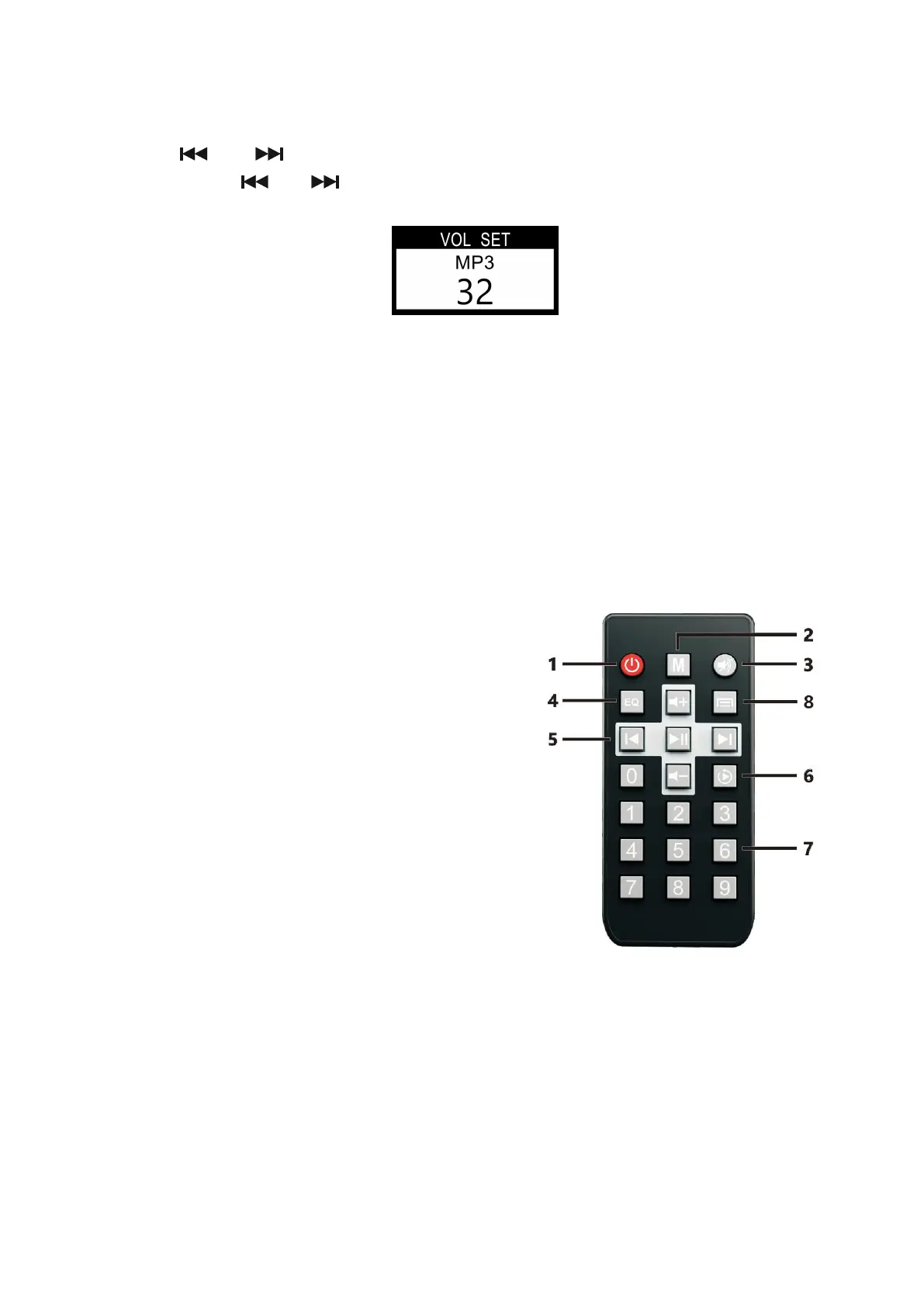
As shown in the following figure, remote controller keys are introduced in details.
1 Standby Switch
2 Mode Selection: Click it to display modes in turn: FM, USB,
AUX and BT.
3 MUTE button.
4 EQ Mode, with 4 optional sound effects.
5 Play Control Area. Play/Pause, Previous/Next, and Volume
Control.
6 Loop Mode. Click it to display modes in turn: Single Loop,
Random Play and Directory Loop.
7 Number Area. In FM mode, press the number directly to enter
the FM frequency that has been stored.
8 Alternative Button



 To Next Page