3
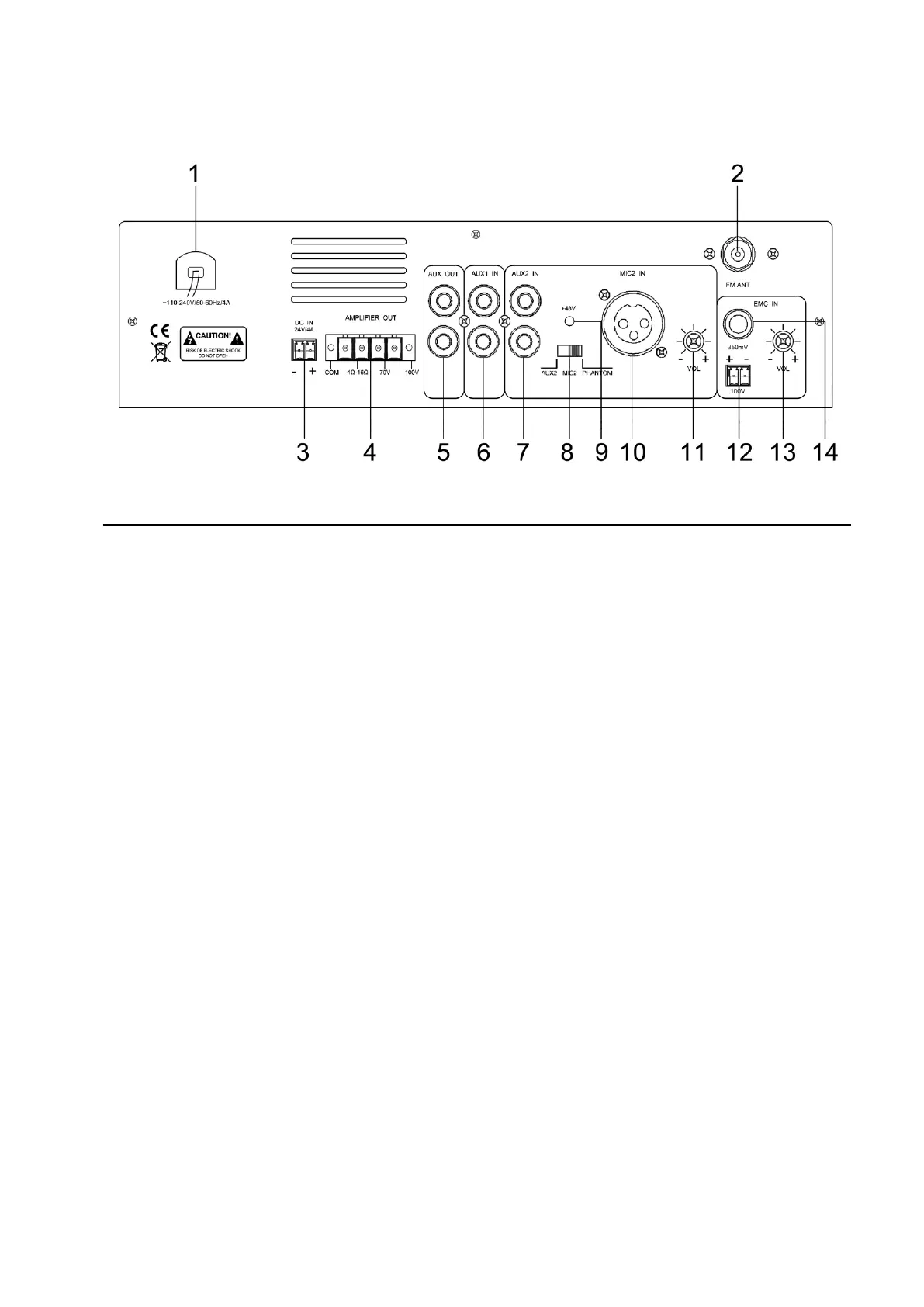
2.2 Rear panel
1. AC~110-240V 50/60Hz Power input
The interface to supply the working power. Insert the plug onto the machine, and then connect the power
grid.
2. Radio antenna interface
Radio antenna connect to this interface
3. DC 24V power input
DC 24V stand-by power input interface
4. Audio power output
Note: No terminal is connectable to “Earth wire” no matter directly or through other devices.
5. AUX output
6. AUX1 input port
7. AUX2 input port
8. Audio source selection switch(AUX2-MIC3)
AUX2, MIC3 audio source selection, left and right slide to choose AUX2 or MIC3
9. Indicator of 48V phantom power
10. MIC2 balanced input interface
11. AUX2/MIC2 volume control
12. 100V emergency signal input
13. Volume control of emergency input
14. Volume control of secondary emergency input


 To Next Page