EasyManua.ls Logo

DTE Lux E - User Manual

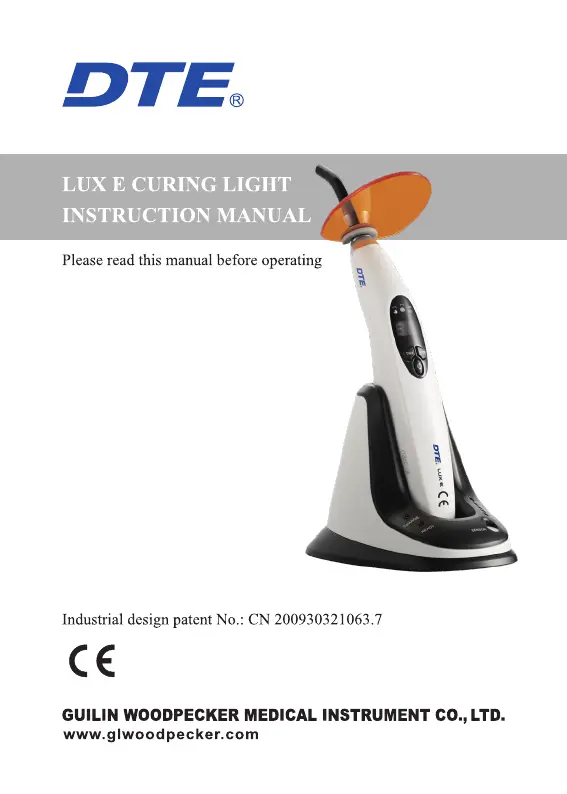
DTE Lux E
16 pages
Print Icon
To Next Page IconTo Next Page
Loading...

Questions and Answers

Summary

Introduction and Company Overview

Principle and Application of LUX E

Product Components

Basic Technical Specifications

Adapter Specifications

Details about the rechargeable Lithium battery and adapter input/output.

Applied Part Identification

Identifies the optical fiber as the applied part of the curing light.

Light Source Details

Specifies the 5W blue light LED, its wave length, and light intensity.

Operating Work Conditions

Defines the operating environment: temperature, humidity, and atmosphere pressure.

Physical Dimensions and Weight

Provides the physical dimensions and net weight of the curing light unit.

Power Consumption

Indicates the maximum power consumption of the device.

Electrical Shock Protection

Specifies protection types and degrees against electrical shock (Class II, Type B).

Ingress Protection Rating

Indicates protection against water/matter ingress as ordinary equipment (IPX0).

Flammable Anesthetic Safety

States the device is not suitable for use with flammable anesthetic mixtures.

Installation and Demounting Procedures

Optical Fiber Attachment

Instructions for attaching the optical fiber to the main unit, ensuring correct screw insertion.

Light Hood Installation

Details on how to secure the light hood onto the optical fiber.

LED Uninstallation

Instructions for uninstalling the LED by reversing the installation procedure.

Battery Replacement Guide

Step-by-step guide for replacing the battery in the main unit.

Pedestal Placement for Charging;Storage

Procedure for placing the main unit in the pedestal for charging or storage.

Device Operation

Working Mode Selection

Instructions on using the mode button to select operating modes: Full-power, Ramping, Pulse.

Solidification Time Setting

Details on setting the solidification time (5, 10, 15, 20 seconds).

Starting and Stopping Light Emission

Guidance on aiming the fiber and using the power button to control light emission.

Battery Status Indicator

Details about the battery indicator, which winks when low power is detected.

Charging Procedure and Indicators

Instructions for connecting the adapter and charge device, and status indicators.

Post-Operation Cleaning

Instructions for cleaning the optical fiber after operation to prevent infection.

Automatic Shutdown Feature

Information about the automatic shutdown feature after 2 minutes of inactivity.

Light Intensity Measurement

Details on how to use the light intensity measuring function.

Optical Fiber Sterilization

Specific instructions for sterilizing the optical fiber before each use.

Over-Heat Protection System

Explanation of the over-heat protection system and its behavior.

Light Intensity Measurement Setup

Power Adapter Connection for Measurement

Instructions for connecting the power adapter to the pedestal for measurement.

Performing Light Intensity Measurement

Procedure for performing light intensity measurement using the device.

Safety Precautions

Initial Battery Charging

Instruction to fully recharge the battery before the initial use.

Correct Aiming for Solidification

Guidance on correctly aiming the light at the resin for effective solidification.

Eye Safety Warning

Warning against directing the blue light beam into the eyes.

Use of Original Accessories

Recommendation to use only original accessories to prevent circuit damage.

Charging Connector Safety

Warning against touching the charging connector with conductive materials.

Battery Handling and Storage

Precautions regarding handling, storing, and avoiding damage to the battery.

Optical Fiber Temperature Warning

Warning about potential high temperatures of the optical fiber during prolonged use.

Prohibition of Unauthorized Modification

Prohibition against modifying the equipment without manufacturer's authorization.

Contraindications

Caution for Specific Patient Groups

Specific groups (heart patients, pregnant women, children) advised to use caution.

Maintenance and Cleaning

Optical Fiber Sterilization Parameters

Detailed instructions for sterilizing the optical fiber using specific temperature and pressure.

Cleaning Other Components

Guidance on cleaning other parts and warnings against specific cleaning agents.

Importance of Optical Fiber Cleaning

Importance of cleaning the optical fiber to maintain its lifespan and performance.

Troubleshooting Common Issues

No Indication or Response

Troubleshooting steps for when the device shows no indication or response.

Screen Error Er

Solutions for when the device screen displays an 'Er' error code.

Screen Error E1

Solutions for when the device screen displays an 'E1' error code.

Weak Light Intensity

Troubleshooting steps for when the light intensity is observed to be weak.

Equipment Not Charging

Solutions for when the equipment fails to charge upon connecting the adapter.

Short Battery Effective Duration

Troubleshooting for when the battery's effective duration is significantly reduced.

Charging Indicator Twinkling

Solutions for when the voltage indicator twinkles during the charging process.

Packing and Transportation Guidelines

Packing List Statement

Information stating that components are listed in the packing list.

Transportation Handling

Instructions to prevent impact/shake and avoid dangerous goods or environmental exposure.

Storage Conditions

Guidelines for careful handling and storage in suitable environmental conditions.

Storage with Hazardous Materials

Warning against storing the equipment with hazardous materials.

Specific Storage Environment Parameters

Specific environmental parameters for optimal storage: humidity, pressure, and temperature.

Transportation Handling Precautions

Advice to handle with care, avoid placing upside down, and protect from elements.

After-Sales Service and Warranty

European Authorized Representative

Symbol Interpretation

Trademark and Applied Part Symbols

Explanation of symbols for Trademark, Type B applied part, and IPX0.

Equipment and Mark Symbols

Explanation of symbols for Class II equipment, CE mark, and Manufacturer.

Date of Manufacture and Usage

Explanation of symbols for Date of manufacture and Used indoor only.

Storage Environment Symbols

Explanation of symbols for temperature, humidity, and pressure limitations for storage.

Handling and Directive Symbols

Explanation of symbols for 'Handle with care', 'Recovery', 'Keep dry', and WEEE directive.

Consultation Symbol

Explanation of the symbol indicating to consult accompanying documents.

European Representative Identification

Identification of the Authorised Representative in the EUROPEAN COMMUNITY.

Environmental Protection Disposal

Electromagnetic Compatibility (EMC) Declaration

EMC Testing and Homologation

Device tested and homologated per EN 60601-1-2 for EMC.

Electromagnetic Emissions Guidance

Guidance on RF emissions (CISPR 11) and harmonic emissions (IEC 61000-3-2).

Electromagnetic Immunity Guidance

Guidance on immunity tests like ESD, EFT, Surge, Voltage dips, and Power frequency fields.

RF Communications Equipment Separation

Guidance on separation distances for RF communications equipment based on transmitter power.

Statement of Rights and Responsibilities

DTE Lux E Specifications

General IconGeneral
BrandDTE
ModelLux E
CategoryDental equipment
LanguageEnglish