EasyManua.ls Logo

Dual Electronics Corporation XVM286BT - User Manual

Dual Electronics Corporation XVM286BT
22 pages
Print Icon
To Next Page IconTo Next Page
Loading...
INSTALLATION/OWNER’S MANUAL
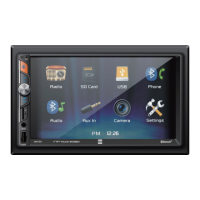
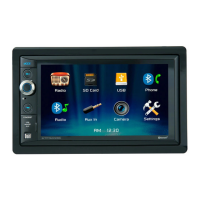
Multimedia Receiver with Bluetooth®
featuring a 6.2" Touch Screen Display
XVM286BT

Questions and Answers

Summary

Safety Information

Damage and Injury Prevention

Precautions to prevent damage or injury during installation and operation of the unit.

FCC Compliance Statement

Compliance details according to FCC Rules, Part 15, for radio frequency energy.

Installation Preparation

Pre-Installation Checklist

Pre-installation steps including consulting a technician and avoiding certain environmental conditions.

Installation Steps

Initial installation steps, including using kits/adapters and the DIN mounting method.

Wiring Diagram and Notes

Inputs;Outputs Diagram

Diagram showing the unit's input and output connections for speakers and other functions.

Wiring Specifics

Notes regarding subwoofer output and rear camera input functionality.

Control Layout

Main Unit Controls

Identifies the physical buttons and their functions on the XVM286BT main unit.

Remote Control Overview

Identifies the buttons and their functions on the included remote control for the unit.

Remote Control Setup

Battery Installation Guide

Steps for installing the battery in the remote control and notes on battery care.

Steering Wheel Clip Usage

Instructions on using the steering wheel clip to mount the remote for convenient access.

General Operation Procedures

Power and Volume Management

Instructions for turning the unit on/off and adjusting the volume level.

Input Mode Selection

Procedure for cycling through available input modes like Radio, USB, Bluetooth, etc.

Media Input Usage

How to connect and use auxiliary devices, USB drives, and SD cards for playback.

System Reset

Procedure to reset the unit to default settings using the reset button.

Setup Menu and Configuration

System Settings Options

Details on configuring various unit settings including time, sound, camera, radio regions, and system restoration.

Audio Adjustments

Options for adjusting audio settings such as equalizer, treble, bass, balance, and fader.

Bluetooth Connectivity Settings

Configuration options for Bluetooth connectivity, including auto-connect and auto-answer features.

Touch Screen Interface

Touch Screen Controls Overview

Description of touch screen controls at the bottom of the screen for quick access to features.

Display Brightness Adjustment

Function to adjust the display brightness of the unit.

Accessing Audio and Settings

How to access audio options and the main settings menu via the touch screen interface.

AM;FM Radio Operation

Radio Mode and Tuning

Instructions on selecting Radio mode and using controls for tuning frequencies and seeking stations.

Band and Tuning Modes

Explanation of how to change radio bands and toggle between Local/Distance and Stereo/Mono tuning modes.

Preset Station Management

Instructions for setting, recalling, and scanning preset radio stations.

USB;SD Card Media Playback

Inserting and Playing Media

Steps for inserting USB devices or SD cards and initiating automatic playback.

Playback Navigation and Controls

Controls for navigating music tracks, folder management, repeat, and random modes.

Direct File Search

Functionality to directly search and play a specific file number.

Media Compatibility Standards

Supported File Formats

Details on compatible file systems, extensions, and MPEG formats for USB/SD card playback.

Audio File Specifications

Information on supported sampling frequencies and bitrates for audio files.

Media Usage Guidelines

Notes on directory depth, file naming, ID3 tag support, and important usage considerations for media playback.

Media File Compatibility Details

Incompatible Media Formats

Lists file types and formats that are not compatible with the unit.

Playback Order and Folder Handling

Explanation of how MP3 playback sequence works, including skipping empty folders.

Recording Format Requirements

Details on compatible recording formats and standards, including folder depth and character limits.

MP3 Ripping Recommendations

Recommendations for MP3 ripping settings (bitrate, sampling frequency) for best results.

Bluetooth Device Pairing

Pairing New Devices

Instructions for pairing a new Bluetooth device with the XVM286BT, including device name and passcode.

Auto-Connecting Paired Devices

Information on how paired Bluetooth devices automatically connect and troubleshooting connection issues.

Accessing Bluetooth Phone Features

How to access the Bluetooth phone function and use the keypad for dialing.

Call Management Functions

Functions for managing calls, including initiating (Talk) and ending calls.

Bluetooth Music Playback

Accessing Bluetooth Music

How to access and play music via Bluetooth connection.

Music Track Navigation

Controls for navigating music tracks, including previous, next, and play/pause functions.

Switching Bluetooth Modes

Access to display dimmer, audio settings, general settings, and switching between Bluetooth phone and music modes.

External Input and Camera

Front 3.5 mm Auxiliary Input

Instructions for connecting external audio devices via the front 3.5mm auxiliary input.

Rear Camera Installation and Operation

Details on connecting an optional rear view camera and selecting camera mode.

Technical Specifications Summary

Tuner and Connectivity Specs

Technical specifications for FM/AM tuners, USB, and SD card compatibility.

Display and General Unit Specs

Specifications for the monitor (size, resolution, brightness) and general unit dimensions.

Amplifier Power Details

Power output and signal-to-noise ratio details, compliant with CEA-2006 standards.

Limited One Year Warranty Information

Warranty Coverage and Exclusions

Details on what the one-year warranty covers and what items are excluded.

Warranty Service Procedure

Procedures for obtaining warranty service, including packing, shipping, and providing necessary information.

Warranty Support Contact

Contact details, including toll-free number and email address, for warranty and service inquiries.

Troubleshooting Common Issues

Problem;Cause;Action Guide

Table outlining common problems, their causes, and recommended actions for troubleshooting the unit.

User Record Keeping

Section for users to record dealer information and purchase date for their records.

Overview

The XVM286BT is a multimedia receiver featuring a 6.2" touch screen display, designed for in-vehicle entertainment and communication. It integrates various audio and video playback options, along with Bluetooth connectivity for hands-free calling and music streaming. The device is intended for use in vehicles with a 12VDC negative ground system.

Function Description

The XVM286BT serves as a central hub for media consumption and communication within a vehicle. Its primary functions include:

  • Radio Tuner: Provides access to AM/FM radio bands, allowing users to listen to their favorite stations. It includes features for seeking frequencies, toggling between local and distance tuning, and storing preset stations.
  • USB/SD Card Playback: Supports playback of MP3 audio files, AVI video files, and JPG photos from USB devices and SD cards. Users can navigate through files and folders, repeat tracks, and enable random playback.
  • Bluetooth Connectivity: Enables wireless connection with Bluetooth-enabled devices for hands-free phone calls and audio streaming. It supports pairing new devices, auto-connecting previously paired devices, and accessing phone contacts and music playback controls directly from the unit.
  • Auxiliary Input: Features a 3.5mm front panel auxiliary input for connecting external audio/video devices, expanding the range of compatible media sources.
  • Rear Camera Input: Allows for the connection of an optional rear view camera, providing a visual aid for parking and reversing. The unit can automatically switch to camera mode when the vehicle is in reverse gear or be manually selected.
  • Settings and Customization: Offers a comprehensive settings menu to personalize various aspects of the unit, including time settings, audio effects (EQ, Treble/Bass, Balance/Fader), camera input activation, loudness control, radio area selection, and touch screen calibration.

Usage Features

The XVM286BT is designed for intuitive operation through its touch screen and physical controls.

  • Power On/Off: The unit can be turned on or off by momentarily pressing or pressing and holding the power button.
  • Volume Control: A dedicated volume knob allows for easy adjustment of the audio level. Pressing the knob mutes or unmutes the audio.
  • Mode Selection: The MODE button on the front panel, or the corresponding icon on the touch screen, cycles through available input modes such as Radio, SD Card, USB, Bluetooth Phone, Bluetooth Music, Auxiliary Input, Rear Camera, and Settings.
  • Main Menu Access: A "house" icon on the touch screen provides quick access to the main menu, where all primary functions are represented by icons.
  • Touch Screen Controls: The 6.2" TFT touch screen serves as the primary interface for most operations, including media navigation, call management, and settings adjustments. Bottom-of-screen controls offer direct access to dimmer, audio settings, and general settings.
  • Remote Control: A steering wheel-mounted remote control provides convenient access to essential functions such as volume adjustment, mute, voice control, and track/tune selection, enhancing safety and ease of use while driving.
  • Radio Operation: Users can seek lower or higher frequencies, switch between AM and FM bands, toggle local/distance tuning, and store/recall preset stations. An AS/PS function allows for scanning and automatically storing the strongest stations.
  • Media Playback (USB/SD): During USB or SD card playback, users can navigate through files, folders, pause/resume playback, and select repeat or random playback modes. A direct search function allows for entering a specific file number.
  • Bluetooth Phone Operation: The Bluetooth phone interface includes a keypad for dialing, access to available devices, and dedicated buttons for connecting and ending calls.
  • Bluetooth Music Operation: When in Bluetooth music mode, users can play, pause, and skip tracks from their connected device.
  • Dimmer Function: The display brightness can be adjusted using the dimmer control, which is accessible via the touch screen.

Maintenance Features

Proper maintenance ensures the longevity and optimal performance of the XVM286BT.

  • Cleaning: The monitor should be cleaned with a dry silicone cloth or soft cloth. Harsh solvents, paint thinner, or alcohol should be avoided as they can damage the screen surface or printing.
  • Fuse Replacement: When replacing a fuse, it is crucial to use a new fuse with the prescribed rating (10 amp ATC mini style fuse). Disconnecting the wiring harness first is recommended to prevent short circuits.
  • Reset Function: In case of abnormal operation or if the unit becomes inoperable, a RESET button (accessible with the tip of a pen) can be pressed to reset the main processor to default settings.
  • Battery Management (Remote Control): The remote control uses a 3-volt Lithium CR2025 battery. The battery insulation tape should be removed before first use. If the remote will not be used for an extended period (a month or longer), the battery should be removed. Proper disposal of batteries is advised, and they should not be stored with metallic objects.
  • Installation Guidelines: To prevent damage, the unit should be securely grounded to the vehicle chassis. It should not be installed in locations exposed to direct sunlight, excessive heat, dust, dirt, or excessive vibration. Professional installation is recommended due to the technical nature of the product.
  • Wiring Precautions: When extending ignition, battery, or ground cables, automotive-grade cables with an area of 0.75mm (AWG 18) or more should be used to prevent voltage drops.
  • Troubleshooting: The manual includes a troubleshooting guide to help diagnose common issues such as power problems, no sound, blowing fuses, or display malfunctions. This guide provides actions to take before seeking professional service.
  • Warranty and Support: The product comes with a limited one-year warranty. In case of issues, users are advised to consult the troubleshooting guide, and if problems persist, contact Dual customer service for assistance. Keeping the original sales receipt is important for warranty claims.

Dual Electronics Corporation XVM286BT Specifications

General IconGeneral
BluetoothYes
USB PortYes
Built-in AmplifierYes
SD Card SlotYes
Auxiliary InputYes
AM/FM TunerYes
Remote ControlYes
Display Size6.2 inches
Compatible FormatsMP3, WMA
Display TypeTouchscreen

Related product manuals