EasyManua.ls Logo

Dual Electronics Corporation XDVD176BT - User Manual

Dual Electronics Corporation XDVD176BT
30 pages
Print Icon
To Next Page IconTo Next Page
Loading...
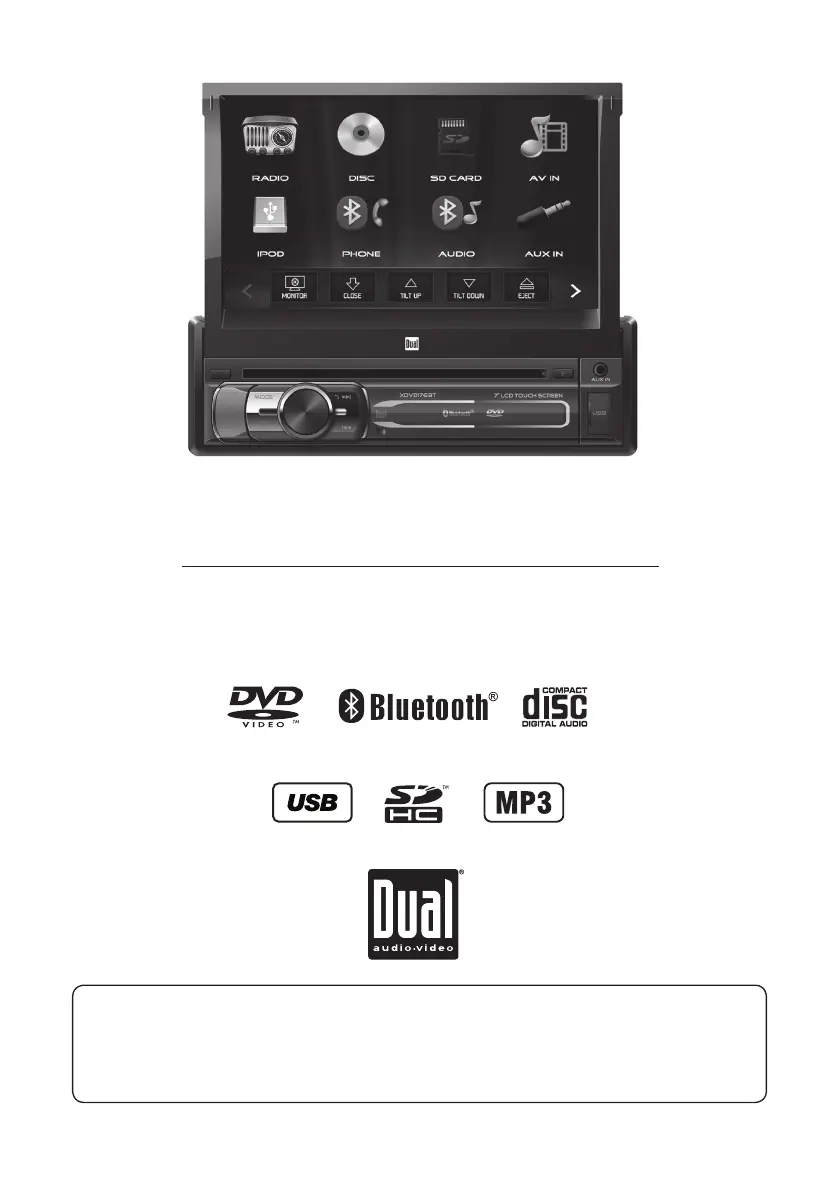
INSTALLATION/OWNER’S MANUAL
DVD Multimedia Receiver with Bluetooth
featuring a 7" Touch Screen Display
XDVD176BT
The DVD video display of the in-dash unit will not operate while the vehicle is moving. This is a safety feature
to prevent driver distraction. In-dash DVD video functions will only operate when vehicle is in Park and the
parking brake is engaged. It is illegal in most states for the driver to view video while the vehicle is in motion.
Safety Notes:
®

Questions and Answers

  • C
    changcarlAug 15, 2025
    What to do if Dual Electronics Corporation XDVD176BT keeps blowing fuses?
    • M
      melissa65Aug 15, 2025
      If your Dual Electronics Corporation Receiver unit blows a fuse, it could be due to several reasons. The yellow or red wire might be touching the chassis ground, so check for any pinched wires. Similarly, speaker wires touching the chassis ground can also cause this issue, so inspect those for pinches as well. Finally, ensure you are using fuses with the correct rating, as an incorrect rating can also lead to blown fuses.
  • P
    Pamela RichardsonAug 18, 2025
    Why Dual Electronics Corporation Receiver has power but no sound?
    • M
      Megan RobinsonAug 18, 2025
      If your Dual Electronics Corporation Receiver unit has power but no sound, the speaker wires may not be properly connected. Check the connections at the speakers to ensure they are secure. Also, one or more speaker wires might be touching each other or the chassis ground. Make sure to insulate all bare speaker wires from each other and the chassis ground to prevent this.
  • C
    Christopher TorresAug 21, 2025
    How to fix Dual Electronics Corporation XDVD176BT Receiver when it will not turn on?
    • H
      Heather LambAug 22, 2025
      If your Dual Electronics Corporation Receiver unit will not turn on, it could be due to a few reasons. First, the yellow wire may not be connected, or the voltage may be incorrect; the same applies to the red wire. Check these connections to ensure they have the proper voltage (11~16VDC). Second, the black wire may not be connected, so verify its connection to the ground. Lastly, the fuse might be blown, so try replacing the fuse(s).
  • B
    Brittany ColemanAug 26, 2025
    What to do if Dual Electronics Corporation XDVD176BT has audio but no video?
    • A
      Anthony TaylorAug 26, 2025
      If your Dual Electronics Corporation Receiver has audio but no video, the parking brake safety circuit may not be connected, or the parking brake may not be applied. Check the connections at the parking brake and apply the parking brake as described on page 26.
  • P
    Peter WallAug 28, 2025
    Why Dual Electronics Corporation XDVD176BT has no video display when in reverse?
    • D
      Daniel JordanAug 28, 2025
      If there is no video display when the vehicle is in reverse using your Dual Electronics Corporation Receiver, the reverse circuit may not be connected, or the vehicle is not actually in reverse. Check the connections at the reverse lamp and ensure that the vehicle is indeed in reverse gear.
  • N
    Nicholas WalkerSep 1, 2025
    What to do if Dual Electronics Corporation XDVD176BT Receiver DVD does not start playback?
    • S
      Stephanie GardnerSep 1, 2025
      If your Dual Electronics Corporation Receiver's DVD player does not start playback, the media may have a physical defect, or it might be the wrong region. Check the disc for scratches and only use discs labeled "Region 1" or "All".
  • M
    Melissa LamSep 4, 2025
    How to fix Dual Electronics Corporation XDVD176BT Receiver remote when it does not work?
    • J
      John KentSep 4, 2025
      If the remote for your Dual Electronics Corporation Receiver isn't working, the battery may be dead. Replace the battery to resolve this issue.
  • E
    ethomasSep 7, 2025
    Why Dual Electronics Corporation Receiver has excessive skipping?
    • K
      Kyle GarciaSep 7, 2025
      If your Dual Electronics Corporation Receiver is experiencing excessive skipping, it could be due to incorrect mounting or a physical defect in the media. Check the mounting sleeve to ensure it is properly installed. Also, inspect the disc for any scratches.
  • J
    jennifer88Sep 12, 2025
    What does 'Disc Region Incorrect' mean on Dual Electronics Corporation XDVD176BT?
    • M
      Maurice StoneSep 12, 2025
      If 'Disc Region Incorrect' appears on the display of your Dual Electronics Corporation Receiver, it indicates a region code error. Use discs labeled "Region 1" or "All" only.

Summary

Critical Safety Warnings

Driver Distraction Prevention

Details risks of watching videos while driving and proper unit positioning.

Parking Brake Lock-Out

Ensures unit operates only when vehicle is in Park with parking brake engaged.

Volume Level Caution

Advise to keep volume low to hear emergency vehicle sounds.

General Safety and Operational Guidelines

Installation and Usage Precautions

Covers grounding, environmental exposure, shock, fuse replacement, and cleaning.

FCC Compliance Information

Details device compliance with FCC rules and potential interference.

Unit Preparation and Mounting

Before You Start Installation

Disconnecting battery, avoiding adverse conditions, and consulting technicians.

Getting Started with Mounting

Instructions for installing the mounting sleeve and securing the unit.

Wiring Diagram and Connections

Main Unit Input;Output Connections

Diagram showing connections for speakers, power, and various inputs/outputs.

Wiring Notes and Fuse Information

Details on subwoofer output, rear camera input, and specific fuse requirements.

Control Locations Overview

Main Unit Controls

Identifies buttons and ports on the front of the multimedia receiver.

Remote Control Functions

Details the buttons and functions of the included remote control.

Remote Control Setup

Battery Installation

Instructions for inserting or replacing the remote control battery.

Steering Wheel Clip Mounting

Guide for attaching the remote to a steering wheel for accessibility.

General Operation Procedures

Basic Unit Functions

Covers power, volume, mute, and mode selection.

LCD Screen and Menu Navigation

Details LCD screen operation and Main Menu access.

Setup Menu Configuration

Explains how to configure General, Audio, Video, and Bluetooth settings.

Touch Screen Control Navigation

Details touch screen controls for standby, eject, audio, and configuration access.

AM;FM Tuner Operation

Radio Screen Layout and Controls

Identifies key elements on the AM/FM radio interface.

Tuning and Band Selection

How to tune frequencies, switch bands, and use Local/Distance settings.

Preset Station Management

Managing and recalling preset radio stations.

CD;USB;SD Card Operation

Media Playback Controls

Operation of play, pause, next/previous track, and folder access.

File Navigation and Repeat Options

Selecting repeat modes and navigating files on media.

Media Compatibility - CD;DVD

CD;DVD File System Compatibility

Details compatibility with ISO9660, JOLIET, and ROMEO file systems.

CD;DVD Format and Bitrate Specs

Specifies supported MPEG formats, sampling frequencies, and bitrates.

Media Compatibility - USB;SD Card

USB;SD Card File System Compatibility

Details compatibility with FAT file systems for USB and SD cards.

USB;SD Card Format and Bitrate Specs

Specifies supported MPEG formats, sampling frequencies, and bitrates.

General Media Compatibility

Supported Disc and File Types

Lists compatible and incompatible disc and file formats.

Recording Format Guidelines

Provides recommendations for ripping MP3 files for best results.

DVD Operation

Inserting and Ejecting Discs

Instructions for inserting and removing DVD discs.

DVD Playback Controls

Details on playback, repeat, chapter navigation, and audio settings.

DVD Screen Setup and Adjustments

Covers screen color, zoom, subtitle, audio, and monitor on/off functions.

Bluetooth Operation - Phone

Pairing and Connecting Devices

Guide to pairing new and connecting existing Bluetooth devices.

Phone Dialing and Call Management

How to dial numbers, talk, and end calls using Bluetooth phone.

Bluetooth Music Playback

Accessing and controlling music playback via Bluetooth.

iPod Operation

iPod Connection and Playback

Connecting an iPod device and initiating playback.

iPod File Navigation and Controls

Navigating iPod files and controlling playback functions.

Front Aux Input and RCA AV Input

Auxiliary Audio Input

Connect external audio sources via 3.5mm front panel input.

Rear RCA AV Input

Connect audio/video sources using rear RCA connectors.

Rear Camera Operation

Camera Connection and Mode Selection

Connect and select rear camera input, including auto-switching.

SWC Input Operation

Steering Wheel Control Compatibility

Compatibility with steering wheel control modules like PAC SWI-RC.

PAC SWI-RC Installation Hints

Configuration settings and programming order for SWI-RC adapter.

Dual iPlug App Operation

Smart App Overview

Introduction to the Dual iPlug app as a wireless remote control.

App Download and Installation

Instructions on where to download and install the app on smart devices.

Technical Specifications

Disc and Tuner Specifications

Detailed specifications for disc playback and FM/AM tuner performance.

Monitor and General Specifications

Details on monitor display, chassis, power output, and signal-to-noise ratio.

Limited One Year Warranty

Warranty Coverage and Exclusions

Defines what is covered, what is excluded, and who the warranty applies to.

Service and Support Information

Instructions for obtaining warranty service and contact information.

Troubleshooting Guide

General Problem Resolution

Addresses common issues like no power, no sound, and blown fuses.

Media Playback Troubleshooting

Troubleshoots issues with video display, DVD playback, and disc region errors.

Dual Electronics Corporation XDVD176BT Specifications

General IconGeneral
BrandDual Electronics Corporation
ModelXDVD176BT
CategoryReceiver
Screen Size6.2 Inches
Resolution800 x 480 pixels
BluetoothYes
USB PortYes
SD Card SlotYes
DVD PlayerYes
AM/FM RadioYes
Rear View Camera InputYes
Video PlaybackYes
AUX InputYes
Built-in MicrophoneYes
Remote ControlYes
Steering Wheel Control CompatibleYes
Audio Output Power200 Watts
Compatible FormatsMP3, WMA, JPEG, AVI

Related product manuals