00
00 : 00
Km/h
3
TIME
98
%
PAS
E
Y
E
00
00 : 00
Km/h
VOL
3
TRIP O D O D ST TIME C HA
98
%
PAS
E
Y
E
PA
0
Km/h
SET
98
%
E
Y
E
PA
3
Km/h
SET
98
%
PA
Km/h
SET
E
Y
E
P3
0
Km/h
3
SET
98
%
PAS
88
0088888
Km/h
VOL
TRIP
Mp/h
①
P
O
W
E
R
M
O
D
E
P
O
W
E
R
E
Y
E
M
O
D
E
00
00 : 00
Km/h
3
TIME
98
%
PAS
00
00 : 00
Km/h
VOL
3
TRIP ODO D ST TIME CHA
98
%
PAS
E
Y
E
E
Y
E
E
Y
E
E
Y
E
P3
0
Km/h
3
SET
98
%
PAS
E
Y
E
88
98
%
00 : 0088888
Km/h
VOL
TRIP O D O D ST TIME C HA
SET RPM O FF
PAS
Mp/h
8
[ M ]
⑥
⑦
⑨
①
②③④ ⑤
⑧
P
O
W
E
R
M
O
D
E
P
O
W
E
R
E
Y
E
M
O
D
E
00
00 : 00
Km/h
3
TIME
98
%
PAS
E
Y
E
00
00 : 00
Km/h
VOL
3
TRIP O D O D ST T IME C HA
98
%
PAS
E
Y
E
PA
0
Km/h
SET
98
%
PA
Km/h
SET
P3
0
Km/h
3
SET
98
%
PAS
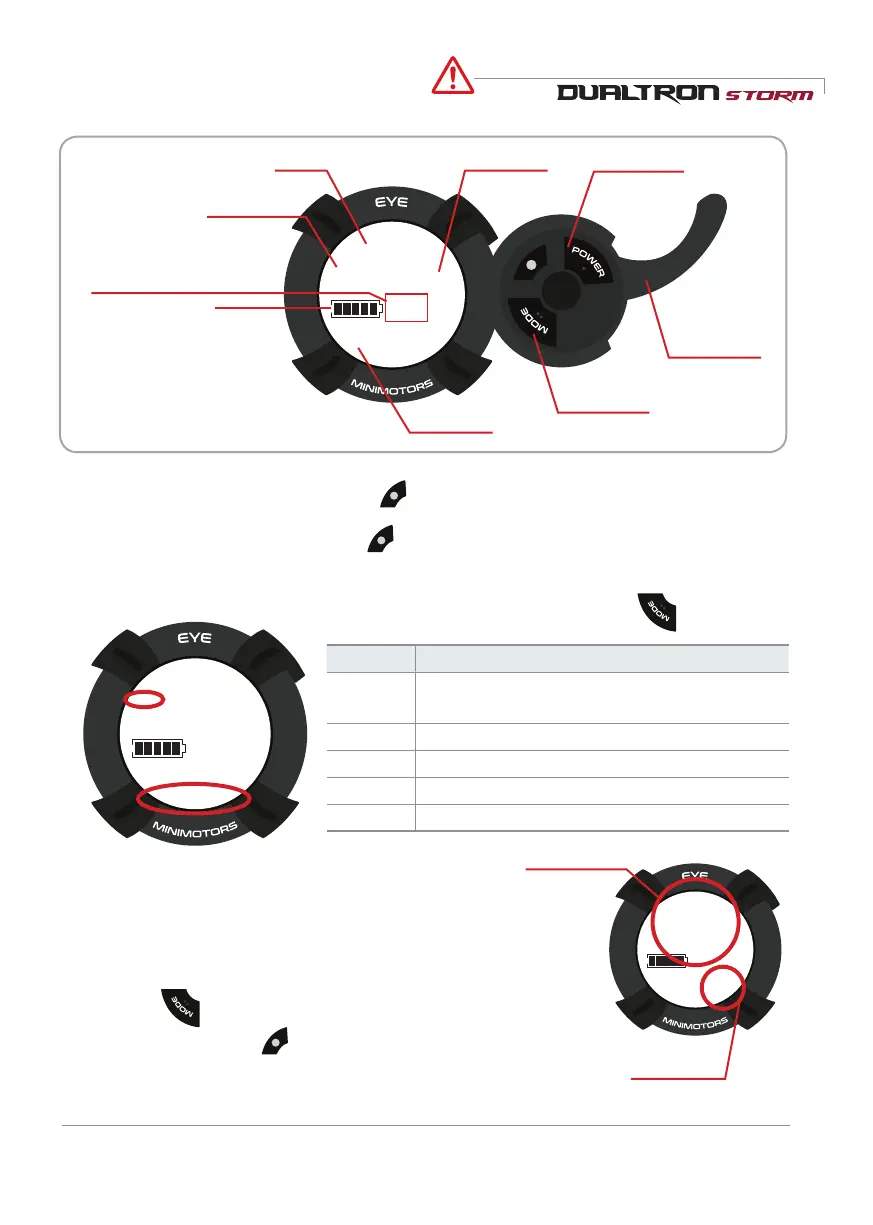
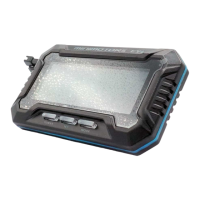
How to use the instrument panel
Caution
Speed Speed step power button
Accelerator
index finger
throttle
Battery balance
Driving time
mode button
While the instrument panel is on, press to set the speed step. The setting is completed when the
selected speed step value is selected.
1) Speed step setting
Can adjust with button.
P
O
W
E
R
E
Y
E
M
O
D
E
00
00 : 00
Km/h
3
TIME
98
%
PAS
E
Y
E
00
00 : 00
Km/h
VOL
3
TRIP O D O D ST TIME C HA
98
%
PAS
E
Y
E
PA
0
Km/h
SET
98
%
E
Y
E
PA
3
Km/h
SET
98
%
E
Y
E
PA
5
Km/h
SET
98
%
E
Y
E
P3
0
Km/h
3
SET
98
%
PAS
E
Y
E
88
98
%
00 : 0088888
Km/h
VOL
TRIP O D O D S T T IME C HA
SET RPM O FF
PAS
Mp/h
8
[ M ]
⑥
⑦
⑨
①
②③④ ⑤
⑧
P
O
W
E
R
M
O
D
E
P
O
W
E
R
E
Y
E
M
O
D
E
00
00 : 00
Km/h
3
TIME
98
%
PAS
E
Y
E
00
00 : 00
Km/h
VOL
3
TRIP O D O D ST TIME C HA
98
%
PAS
E
Y
E
PA
0
Km/h
SET
98
%
E
Y
E
PA
3
Km/h
SET
98
%
E
Y
E
PA
5
Km/h
SET
98
%
E
Y
E
P3
0
Km/h
3
SET
98
%
PAS
E
Y
E
88
98
%
00 : 0088888
Km/h
VOL
TRIP O D O D S T T IME C HA
SET RPM O FF
PAS
Mp/h
8
[ M ]
⑥
⑦
⑨
①
②③④ ⑤
⑧
P
O
W
E
R
M
O
D
E
2)Functions and settings for each main screen
P
O
W
E
R
E
Y
E
M
O
D
E
00
00 : 00
Km/h
3
TIME
98
%
PAS
E
Y
E
00
00 : 00
Km/h
VOL
3
TRIP O D O D S T T IME C HA
98
%
PAS
E
Y
E
PA
0
Km/h
SET
98
%
E
Y
E
PA
3
Km/h
SET
98
%
E
Y
E
PA
5
Km/h
SET
98
%
E
Y
E
P3
0
Km/h
3
SET
98
%
PAS
E
Y
E
88
98
%
00 : 0088888
Km/h
VOL
TRIP O D O D S T T IME C HA
SET RPM O FF
PAS
Mp/h
8
[ M ]
⑥
⑦
⑨
①
②③④ ⑤
⑧
P
O
W
E
R
mode Can adjust with button.
Mode Discription
TRIP
Current mileage(Press and hold
●
button to
reset to '0')
ODO
Accumulated mileage
CHA
Not use
VOL Current voltage
TIME
Drived time
You can change the setting mode by turning on the power of the dashboard and
pressing for 2~3 seconds.
In the setting mode, press once to change the internal setting value
P
O
W
E
R
E
Y
E
M
O
D
E
00
00 : 00
3
TIME
98
%
PAS
E
Y
E
00
00 : 00
3
TRIP O D O D S T T IME C HA
98
%
PAS
P
O
W
E
R
M
O
D
E
P
O
W
E
R
M
O
D
E
3
3
3
E
Y
E
88
Km/h
VOL PAS
8
[ M ]
⑥
①
②③④ ⑤
P
O
W
E
R
3) Instrument panel detailed function
* If you change the default setting values P0 (11), P1 (72), P2 (15), P3 (0),
correct information will not be displayed.
Setting mode
Setting value
Speed unit
* Blinks 3 times per 10 seconds
when the remaining battery
power is 10%.
It blinks continuously when the
remaining battery power is 0%.
Dualtron Storm User Manual
13


 To Next Page