12
Dualtron Thunder User Manual Dualtron Thunder User Manual
13
P
O
W
E
R
E
Y
E
M
O
D
E
00
00 : 00
Km/h
3
TIME
98
%
PAS
⑥
⑦
⑨
①
②③④ ⑤
⑧
E
Y
E
00
00 : 00
Km/h
VOL
3
TRIP ODO DST TIME CHA
98
%
PAS
⑥
⑦
⑨
①
②③④ ⑤
⑧
E
Y
E
P3
0
Km/h
3
SET
98
%
PAS
Km/h
MINIMOTORS
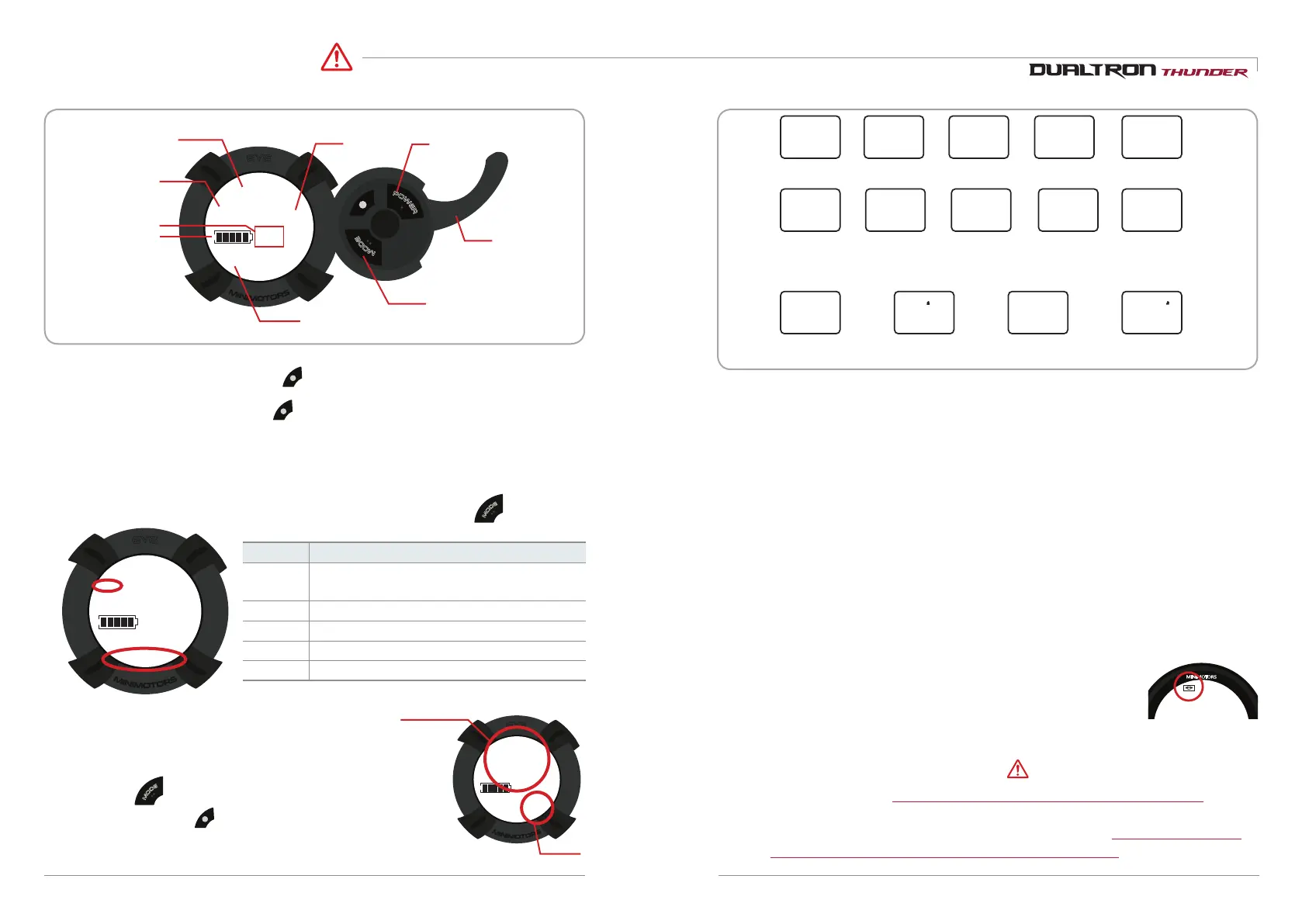
How to use the instrument panel
Caution
Speed
Speed step power button
Accelerator
index finger
throttle
Speed unit
Battery balance
Driving time
mode button
While the instrument panel is on, press to set the speed step. The setting is completed when the
selected speed step value is selected.
1) Speed step setting
Can adjust with button.
2) Functions and settings for each main screen
M
O
D
E
mode Can adjust with button.
* Blinks 3 times per 10 seconds when the remaining battery power is 10%.
It blinks continuously when the remaining battery power is 0%.
You can change the setting mode by turning on the power of the dashboard
and pressing for 2~3 seconds.
In the setting mode, press once to change the internal setting value
M
O
D
E
3) Instrument panel detailed function
Mode
Discription
TRIP
Current mileage(Press and hold mode
button to reset to '0')
ODO
Accumulated mileage
CHA
Not use
VOL
Current voltage
TIME
Drived time
* If you change the default setting values P0 (10), P1 (60), P2 (15), P3 (0),
correct information will not be displayed.
Setting mode
Setting value
(1) The start of the cruise function
Select the Cruise function section of the dashboard as 'Settings' and
set the throttle to the same Acceleration.The cruise functionwill start.
(2) End of cruise function
When you hold and release the brake while cruise mode is in effect, the cruise mode is automatically released
Precautions when using the cruise function
* In case of cruise function, please ride in a position where brake can be used immediately so that
cruise function is canceled and braking is possible in preparation for safety situation while driving.
* When switching from dual drive mode to single mode in cruise mode, it is not possible to cancel
cruise mode by using throttle and it is only possible to release by braking.
4) Features of cruise mode (automatic driving)
1. Displayng speed unit selection - P4: 0 (Km/h), 1 (mp/h)
2.Start method selection - P5: 0( Acceleration start), 1 (Kick start)
3.Cruise mode selection - P6: 0(Off), 1(On)
4. Slow start - P7: 0 (Slow start off: Power start) ~ 5 (Slow start)
5. Battery save mode - P9: 1 (MAX SAVE), 2 (MID SAVE), 3 (NO SAVE)
6. Electronic brake setting mode - PA: 0 (Electronic brake off) ~ 5 (Strongest)
7. LCD brigntness adjustment - Pb: 0 (Backlight off) ~ 5 (Highest illumination)
8. Auto off time setting - PC: 1 ~ 30 minutes
9. ABS setting - Pd: 0 (OFF), 1 (ON)
The cruise control function allows you to maintain the driving speed automatically. Take
advantage of cruise features
The advantage of being able to reduce fatigue when traveling long distances and to increase
mileage of driving due to constant speed driving.
P0 P 1 P2 P3
P4
P9P5 P6 P8
P7
PA PCPb
11(Fixed)
Start method
0(Acceleration start),
1(Kick start)
Slow start
0(Off:Power
start~5(Slow start)
Max output
5~100%
(User adjust)
Electronic brake power
0(Off)~5(Powerful)
LCD brightness control
0(Back light off)~5(Brightest)
Auto off time setting
1~30 minutes
Cruise mode
0(OFF)
1(ON)
60(Fixed) 15(Fixed)
Caution
Battery save
1(MAX SAVE)
2(MID SAVE)
3(NO SAVE)
ABS setting
0(OFF), 1(ON)
0(Fixed)
Speed unit
0(Km/h), 1(mp/h)


 To Next Page