Dualtron X User Manual
15
Product functions guide
P
O
W
E
R
E
Y
E
M
O
D
E
00
00 : 00
Km/h
3
TIME
98
%
PAS
E
Y
E
00
00 : 00
Km/h
VOL
3
TRIP ODO DST TIME CHA
98
%
PAS
E
Y
E
PA
0
Km/h
SET
98
%
E
Y
E
PA
3
Km/h
SET
98
%
E
Y
E
PA
5
Km/h
SET
98
%
E
Y
E
P3
0
Km/h
3
SET
98
%
PAS
E
Y
E
88
98
%
00 : 0088888
Km/h
VOL
TRIP ODO DST TIME CHA
SET RPM OFF
PAS
Mp/h
8
[ M ]
⑥
⑦
⑨
①
②③④ ⑤
⑧
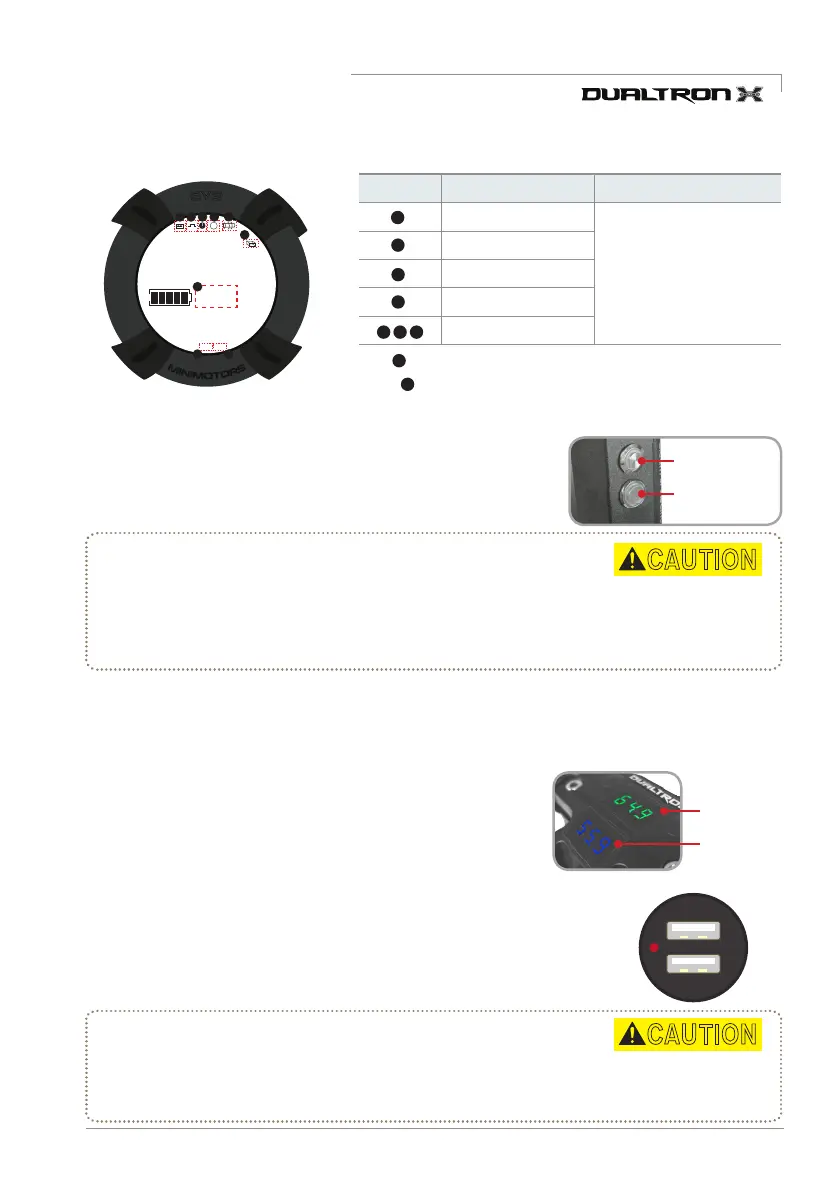
1) LED function guide
3) How to use USB Charging Terminal
2) Voltmeter function guide
When the LED is turned on, the main power is turned on and the
LED bar is lit when the throttle power is turned on. Make sure that
the LED lamp button on the right side of the deck is turned on.
The USB charger operates as a sub-battery power source and can easily
charge mobile phones, action cams, etc. within the allowed output range.
Battery Voltmeter is basic mounted and can check real-time battery voltage.
█
Main battery voltmeter
Battery volts are displayed when power on main battery
█
Sub battery voltmeter
Sub battery voltmeter displayed when press power button located
on handle steering tube right side.
* LED Light Emitting System Cover Precautions
Cracks in the LED cover can be caused by direct sunlight or by polish, oil,
wax etc. used for product maintenance. When using and servicing the product, always be careful not to
contact the LED cover with direct sunlight, polish or alcohol.
*Solvent crack is a fine crack that occurs when a solvent touches the surface of a resin molding product. Solvents
include not only chemicals such as alcohol, but also oils, waxes and cosmetics that are commonly used in everyday life.
* Precautions when using USB charging terminals
USB charging terminals and products may be damaged when connecting high-power devices
that are not allowed to USB charging terminals.
*
To prevent infiltration of moisture and outside substances, always close the USB protective cap after use.
②
④
⑤
⑥
⑦ ⑨
⑧
8) Self-diagnosis through dashboard
Fault type Diagnosis Solution
System error
* If the error information
appears, immediately stop
using the product and take the
scooter to the service center
before use. Excessive use
can result in damage to the
product and safety accidents.
Motor error
Accelerator error
Controller error
None
*
The number is displayed when the cruise function is executed at a constant speed.
* The number is displayed when the brake lever is operated.
(When the indicator lights, the accelerator does not operate.)
①
5V 1A
5V 2.1A
LED light button
Sub battery
power button
CAUTION
CAUTION
Main battery
voltmeter
Sub battery
voltmeter



 To Next Page