74
GARMIN eBike
REMOTE CONTROL
ASSISTANCE
MANAGEMENT
The Garmin eBike remote control
is supplied with the bike. It enables
you to adjust the assistance levels
oered by the FSA motor.
This chapter explains how to use the
device and the procedure to pair the
Garmin e-Bike with the FSA motor
system.
Overview of the device
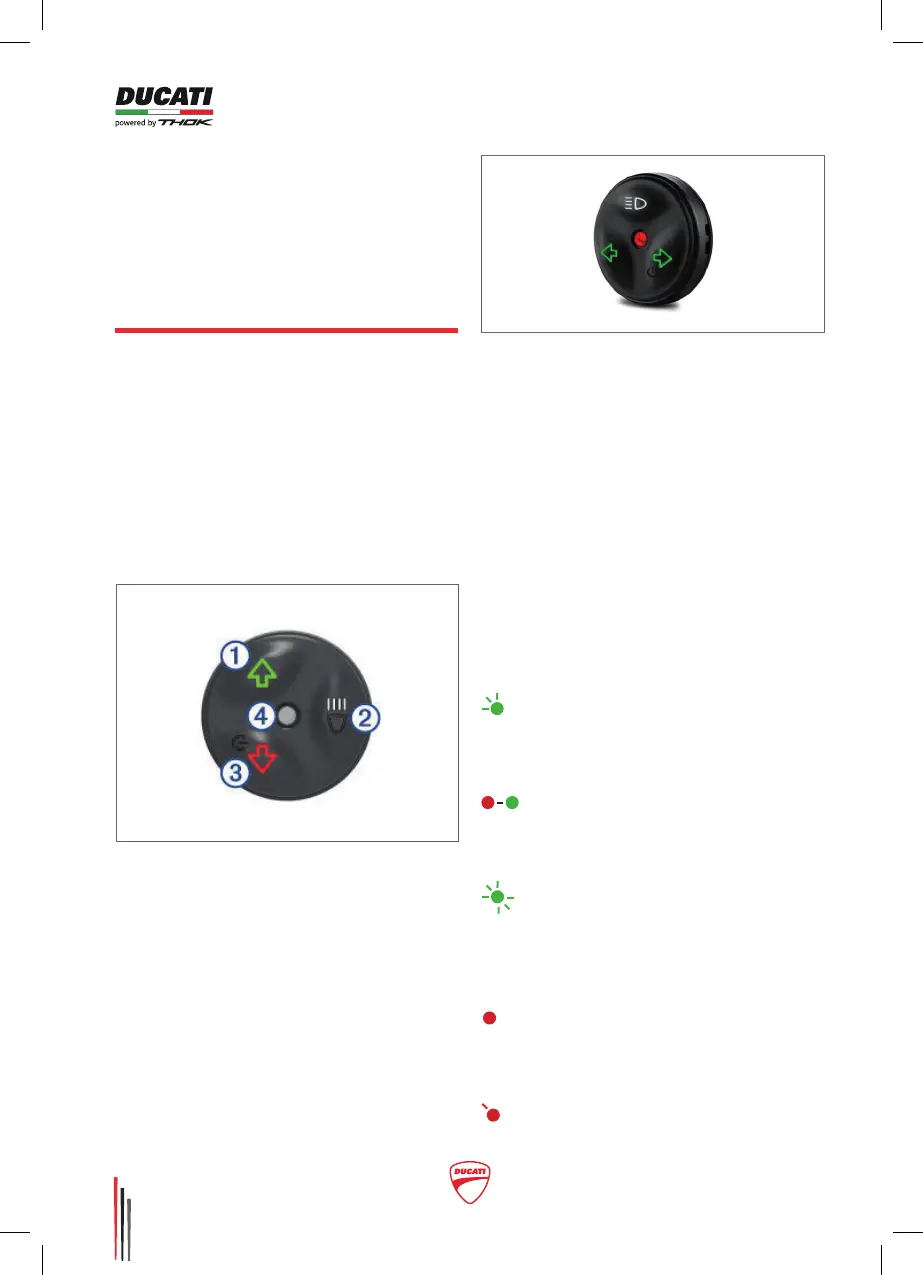
The Garmin eBike remote includes 3
control buttons and a warning LED:
1• Select to increase the assistance
level of the motor.
2•Select to scroll through the data
pages in case of connection with a
Garmin Edge device.
PLEASE NOTE: the customised
e-Bike function is set by the e- Bike
manufacturer.
3• Select to reduce the assistance
level. Press and hold to deactivate
the assistance function
4•State LED
Key of state LED
Flashing green:
The remote control is looking for a
paired e-Bike
Alternating red and green:
The remote control is trying to pair
with an e-Bike
succession:
The remote control has been
correctly paired with an e-Bike
Fixed red: The pairing failed
or the connection has been
interrupted.
:
The battery of the remote control



 To Next Page