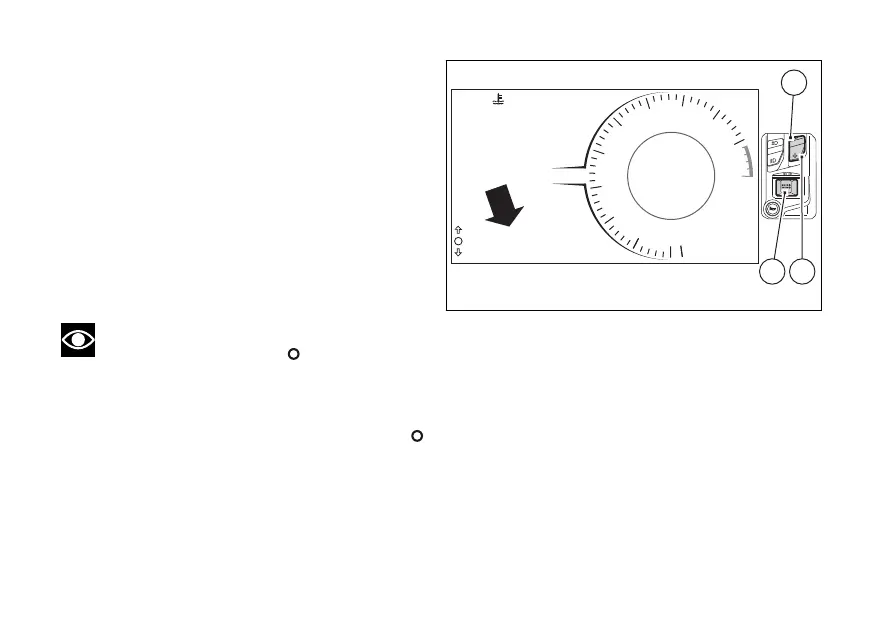
menu (SETTING MENU)
This menu allows enabling, disabling and
some motorcycle functions.
For safety reasons, you can enter this Menu only
when the actual vehicle speed is lower than or equal
to 5 km/h (3 mph).
If you are inside the menu and the actual
vehicle speed exceeds 5 km/h (3 mph) the
instrument panel automatically exits from the
menu and displays the main screen.
To gain access to the menu, use (1) or
(2) to select “SETTING MENU” and press (4).
Note
The empty circle symbol
is only displayed
when the actual vehicle speed is lower than or equal
to 5 km/h (3 mph): if the actual vehicle speed is lower
than or equal to 5 km/h (3 mph) and suddenly it goes
above 5 km/h (3 mph), the empty circle symbol
turns and will come on again when vehicle speed
is again lower than or equal to 5 km/h (3 mph).
1
N
0
2
3
4
5
6
7
8
9
10
11
10:34
AM
DTC 5
ABS 1
DWCRPM X 1000
km/h
40°C
TOURING
Gear
1
SETTING MENU
1
24
Fig 101
150





 To Next Page