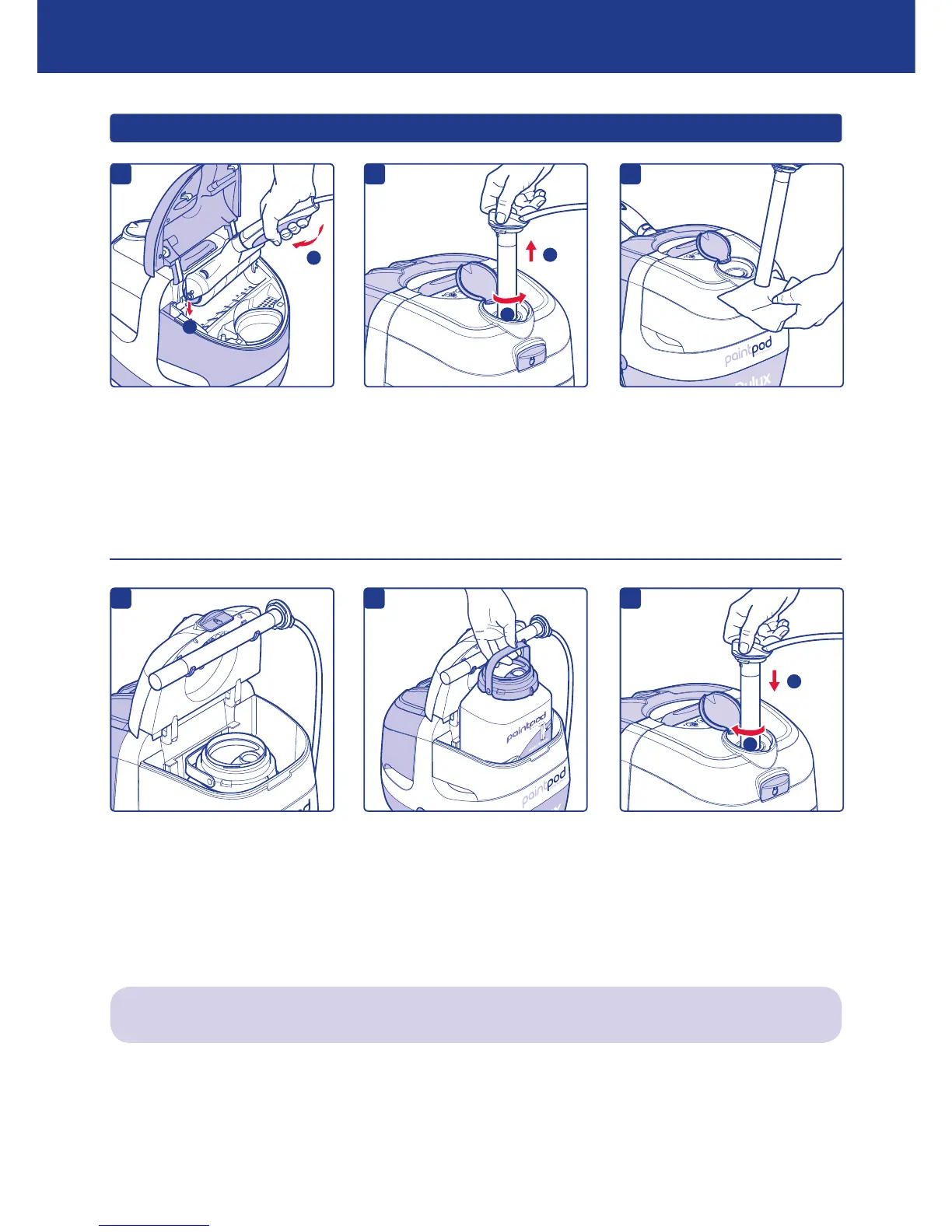
INSERTING A NEW PAINT PACK
d
Press ‘pause’ button on control
panel.
Place roller head correctly in the
docking station, close lid and
‘click’ shut.
9
Lift dip tube cover and twist dip
tube cap anti-clockwise to unlock.
Carefully remove dip tube from
PaintPod.
Any excess paint on dip tube will
be removed by dip tube wipe.
Whilst holding dip tube in one
hand, open lid of white chamber
and place dip tube onto dip tube
rests.
e
Remove empty paint pack and
replace with a new one. Follow
instructions in ‘SETTING UP’
(page 5).
IMPORTANT: Ensure paint pack
is facing the right direction.
Remove dip tube from resting
position, close lid and insert dip
tube back into PaintPod, locking
it into position. Follow instructions
in ‘SETTING UP’.
Press ‘paint’ button to resume
painting.
If a different paint colour is to be used, the PaintPod should be drained and cleaned. Follow instructions on
pages 10, 11 and 12.
USING YOUR PAINTPOD
c
Paint on the end of dip tube will
need to be removed with a rag.
a
1
2
b
1
2
f
1
2


 To Next Page