Dune 4WD Fridge/Freezer Dune 4WD Fridge/Freezer
8 9
3. Operating Instructions3. Operating Instructions
Set the compressor mode (ECO/MAX)
Adjust the compressor mode to either save power (ECO) or maximise cooling
speed (MAX):
• Press the
button to enter the settings mode.
• Press the
button until the compressor mode icon (ECO or MAX) is
• Press the or button to select the compressor mode.
Set the battery protection level (HIGH, MED, LOW)
Use the 3-stage battery protection to ensure your Dune 4WD Fridge/Freezer
does not deplete your power source. When the voltage input drops below the
‘cut-off’ value, the fridge unit will turn off. When the voltage input reaches the
‘restart’ value after the power source is charged, the fridge unit will turn back
on. It is recommended to set the battery protection level to ‘high’ when the
fridge is powered by a vehicle battery.
• Press the
button to enter the settings mode.
• Press the
button until the battery protection icon (HIGH, MED or LOW)
• Press the or button to select the battery protection level.
Turn o/on a compartment (Dual-zone only)
• Hold the button for 3 seconds to turn off the large compartment.
• Hold the
button for 3 seconds to turn off the small compartment.
• NOTE: To turn on the compartment again, hold down the relevant arrow key
until the compartment temperature display reappears on the control panel.
Un-pair Bluetooth device
• Hold the and buttons simultaneously for 3 seconds to manually
un-pair the fridge unit from a Bluetooth device.
• The Bluetooth icon will disappear when the fridge unit has successfully un-
paired from the Bluetooth device.
Note:
Your Dune 4WD Fridge/Freezer is always discoverable as a Bluetooth device.
Once the Dune 4WD Fridge/Freezer unit has paired with a smartphone, the
Bluetooth symbol will automatically appear on the control panel display. Once
you have un-paired your Dune 4WD Fridge/Freezer unit, the Bluetooth icon will
disappear.
Once the fridge unit is paired to a smartphone, it is locked to that smartphone
until you either disconnect from the Fridge unit on your Dune 4WD app, or man-
ually un-pair on the control panel with the above step (see ‘Un-pair Bluetooth
device’)
Change the temperature display unit (°C or °F)
• Hold the and buttons simultaneously for 3 seconds to switch the
temperature display unit between Celsius and Fahrenheit.
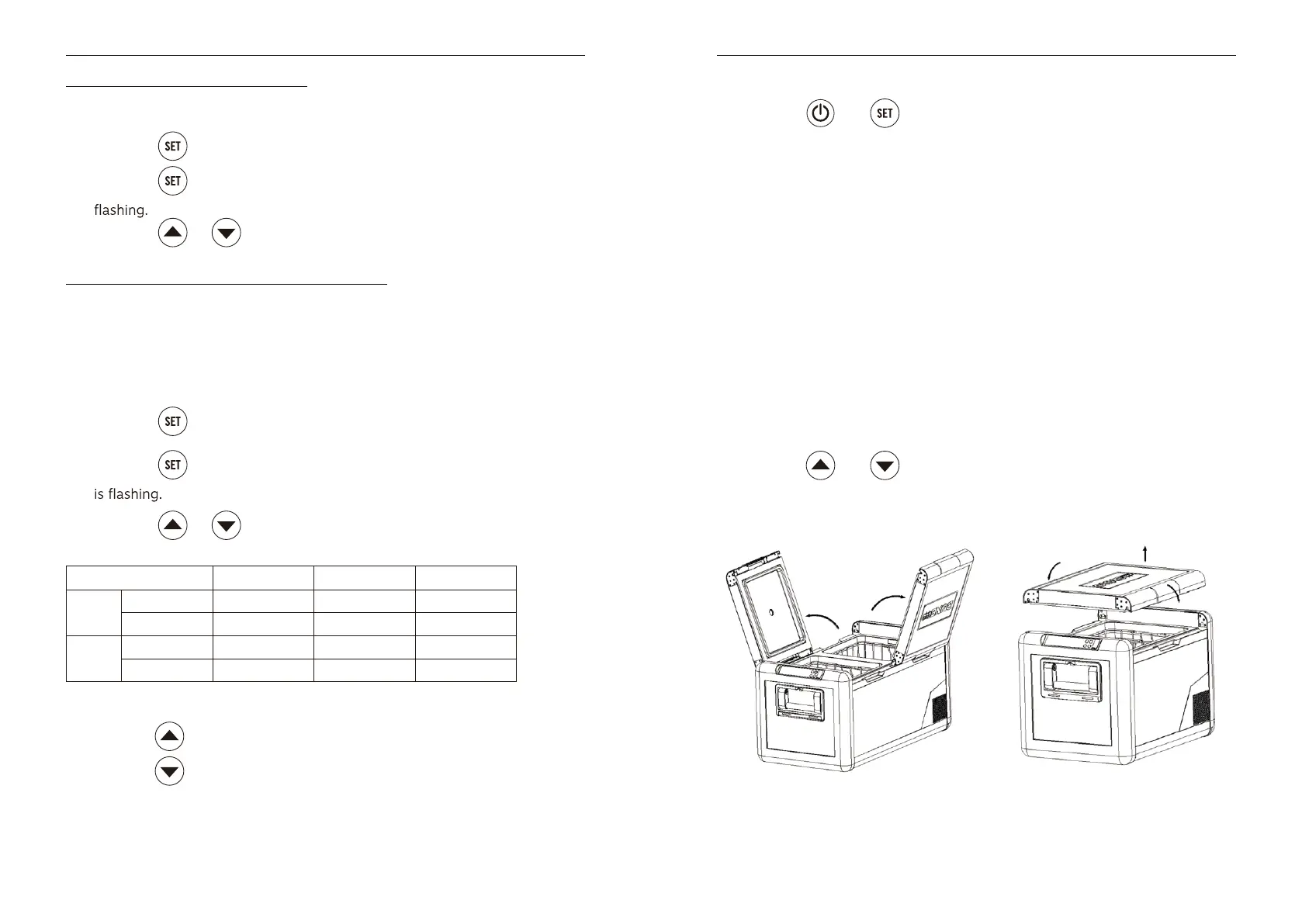
Bi-directional, removable lid
Your Dune 4WD Fridge/Freezer lids are bi-directional – meaning that they can be
opened from either side. They are also completely removable – this makes for
easy access and cleaning of your fridge interior.
HIGH MED LOW
12V Cut-off 11.1V 10.5V 10.1V
Restart 12.4V 11.4V 10.9V
24V Cut-off 24.3V 22.3V 21.5V
Restart 24.7V 23.7V 22.7V


 To Next Page