computer radio control system
EN
4. 4.
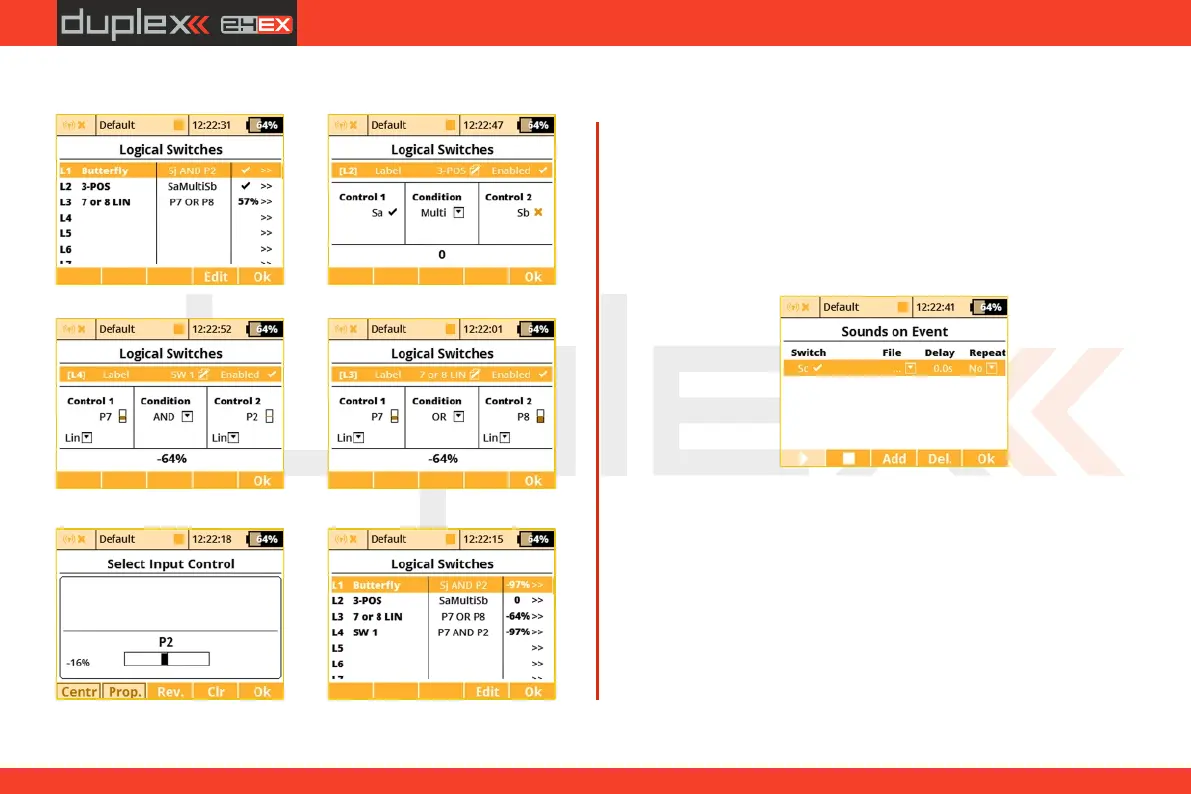
You can combine more controls using logical conditions:
a)
b)
c)
d)
e)
f)
9.3.5 Sounds on Event (Sound Assignments)
You can assign an audio file to be played based on any transmitter
condition. This means that any music file stored in the transmitter
can be assigned to any switch, stick, knob, logical switch, alarm or
any other special function. Since you can also upload music files the
the DS-12, you can fully customize how your transmitter
communicates with you. If multiple sound files are triggered at the
same time, they will play at the same time and their sounds will
overlay each other.
1. Sound Switch Assignment
Select the “Switch” menu item and assign the switch that you want
to use to trigger the sound playback.
2. Select the Sound File
Select the “File” menu item and select the sound file that you want
assigned to the switch. The available audio files are stored in
Directory/Audio. This is important to remember if you upload your
own files.
3. Sound Playback Delay
The playback of any sound, after activation, can be delayed by
editing the “Delay” menu item.
95


 To Next Page