39
2
1
2
Printing Using Basic Functions
1%-Step Enlargement and Reduction
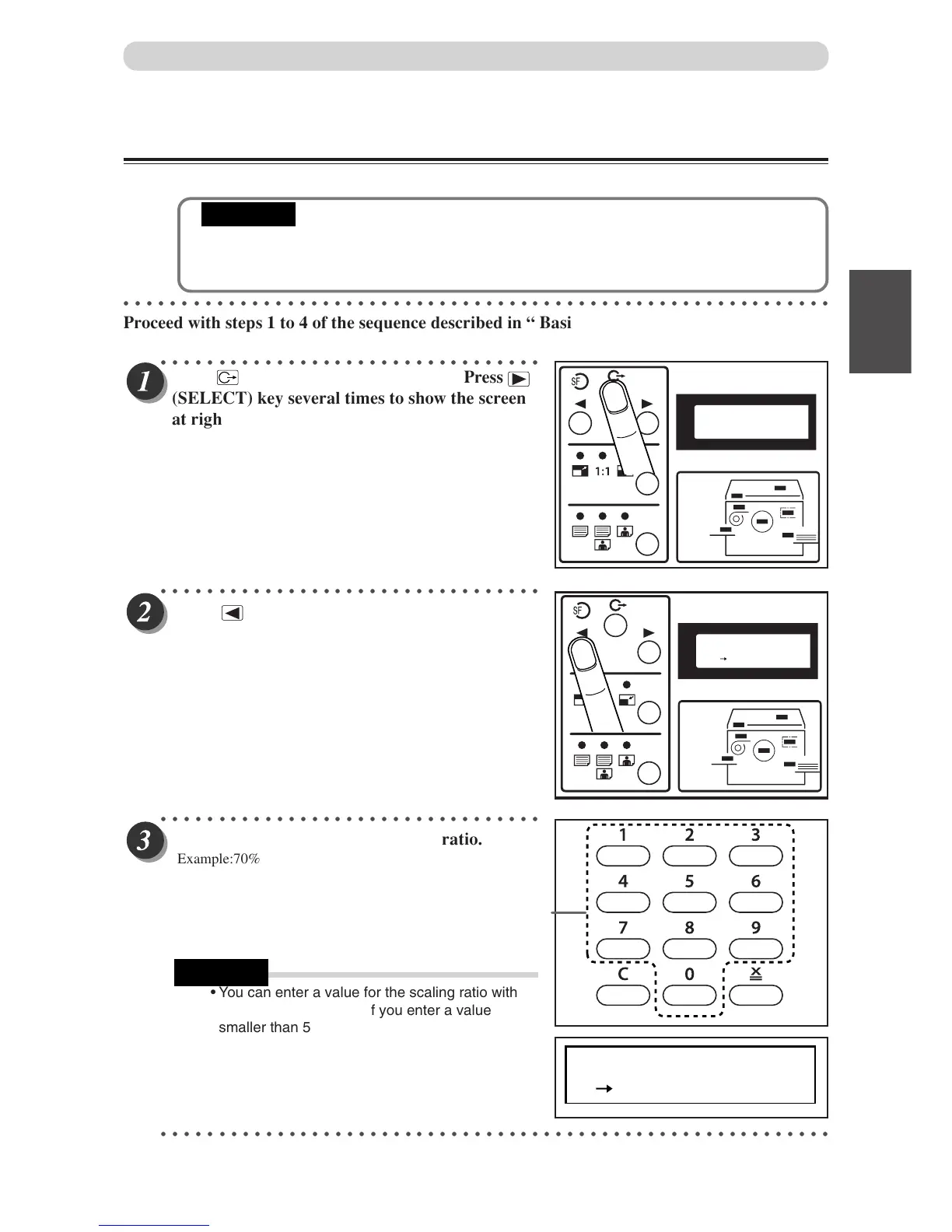
You can set a zoom ratio between 50% and 200% in 1% steps.
• Select “1%-Step Enlargement and Reduction” before starting mastermaking.
• You cannot select “94% Reduction” at the same time as “1%-Step Enlargement and Reduc-
tion”.
○○○○○○○○○○○○○○○○○○○○○○○○○○○○○○○○○○○○○○○○○○○○○○○○○○○○○○○○○○○○○
Proceed with steps 1 to 4 of the sequence described in “ Basic Printmaking” (
a
a
aa
a page 30).
○○○○○○○○○○○○○○○○○○○○○○○○○○○○○○○○○
○○○○○○○○○○○○○○○○○○○○○○○○○○○○○○○○○
Press
actual zoom ratio.
○○○○○○○○○○○○○○○○○○○○○○○○○○○○○○○○○
Use the ke
ypad to enter the scaling ratio.
Example:70%
• You can enter a value for the scaling ratio within
the range 50 to 200%. If you enter a value
smaller than 50%, "50%" will automatically be
selected and displayed, and if you enter a value
larger than 200%, "200%" will automatically be
selected and displayed.
○○○○○○○○○○○○○○○○○○○○○○○○○○○○○○○○○○○○○○○○○○○○○○○○○○○○○○○○○○
6.FREE ZOOM
70% OFF
Key pad
Enlargement and Reduction
6.FREE ZOOM
OFF
6.FREE ZOOM
100% OFF
(SELECT) k
e
y to move the arrow befor
Press
(FUNCTION SWITCH) ke
y. Press
(SELECT) ke
y several times to show the screen
at right,then press FUNCTION SWITCH key
again.
IMPORTANT
REFERENCE


 To Next Page