- 16 -
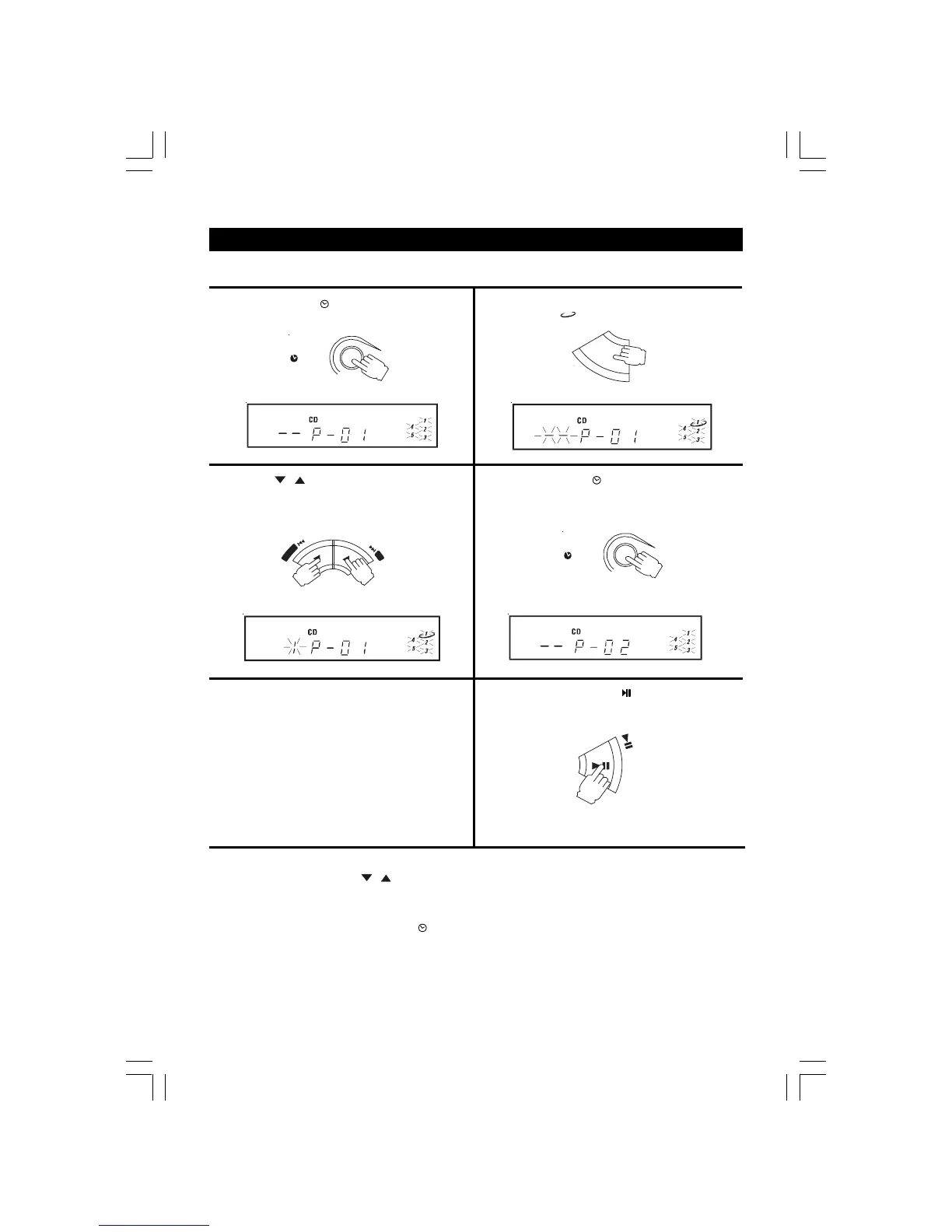
1. Press the MEMORY/ CLOCK button (in stop mode).
2. Press the DISC SKIP button to select the desired disc (the
disc symbol (
) shows which disc is selected).
3. Press the
/ SKIP buttons to select the desired
track.
5. To add additional tracks,
Repeat steps 2 to 4.
4. Press the MEMORY/ CLOCK button again to store this
track in memory.
6. To start playback, press the
PLAY/PAUSE button.
COMPACT DISC PROGRAMMED PLAYBACK
A program of up to 32 tracks from all the available discs in the disc tray can be played in a preset order.
NOTE: 1. The same track can be selected more than once in the same program.
2. With program on, the
/ SKIP buttons function can only be used for the selected tracks.
3. With program on, repeat play cannot be done for ALL DISCS.
TO CHECK THE PROGRAM
After setting the program, press the MEMORY/
CLOCK button repeatedly to check the order. This will not work when the
disc is playing.
MEMORY
CLOCK
MEMORY
CLOCK
TRACK
MEMORY
TRACK
MEMORY
TRACK
MEMORY
TRACK
MEMORY
D
O
W
N
U
P
S
K
I
P
•
S
E
A
R
C
H
•
P
R
E
S
E
T
P
L
A
Y
/
P
A
U
S
E
D
I
S
C
S
K
I


 To Next Page