- 7 -
VOL UP
VOL DOWN
R
E
P
E
A
T
T
U
N
I
N
G
U
P
T
U
N
I
N
G
D
O
W
N
R
A
N
D
O
M
TRACK
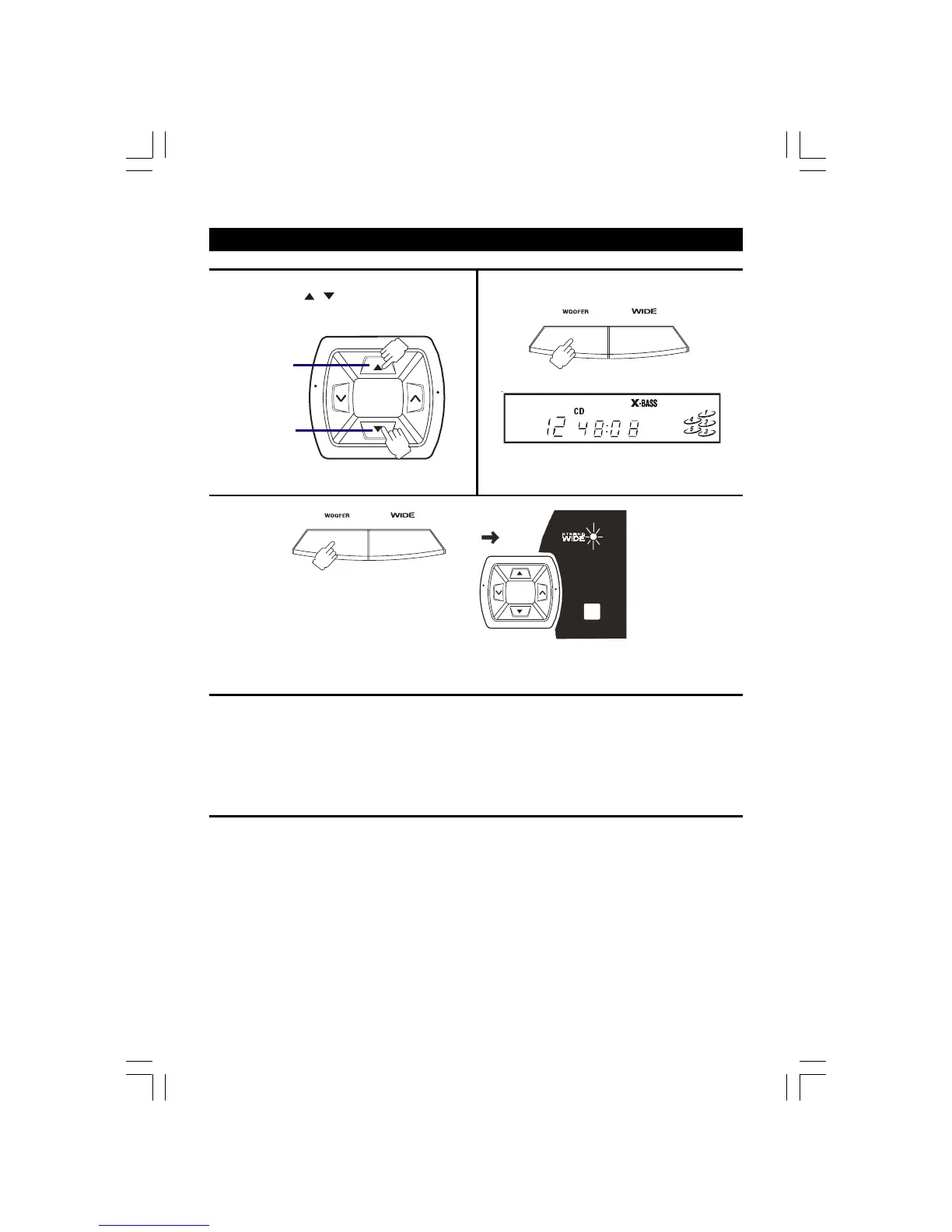
TO USE THE X-BASS WOOFER
Press the X-BASS WOOFER button to adjust the bass.
ADJUSTING THE SOUND
X-BASS is designed specifically to boost the low
frequency sound to obtain a more powerful bass.
TO ADJUST THE VOLUME
Press the VOLUME
/ buttons to adjust the sound.
The display will show:
To increase
the volume
press here.
To decrease
the volume
press here.
STEREO WIDE creates the feeling that the sound is being spread to the left and right, beyond the actual position of the
speakers. When listening to the sound in stereo, press the STEREO WIDE button to get more dynamic sound.
WHEN RECORDING
The VOLUME, X-BASS WOOFER and STEREO WIDE
controls switch on may be adjusted with no effect on the
recorded signal.
FOR PERSONAL LISTENING
Connect headphones (ø 3.5mm stereo mini plug) to the
PHONES jack.
Adjust the VOLUME control, X-BASS WOOFER and
STEREO WIDE controls for the desired listening level.
When headphones are connected, the speakers are
automatically disconnected.
BUILT-IN SUBWOOFER SYSTEM
The built-in subwoofer system has a separate
subwoofer cavity area that is part of the loudspeaker
cabinet structure, which acts as a sonic filter to cut
distortion components. This separate construction
gives a clear, rich definition to bass reproduction and it
can realize clear, well-defined mid-to-high frequency
signals.
-BASS
X
STEREO
REMOTE
SENSOR
VOL UP
VOL DOWN
R
E
P
E
A
T
T
U
N
I
N
G
U
P
T
U
N
I
N
G
D
O
W
N
R
A
N
D
O
M
-BASS
X
STEREO
2775SW-eng.pmd 10/29/2004, 3:05 PM7


 To Next Page