- 6 -
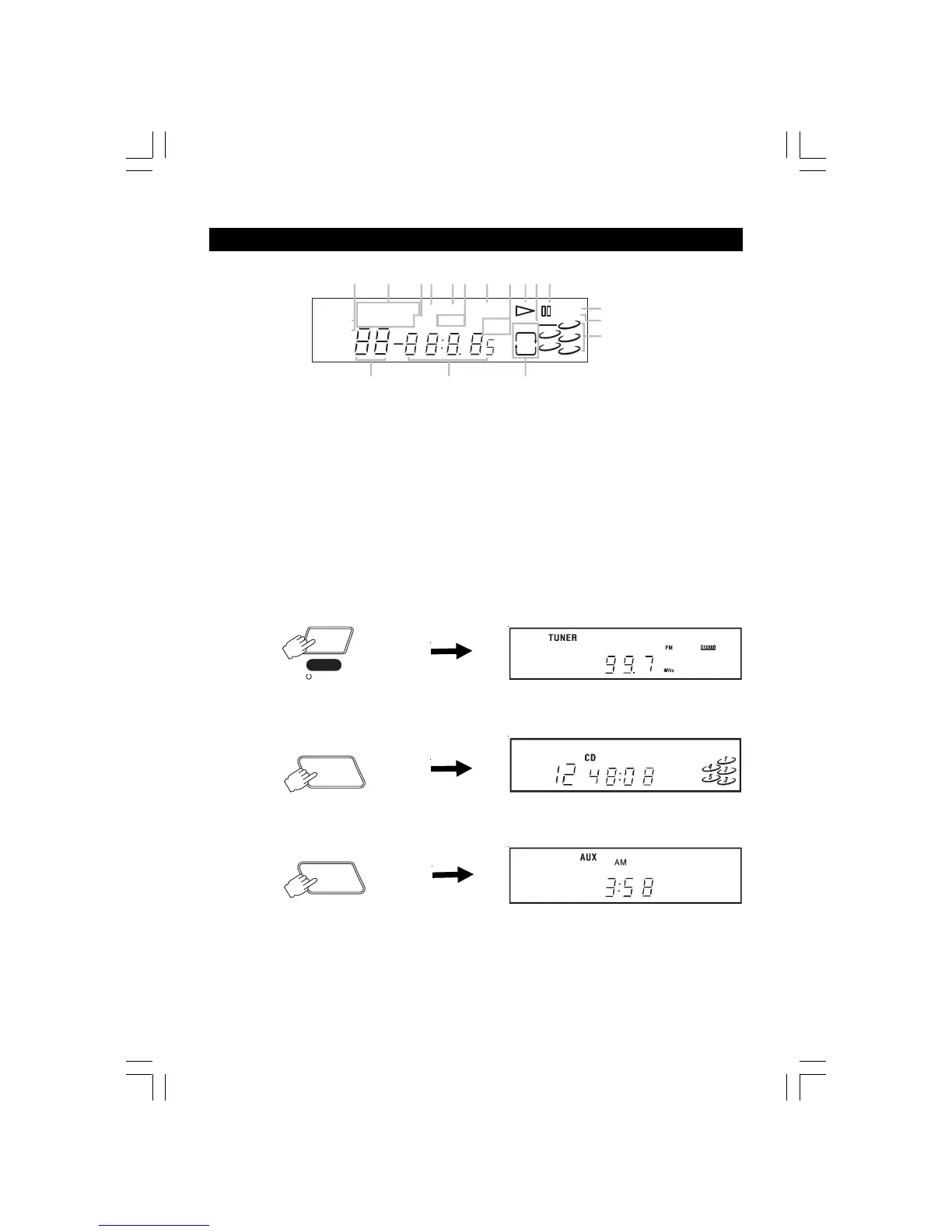
DISPLAY
1. TRACK and CHANNEL indicators.
2. FUNCTION indicators.
3. SLEEP indicator.
4. TIMER indicator.
5. ON/OFF indicators.
6. AM/PM indicators.
7. X-Bass indicator.
8. Band FM/MW(AM)indicators.
9. Playback Indicator.
10. STEREO indicator
11. Pause indicator.
12. MEMORY indicator.
13. RANDOM indicator.
14. Indicators to show which disc holder of the disc tray
is occupied. If a certain disc holder is empty, the cor-
responding number indicator will be off.
15. REPEAT mode indicators.
16. CLOCK/CD TIMING/BROADCAST STATION display.
17. Track number.
POWER INDICATOR
While the AC cord is connected and the unit is on stand-by, power will be consumed and only the clock display will be lit.
• Press the POWER/STANDBY button to turn on the unit. After a short period of time the display will show:
will resume the same mode as you power off the
unit last time for example
• Press FUNCTION button to CD
• Press the FUNCTION button to AUX A short period of time is needed for track shuffling,
and the display will show:
• The numbers showing in the display depend on the time, the selected frequency or the compact disc. CD numbers will
only be displayed if a compact.
TRA CK
After a short period of time the display will show:
1
2
4
TRACK
CH
AM FM
MW
kHz
MHz
AM
SLEEP
ONOFF
TIMER
PM
RANDOM
MEMORY
TUNER
CD
AUX
REPEAT
DISC
ALL
ONE
3
5
STEREO
12345
78911
10
6
13
12
14
15
1617
-BASS
X
FUNCTION
FUNCTION
POWER
STANDBY
2775SW-eng.pmd 10/29/2004, 3:05 PM6


 To Next Page