For TV Connection
This DVD player can also be used to view movies on your large screen TV. When viewing on
your TV, you may fold the screen down to shut off the TFT LCD display.
Always ensure when connecting cables, the DVD player, TV and any other electrical equipment
are turned off and not plugged into the AC outlet.
Ensure that you observe the color coding when connecting audio and video cables.
1. Connecting the DVD player to your TV
Using the attached A/V cables
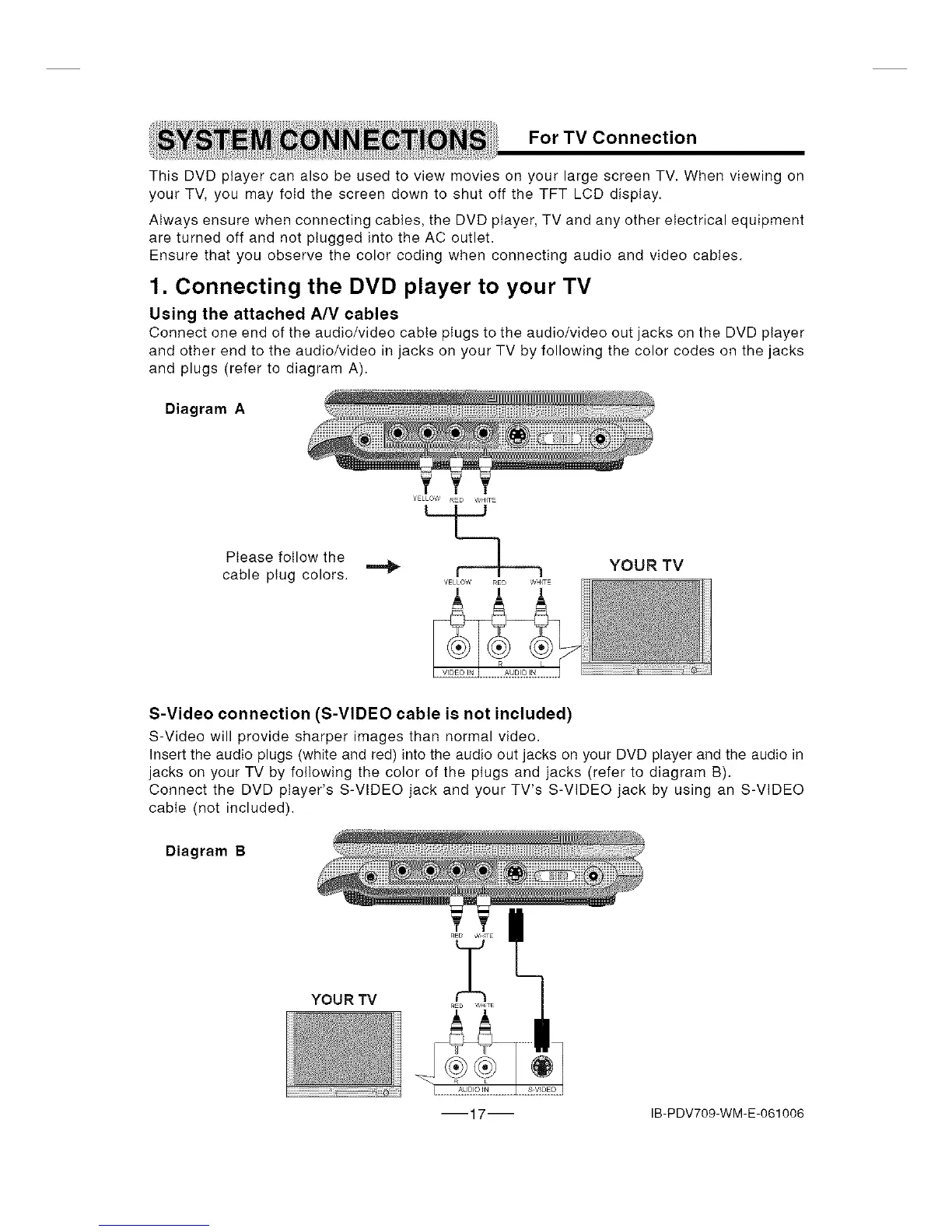
Connect one end of the audio/video cable plugs to the audio/video out jacks on the DVD player
and other end to the audio/video in jacks on your TV by following the color codes on the jacks
and plugs (refer to diagram A).
Diagram A
Please follow the ] YOUR TV
cable ptug colors. _ I I I
S-Video connection (S-VIDEO cable is not included)
S-Video will provide sharper images than normal video.
Insert the audio plugs (white and red) into the audio out jacks on your DVD player and the audio in
jacks on your TV by following the color of the plugs and jacks (refer to diagram B).
Connect the DVD player's S-VIDEO jack and your TV's S-VIDEO jack by using an S-VIDEO
cable (not included).
Diagram B
YOUR TV
17 IB-PDV709-WM-E-061006


 To Next Page